
Google Rewrites Smartwatch Design Rules With Wear OS 7
Google has officially launched Wear OS 7 for eligible Pixel Watches, delivering up to 10% more battery life, real-time Live Updates, and deep AI integration.
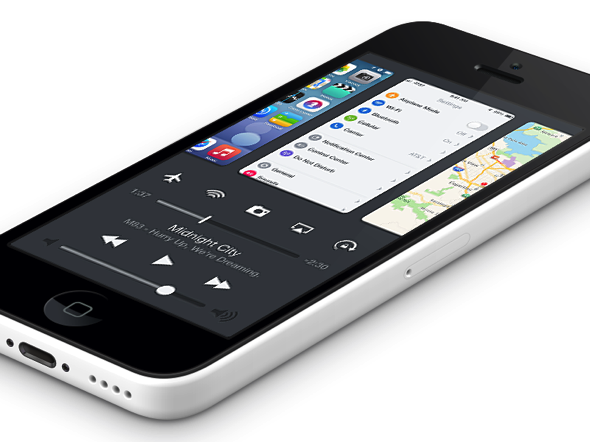
Designer Bill Labus has posted a brilliant Mission Control concept for iOS 8 on Dribble, that merges the iOS 7’s Control Center and the multitasking/app switcher. The designer imagines how a simple swipe up from bottom gesture can bring up Mission Control, replacing the current double click Home button approach and eliminating the noticeable delay between the second click and the multitasking view appearing.
“I find double-clicking the home button to be irritating”, says Bill. “In my haste I often accidentally triple-click the home button, forcing me to wait while the OS bounces into, and back out of, multitasking”. He notes that since Control Center’s bottom edge gesture is far faster and easier to perform, he decided to combine the two in his new concept.
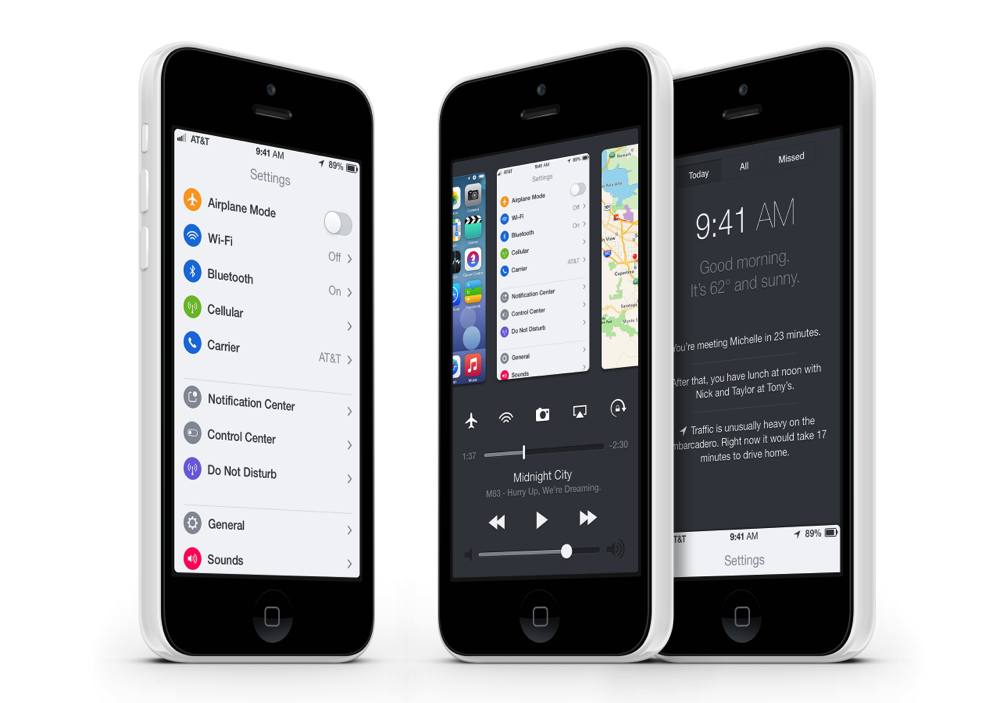
Here’s how the designer describes his concept:
- Flicking up from the bottom of the edge allows the multitasking app views to be tied directly to the gesture, which allows for direct manipulation and avoids having to wait for a passive animation to complete before interacting with them.
- The obvious potential drawback to this combined approach is that there is less room available for Control Center- I personally find that I use a couple features of Control Center, but almost never touch at least half of them (calculator, clock, airplane mode, bluetooth). I can’t be sure, but I suspect this is true for a large amount of other users as well, so my solution is to have 5 button ‘slots’ that can be customized with the 5 most used shortcut functions for that particular user.
- The brightness slider is also omitted for lack of space, however I think it could perhaps replace the volume slider, as I personally control my phone’s volume with the hard keys 100% of the time.
Check out the video demonstration of Bill’s Mission Control concept:

Want to see more of our stories on Google?

P.S. Want to keep this site truly independent? Support us by buying us a beer, treating us to a coffee, or shopping through Amazon here. Links in this post are affiliate links, so we earn a tiny commission at no charge to you. Thanks for supporting independent Canadian media!


That is AWESOME!
Please no, the ui is already horribly laggy dont need to make it worse
Nope, this would be much less laggy and quicker. There isn’t a lot of GPU math required to do this as opposed to the intensive blur/transparency effects in iOS 7.
In what world is it laggy? Obviously you haven’t used an Android phone before to know what laggy really is.
great concept! looks beautiful
This concept already exists with blackberry 10 phones
This is already available to those who are Jailbroken.
Whats the name of it in Cydia?