
Apple’s AirPort Utility App is Being Removed From the App Store
Apple warns that "functionality is not guaranteed" when using AirPort Utility on iOS 27 or later.
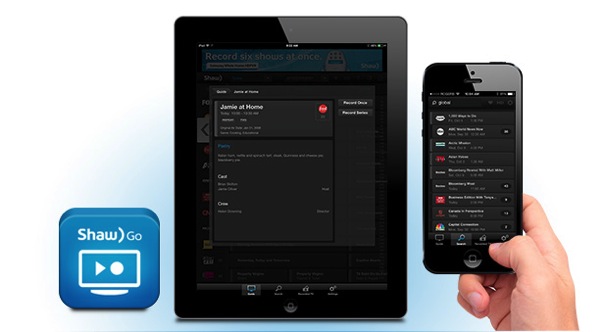
Shaw has released their Shaw Go Gateway iOS app in the App Store, which will allow customers to manage and set recordings for their HDPVR from anywhere.
The Shaw Go Gateway app allows you to record all your favourite shows and manage existing recordings while you’re on the go. With the Shaw Go Gateway app, you won’t miss a thing.
Available for all Shaw Gateway Whole Home HDPVR customers.
The app went live today in the App Store after the company had started an invite-only beta test for the app last December.
http://twitter.com/ryleylamarsh/status/472129854213595136
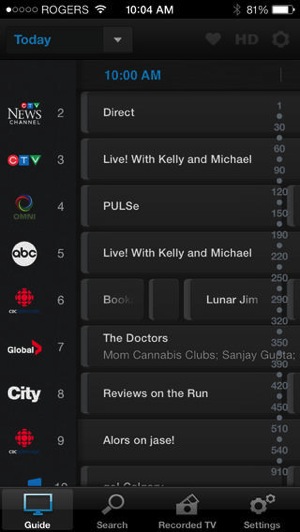
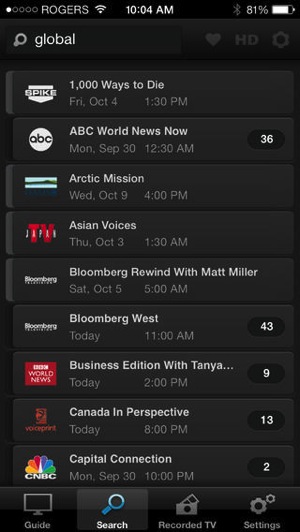
To use the app, customers will require their @shaw.ca email address or Customer Centre ID to log in. The app offers the following features (there’s also an Android app too):
We tried signing into the app but we’re getting a network error message that says it’s preventing us from signing into the app (we tried both Wi-Fi and cellular). We’ll try again in a bit.
Click here to download Shaw Go Gateway for iOS—it’s free. Let us know how it works for you!
Update: Shaw has let us know about the change to the ‘Simplified Remote’ feature, which we have modified above in the bullet list.
Want to see more of our stories on Google?

P.S. Want to keep this site truly independent? Support us by buying us a beer, treating us to a coffee, or shopping through Amazon here. Links in this post are affiliate links, so we earn a tiny commission at no charge to you. Thanks for supporting independent Canadian media!


I’m getting the network error message too!
Hopefully it will get fixed soon! I can’t wait to delete old PVR recordings from my iPhone as that will be way faster than going through the Gateway interface.
We had some issues but they were resolved this morning. Give it a try and let us know the outcome? Thanks for your patience!!
Yep, works great now. Thanks!
Shaw is so far behind. Telus Optik TV had this years ago.
Yup. Better late (way late) than never though.
Yeah and too bad if you have anything other than Shaw’s Whole Home HDPVR system. You have to be home to set up or delete anything on those. Can anyone say convenient?
Hey guys, Gateway tier 2 from Shaw here. Just wanted to mention that this is incorrect:
Full Control: Change the channel, play, pause, and rewind your recordings, just like a remote control, from anywhere
You can change the channel but, play, pause, and rewind are not present currently.
Oops, Play is available. Mistyped 🙂
I don’t like to promote Bell, but they are, and have always been, sooooo far ahead of Shaw, I’m surprised people use Shaw. If they could compete, I would switch. But Shaw’s recent devious promotion of claiming to have the most HD channels is sick and lowered them to the level of a typical BS’ing corporation.
Sorry – I seem to have deviated from my point… Why introduce something if it isn’t yet competitive (in functionality) with what is already in the market?
The information was taken from the Shaw website. So what’s not available?
Gary,
The shaw website had a mistake and has been updated accordingly.
If possible, can you please update that section with the new information
“Simplified Remote: Change the channel on your portal and start the playback of a recording, from anywhere.”
Instead of “Full Control: Change the channel, play, pause, and rewind your recordings, just like a remote control, from anywhere
Edited, thanks!
Having only an apartment to ones self I don’t think I need the gateway. The other model, the regular HDPVR has (the DCX3510), if you believe the massive threads they shut down in the forums, major problems. My current PVR is going on seven years old at this point but I keep waiting for them to replace the current problematic unit first.
Used it last night. Very cool. The funny thing is I was just wishing for this feature last weekend when I remembered while out that I forgot to record the Champions League final. It’s pretty cool. I don’t see pause and rewind features in it though. Just play, Delete and Series recording options. I was really disappointed though when I saw the “recorded TV” panel. My first though was that I could watch said program on my device. Realizing I still had to be in front of my TV was disappointing. Still, pretty handy with the world cup coming up.
Re: Bell and Telus.
Here in Manitoba, Bell only has satellite, not cable. Telus offers no TV option in the province.
One thing that is missing in the Shaw Go Gateway app for IOS is the % recorded. Would be nice to know.
Is there ever going to be an app to allow me to watch live tv and/or something I have recorded on ,y ipad?