
Apple’s AirPort Utility App is Being Removed From the App Store
Apple warns that "functionality is not guaranteed" when using AirPort Utility on iOS 27 or later.
Last May Loblaws released their PC Plus iPhone app to allow customers to implement their reward card right into the app to use at checkouts.
The PC Plus app has been updated with a new dashboard redesign to offer more home screen content by swiping to the left. There’s also a new navigation menu to allow customers to quickly access various parts of the app, to go along with a new simplified login and registration for existing and new users.
What’s New in Version 1.6.12
We’ve made some improvements to the PC Plus™ app that we can’t wait to share with you:– Fresh dashboard design with new home screen content
– Added navigation menu to give you quick access
– Personalize your home screen by naming your app with a simple tap
– Simplified login and registration screens
– Offer display improvements and helpful recipe add-on features
– Minor bug fixes and stability improvements
You can check out the updated dashboard look below on the left, compared to the old design on the right:
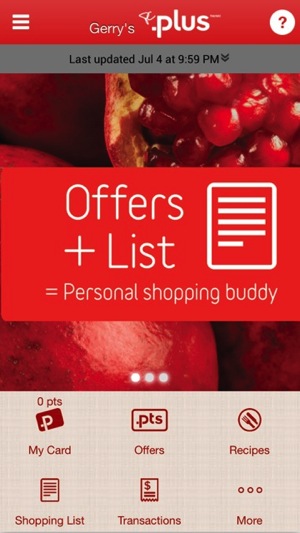
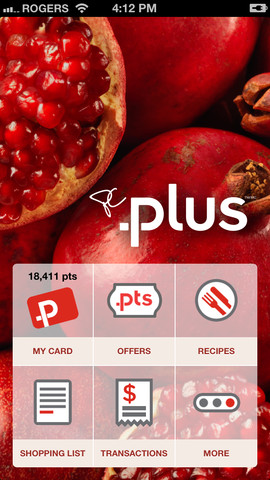
Users can also pull to refresh to update their offers list and the new looks aims to make it easier to personalize the app to make shopping easier. The app added Passbook support for the PC Plus card last December.
Click here to download the PC Plus app—it’s free.
Want to see more of our stories on Google?

P.S. Want to keep this site truly independent? Support us by buying us a beer, treating us to a coffee, or shopping through Amazon here. Links in this post are affiliate links, so we earn a tiny commission at no charge to you. Thanks for supporting independent Canadian media!


Just fluff. You know what would be REALLY useful? If they including a grocery shopping list associated with the aisles in the specific store that you were in. And if they used iBeacons to bring up the items you need to get in the aisle or department you were currently in.
BOOM! Not THAT is how you make a useful app.