
Apple’s AirPort Utility App is Being Removed From the App Store
Apple warns that "functionality is not guaranteed" when using AirPort Utility on iOS 27 or later.
Slow Shutter! is normally $1.99 in the App Store, but right now you can get it for free via the Apple Store iOS app.
This app allows you to control your Camera’s shutter speed, to enable you to take long exposure images easily right on your iPhone (instead of your DSLR).
App Supports:
– AUTO – Perfect for waterfalls, ghost photos and other moving objects.
– LIGHT TRAIL – Capture hypnotizing photos of night traffic, fireworks, carousels and other moving lights.
– NIGHT – Capture bright, noise-free photos in low-light conditions!Featuring:
– Real time preview.
– Full photo resolution support in Auto and Night modes. Maximum framerate is used in Light Trail – this can be modified in iOS Settings.
– Adjust exposure in Light Trail and Night modes.
– Adjust Freeze in Auto mode.
– Tap “Shoot” button again to stop capture.Tip:
– To improve sharpness use a tripod.
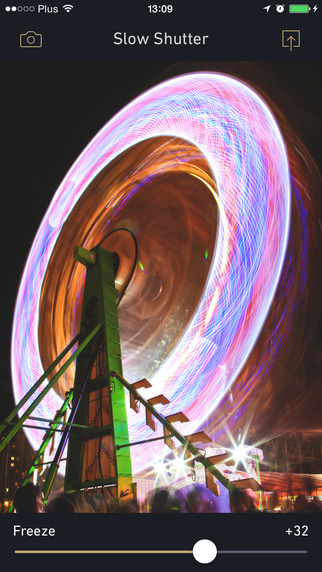
Slow Shutter! will let you take cool pictures such as the one below (using a tripod helps immensely with long exposures):
How to get Slow Shutter for free? Easy. I’ll hold your hand for each step below (because there’s always one person who will say “IT’S NOT FREE IN THE APP STORE!”)
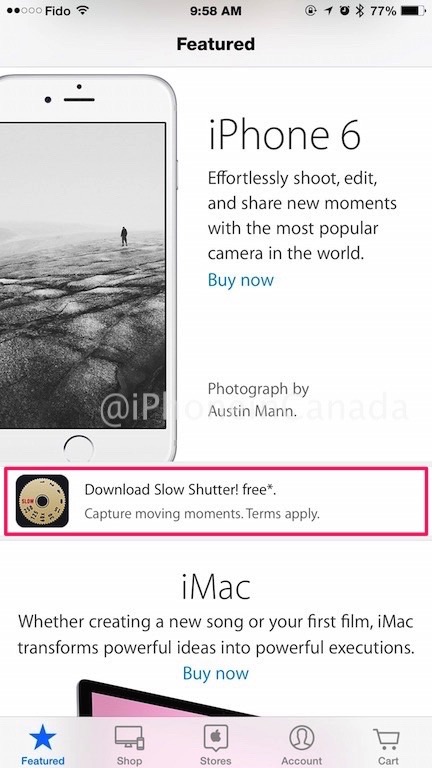
1. Download the Apple Store iOS app and launch it. Scroll down until you see the banner for ‘Download Slow Shutter! for free’ and tap it:
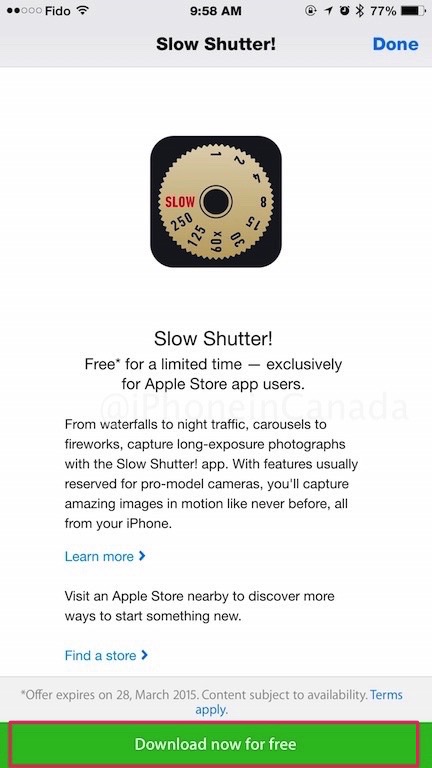
2. Next, tap ‘Download now for free’, which will then give you a PROMO CODE, to then redeem in the App Store. Done. Free!
The Apple Store app usually refreshes its free apps every month or so. Let us know if you like Slow Shutter!
Want to see more of our stories on Google?

P.S. Want to keep this site truly independent? Support us by buying us a beer, treating us to a coffee, or shopping through Amazon here. Links in this post are affiliate links, so we earn a tiny commission at no charge to you. Thanks for supporting independent Canadian media!


Nice. But don’t scroll down too far. The banner is small but the pics above show you exactly where it is.
Yeah I almost missed it myself.
“Tip: To improve sharpness use a tripod.”
That’s hilarious. It should be more like…
“MUST use a tripod, or else your pictures will look like crap!”
Which begs the question… If you’re going to carry a tripod, or even a GorillaPod (assuming you can find anyplace to put it), then why not carry an actual camera?
iPhoneographers
pffftt… An iPhoneographer is to photography what a ThumbJammer is to guitar playing.
While I’m picking on this poor little app, should I mention that their icon is just wrong. “SLOW” should be below the 1, not above the 250.
A small technical correction: This app does not control your iPhone camera’s shutter speed. It simulates a long exposure by blending frames from a captured video into a still photo. This is why the resulting image is so customizable.
complicated AF to get a free app.however, thanks to gary though for his walkthrough and telling us where to look.