Want to make some neat iPhone homescreens without jailbreaking? Enter Makeovr.io, which cleverly uses some ‘invisible’ icons you save to your home screen coupled with wallpapers to make some interesting creations like the ones below:
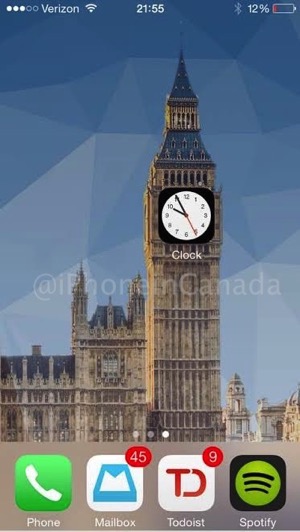


How to create these homescreens? Easy. Just visit Makeovr.io on your iPhone 5, iPhone 6 or iPhone 6 Plus and follow the instructions.
Essentially you first need to save a homescreen wallpaper, then use the Makeovr website to save icons, which you then rearrange. Check out the video below for a detailed walkthrough:
Makeovr.io was created by William Stoy, who tells us he created it with his partner Gabe Whaley, formerly from BuzzFeed.
We tried this out ourselves and it works as advertised. The only thing is it takes some time to rearrange the invisible icons and the Makeovr.io ones.
If you want to tweak your homescreen without jailbreaking, you can get pretty creative here. Let us know if you’re going to try this!
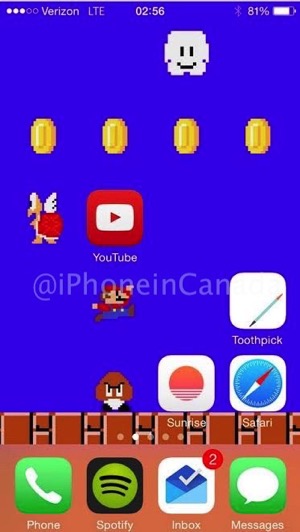
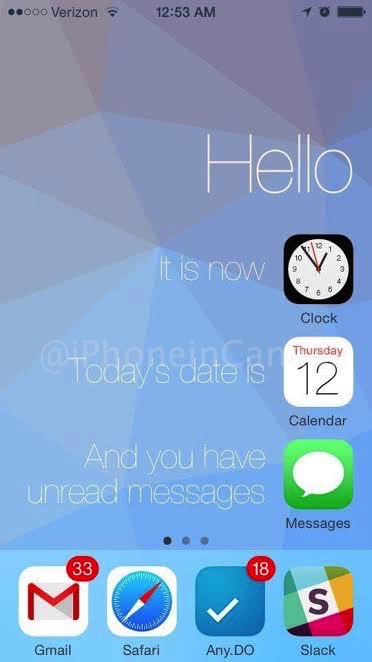




Still not as good as custom theming that Jailbroken phones have, thats the inly feature I actually miss when I used to jailbreak. Too bad Apple has yet in incorperate any type of theming on their iOS devices.