
Apple’s AirPort Utility App is Being Removed From the App Store
Apple warns that "functionality is not guaranteed" when using AirPort Utility on iOS 27 or later.
iPhone 6 and iPhone 6 Plus users can now update the Scotiabank iOS app as it finally brings screen optimization for Apple’s latest smartphones. Also new is a Quick Balance widget for iOS 8 users, so they can easily see their balance within Notification Centre.
What’s New in Version 15.1.1
* View Quick Balance from the Notification Centre’s Today widget (iOS 8 + users)
* Now optimized for iPhone 6
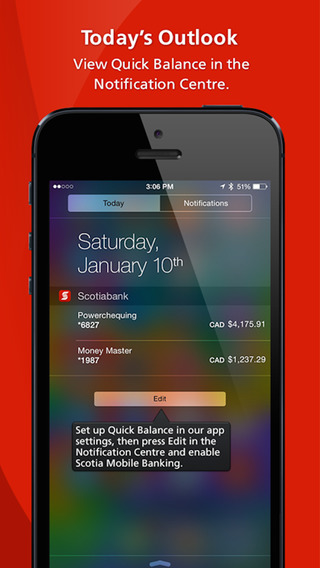
To add the Quick Balance widget, users need to setup the feature within the app’s settings first, before they can add it to Notification Centre (swipe down, tap Edit, then add Scotiabank).
Click here to download Scotiabank for iPhone in the App Store.
Want to see more of our stories on Google?

P.S. Want to keep this site truly independent? Support us by buying us a beer, treating us to a coffee, or shopping through Amazon here. Links in this post are affiliate links, so we earn a tiny commission at no charge to you. Thanks for supporting independent Canadian media!


Feels weird to have a balance on your notifications screen so anyone could just see it?
That is true…unless you can customize which accounts show up? Even then, there’s no security aspect.
Yes you can choose which accounts show up and which do not. The app itself had this feature before, but now you can access it from anywhere via Notification center.
REALLY wish they’d get going on e-deposit though
I like tangerines idea of putting it in your passbook. It is still easily accessible to people but a little more hidden.
Its just a balance, most people done store crazy amount of money in your main account anyway.,.
It would be nice to have iTouch instead of me entering my password all of the time.
It’s Touch ID, not iTouch
In my defence, I am sick today. 😉
You are right, it is Touch ID.