
Microsoft is Killing Popular Copilot Features as it Prepares a Massive ‘Super App’
Microsoft is merging its work and personal Copilot apps while cutting several consumer features to prepare for a new AI super app.
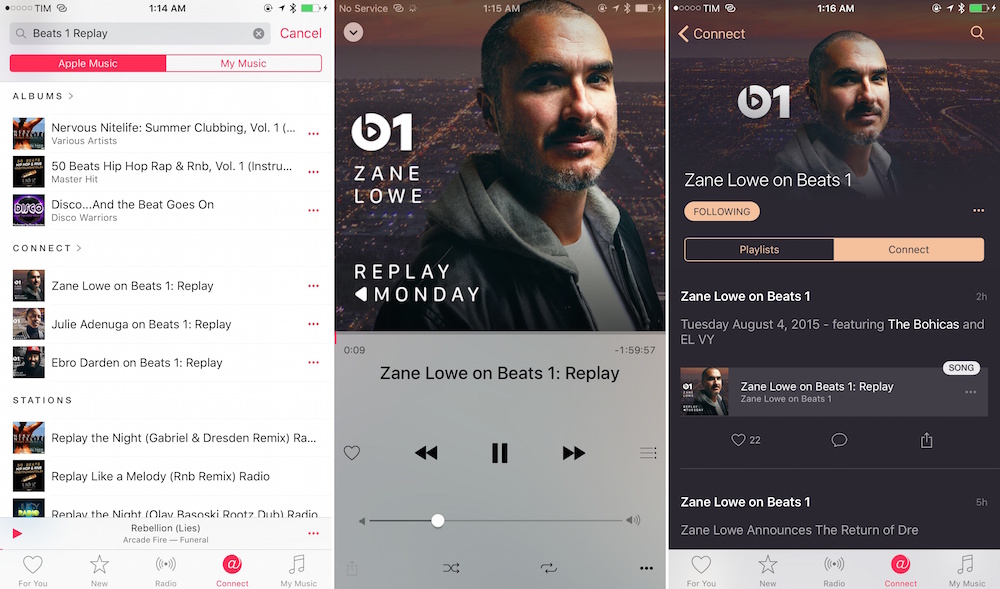
The folks over at MacStories have highlighted a recently added new feature in Apple Music, that allows you to listen to several Beats 1 shows in full. With ‘Beats 1 Replays’, you can now catch all the Beats 1 shows, including those by Zane, Julie, and Ebro, you may have missed during their live run. Here’s what you need to do:
Step 1:
Look for the DJ’s curator page on Connect (such as “Julie Adenuga on Beats 1”).
Step 2:
Now tap the Connect tab.
Step 3:
You’ll now see a playable Replay, which will let you listen to a show in its entirety.
This way, you can listen without having to skip the DJ talk and interviews with the playlists, which are still available if you only want to get the songs from each show. It must be noted however that istening to Beats 1 Replays won’t display information about the currently playing song as it’s the case with a live show on Beats 1.
That’s it, enjoy!
Want to see more of our stories on Google?

P.S. Want to keep this site truly independent? Support us by buying us a beer, treating us to a coffee, or shopping through Amazon here. Links in this post are affiliate links, so we earn a tiny commission at no charge to you. Thanks for supporting independent Canadian media!


Nice! Thanks for posting that.
The Beats 1 Replays section of Apple Music can be accessed by one of the banner ads that appears on top of New. It will always present one of the Beats 1 Replays being promoted and link to the total list. This is the only way to listen to some shows that can’t be accommodated by the Playlist format, such as A-Trak Presents Day Off Radio.