The Weather Network has updated its app to bring Apple Watch complication support, so you can get weather from the latter on your watch face. The app now supports watchOS 2 and the weather complications support the Follow Me feature.
What’s New in Version 3.4.3
– Updated Apple Watch OS2 Complication to support Follow Me (look for TWN/MM to add the Complication).
– Bug fixes
How to add The Weather Network complication to your Apple Watch?
Make sure you have the app installed on your iPhone and Apple Watch. Force Touch on your watch face to get to the customize screen. From here, tap any complication and scroll the Digital Crown until you see “TWN/MM” as seen below:
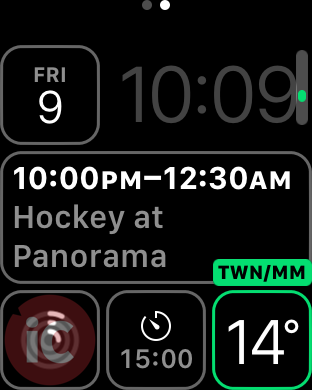
Once you’ve selected the complication, exit out and now your Apple Watch face weather data will be from The Weather Network. There is a bug with this complication though, as once you tap it to go to the app, the latter crashes.
Let us know if you’re using this complication!
Click here to download The Weather Network from the App Store.



I find it to be the worst app so far on the Apple Watch. Never loads any data to complications and always says oops when you go into the app
Yep, crashes like crazy when you tap the complication.
Wow – first time an app has crashed on my watch. Not very stable.