Starbucks Launches an Emoji Keyboard on iOS

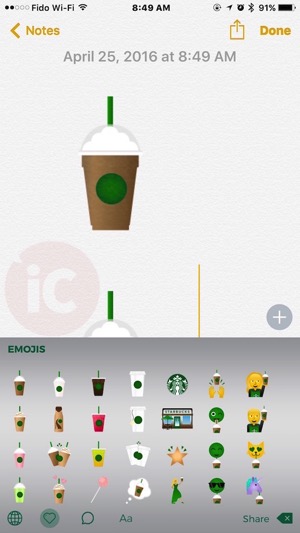
Starbucks has launched its own emoji keyboard on iOS (and Android), their first-ever on mobile devices. The app allows customers to use emojis that feature the company’s signature drinks like Frappuccinos, plus others like iced tea, coffee, and food items like cake pops.
After installing Starbucks for iOS, here’s how to enable it on your iPhone:
Settings > General > Keyboard > Keyboards > Add New Keyboard > Starbucks 
You will need to enable ‘Full Access’ to the Starbucks keyboard.
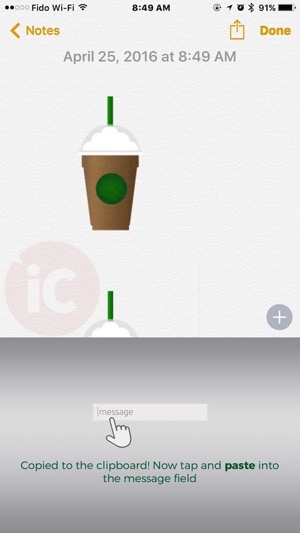
There are a variety of Starbucks-themed emojis and to use them, you can’t just tap one and it’ll appear—you need to paste them into the text field, which is cumbersome. But if you have friends and family members that are Starbucks addicts, this keyboard and its emojis will definitely get them excited.
IMG 0936 IMG 0937

The company explained via email they will be “refreshing the keyboard content and adding new emojis throughout the year,” and also highlighted there’s an included unicorn #sipface emoji too.

Click here to download the Starbucks Keyboard for iOS in the App Store.

Want to see more of our stories on Google?

Add iPhone in Canada as a Preferred Source on Google

P.S. Want to keep this site truly independent? Support us by buying us a beer, treating us to a coffee, or shopping through Amazon here. Links in this post are affiliate links, so we earn a tiny commission at no charge to you. Thanks for supporting independent Canadian media!

Subscribe
Notify of
guest
0 Comments
Oldest
Newest Most Voted
0
Would love your thoughts, please comment.x
()
x