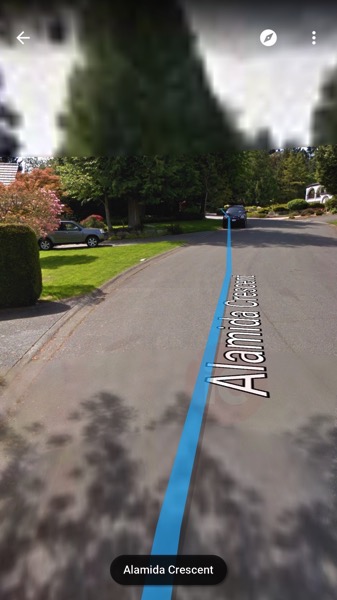

Google Maps for iOS Gains Faster, Smoother Street View Navigation
Google Maps for iOS has silently gained a new streamlined Street View feature, where you can navigate down streets and more by sliding your finger along a new blue line that appears onscreen, a feature we saw appear back on Tuesday.

Previously, users would be required to tap forward or back arrows to navigate step-by-step within Street View, but this new feature makes it much faster to travel down the street, by just swiping. It almost feels like you’re flying down the street now.
Interestingly enough, this feature hasn’t even rolled out within Google’s standalone Street View for iOS app, yet. Let us know if you’re seeing this too.
Click here to download Google Maps for iOS in the App Store.
Want to see more of our stories on Google?
P.S. Want to keep this site truly independent? Support us by buying us a beer, treating us to a coffee, or shopping through Amazon here. Links in this post are affiliate links, so we earn a tiny commission at no charge to you. Thanks for supporting independent Canadian media!
Indeed, it’s way better now.
The transition effect between photos kinda reminds me of “like a rolling stone” videoclip by the Stones though. ????
Agreed, must faster
I still have the arrows even though my app is updated!