
Apple’s AirPort Utility App is Being Removed From the App Store
Apple warns that "functionality is not guaranteed" when using AirPort Utility on iOS 27 or later.
If you’re an Aeroplan points collector, you can finally add your digital card to the Wallet app on your iPhone. At the ‘Your Aeroplan Card’ screen within the app, just tap the ‘Add to Apple Wallet’ icon, to store your card digitally on iPhone for quick access:
What’s New in Version 4.2
– IPHONE: We’re still listening! Now you can add your digital Aeroplan Membership Card to Wallet so you can access it whenever you want.
– Bug fixes and performance improvements
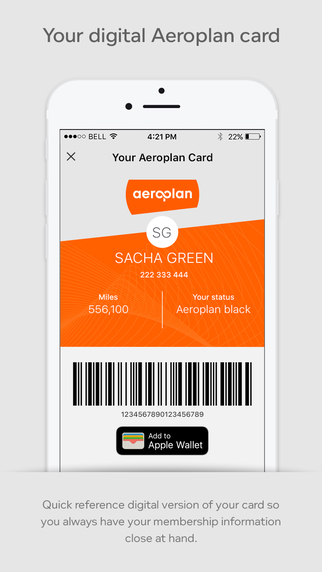
Now that your Aeroplan card is accessible within Wallet, that means you’ll be able to get to it quickly by double tapping the Home button from the lock screen (if enabled in iOS Settings), instead of unlocking your device and launching the Aeroplan app.
Air Miles, a rival loyalty program to Aeroplan, has had Wallet support for a while now, so it’s great to finally see this one arrive.
Click here to download Aeroplan for iOS in the App Store.
Thanks @slawek_bielawa
Want to see more of our stories on Google?

P.S. Want to keep this site truly independent? Support us by buying us a beer, treating us to a coffee, or shopping through Amazon here. Links in this post are affiliate links, so we earn a tiny commission at no charge to you. Thanks for supporting independent Canadian media!


I was unaware until I read this that Air Miles could be added to Wallet. So that’s now taken care of…
Yeah, it’s. been available for ages. Unfortunately, at least in my experience, very few retailers who accept Air Miles have the capability of scanning the card from your phone.
Can you add it to your wallet then delete the app?
is that possible?
I have with the starbucks, longos, and chapters cards.