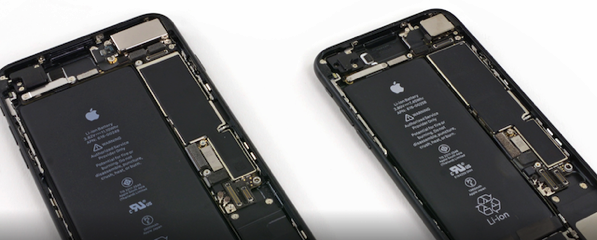
The folks over at iFixit have just released their internals wallpapers for the new iPhone 7 and 7 Plus, that make you feel as if you’re looking straight through the screen and into the heart of your iPhone. As the teardown experts put it, the wallpapers let you “show off all the beautiful guts that make your iPhone 7 and 7 Plus tick”.
Follow these instructions on how to download these iPhone 7 and 7 Plus internals wallpapers:
- Navigate to this blog post on your iPhone.
- Find the wallpaper you want and click on the photo for the full resolution image.
- Then, simply Force Click or long press the photo and select “Save image”.
- You can set the wallpaper from “Wallpapers” in your phone’s Settings. “Choose a New Wallpaper” lists your recent photos, including downloads.
- It looks best on Still as opposed to Perspective, so be sure to pinch the photo and zoom out all the way before you set it as your wallpaper.
Let us know how you like the powerful internals of your shiny new iPhones.



Looks really cool, thanks!
Cheers. Definitely rad wallpapers!