
Apple’s AirPort Utility App is Being Removed From the App Store
Apple warns that "functionality is not guaranteed" when using AirPort Utility on iOS 27 or later.
This is not a joke: TD Canada has finally updated their iOS app to support Touch ID for logging in. This afternoon’s update brings support for the iPhone’s fingerprint reader and also includes “minor bug fixes”.
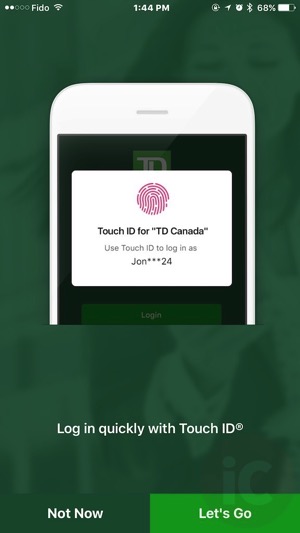
The moment you launch the app after updating it in the App Store, you’ll be greeted with a splash page to proceed with enabling Touch ID. If you proceed, you’ll need to accept the Terms of Use:
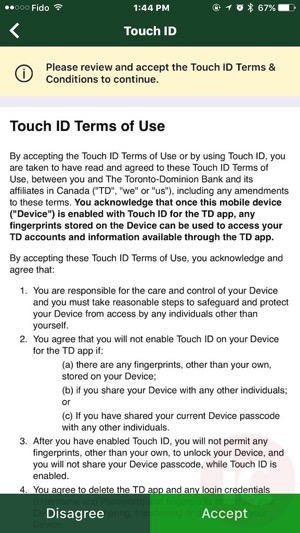
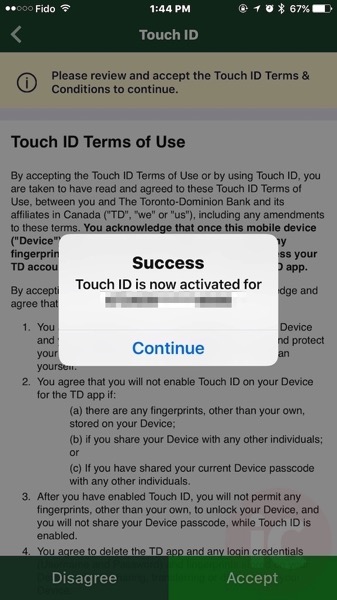
Once you tap accept, you will need re-enter your login password one last time, then you’ll get a confirmation message “Touch ID is now activated” for your account.
TD Canada was the last big bank in Canada to support Touch ID—finally, it’s here.
Click here to download TD Canada for iOS in the App Store.
Thanks everyone!
Want to see more of our stories on Google?

P.S. Want to keep this site truly independent? Support us by buying us a beer, treating us to a coffee, or shopping through Amazon here. Links in this post are affiliate links, so we earn a tiny commission at no charge to you. Thanks for supporting independent Canadian media!


Finally!
Woo. About time!
Wow, finally. Great, except Touch ID can only be enabled for 1 account :/
If you have multiple accounts–business and personal, you cannot use Touch ID on both.
Not iOS app. iPhone app only. The ipad still doesn’t support touch id
End I thought we would have to see pigs fly before TD would add touch ID support
Haha was going to say that but too cliché #stillagoodone
Someone had to say it
I was one of the freelance software developers on this part of the TD iOS software development project (as well as on 6/6+ enhancement). It was a lot of work to actually get it to work from a logic perspective in all use cases. The code that actually does the fingerprint stuff is trivial – only about 6 lines of code. All the other stuff surrounding it, is much bigger code wise. The team from the Waterloo office that did all the “heavy lifting” work on this code did a really great job. Congratulations to them!
Nice, thanks for sharing!
Any idea why they won’t release the app to non iTunes-Canada users? I am an iTunes-USA user but can’t get this app.
It’s a pain but you can log out, change region to Canada, log into the App Store and then download. Then logout and back into the USA region and login.
He may be able to download the app, but, if his accounts are in TD-USA, he will never be able to log in to begin with..
you don’t get updates
If you do all your banking in TD-USA, then you should be using a US version of that app. Even if you were able to somehow download it, it would not be able to connect to any of your US accounts, or even let you log in, because in the back-end, the US and Canadian users are kept separate etc.. Completely different back-ends.
TD has a pretty good US app, that a group of developers in US developed.
understood. TD-USA app for TD-USA; TD-CA for TD-CA. However, iTunes geo is not a proxy for which bank is relevant. You have snowbirds who need TD-USA app but are in itunes-canada. And the opposite is true.
In my case, once you setup family sharing with kids, you can’t change your geo without removing kids but you can’t remove under-aged dependents. I am locked forever in a itunes-usa because I once lived in the USA.
That’s really an App Store issue, and not a TD App issue.
Why would you not publish an app globally?
As silly as it may sound, can I turn off the the touch ID afterward on the TD app?
If so, how?
There’s a setting within the TD app. Go to Preferences via the menu.