Being released as part of Microsoft’s Garage project, which lets employees release experimental apps, the new Photos Companion app for iOS and Android makes it easy to transfer your photos and videos from a phone to the Microsoft Photos app on a Windows 10 PC. “It was originally created to serve the education market”, says the Microsoft Garage team behind the app.
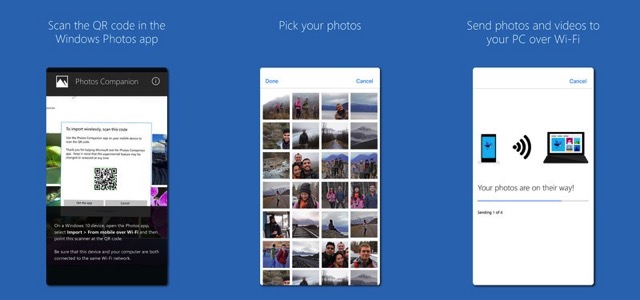
The developers noticed that educators were increasingly incorporating video in their lessons, but would often run into issues getting student-created content from their phones onto PCs. So they designed this simple Photos Companion app, that makes it a breeze to wirelessly transfer photos to any Windows 10 PC from iOS and Android.
The app requires Wi-Fi to work and is fairly simple to set up. After downloading the app on iOS, you’ll be asked to open the Photos app on Windows 10 and select the “From Mobile over Wi-Fi” option from the “Import” menu. You then need to scan a QR code to set up the connection between devices, and select the photos and videos you want to transfer.
You can download the free app for iOS and Android phones at this link.



I tried the app this morning… and it works really fine.
exported JPEG files were even better quality (not compressed as much) compared to what I would get with a regular same to Google Drive or iCloud (through Files).
Only “problem” is that exported JPEG do not have embedded EXIF data. So not device name, location…
no EXIF data would be a deal breaker for me as my library with thousands of photos is organized via location info captured in EXIF