
Apple’s AirPort Utility App is Being Removed From the App Store
Apple warns that "functionality is not guaranteed" when using AirPort Utility on iOS 27 or later.
Google continues to tweak its Gboard keyboard app for iOS, as it has now gained the ability for users to delete misspelled suggestions from the dictionary.
When you’re typing with Gboard and you see a misspelled suggestion, all you have to do is tap and hold on it, then a menu will pop up saying “Stop Suggesting _____ ?” Tap “OK” and you’ll never see that suggestion again. Gboard says “this action cannot be undone,” so choose skips wisely?
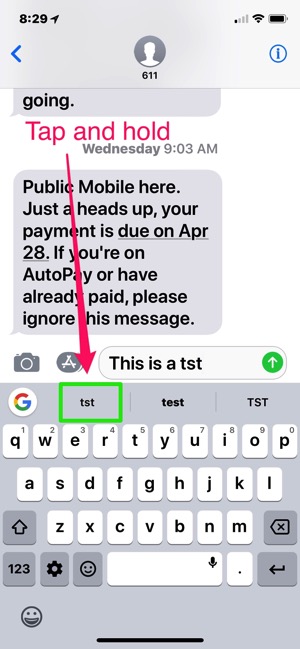
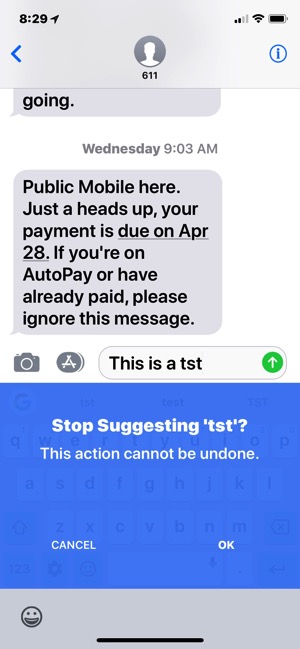
Today also adds support for Hindi and Hinglish, while a couple weeks ago, Gboard added numbers to the top row of keys (similar to what you see on iPad), which you can quickly type by long pressing or swiping up, as well as the addition of emoticon support.
It would be nice for iOS to have a similar feature to remove misspelled auto correct suggestions. Gboard’s swipe feature continues to improve and the keyboard app is worthy one to consider if you’re deep into Google services for search and more. It’s the quickest way to send directions, YouTube links, GIFs, emojis and more.
Click here to download Gboard for iOS in the App Store.
Want to see more of our stories on Google?

P.S. Want to keep this site truly independent? Support us by buying us a beer, treating us to a coffee, or shopping through Amazon here. Links in this post are affiliate links, so we earn a tiny commission at no charge to you. Thanks for supporting independent Canadian media!


Praise be!!
For some reason Apple’s keyboard keeps autocorrecting street names I type in to ALL CAPS, like “Bloor St.” becomes “BLOOR ST.” No matter how many times I correct it, it never learns to just leave it alone. So yeah, I hope Apple copies this feature.
GBoard is such a joke! It automatically corrects the words I want. I never learn the new words. I removed it after using it for a week. It sucks!
Apple default keyboard is horrible. Gboards layout is too small and it’s quick correct is a nuisance. I wish SwiftKey had all of Gboards features including voice dictation. Unfortunately, like the Gasbuddy developers, the makers of SwiftKey prefer Android over iOS that’s why the Android version has more useful features than the IOS version.
My one big issue with Gboard is that for some reason, I just can’t type accurately on it compared to the default keyboard or even SwiftKey and I don’t know why. So many typos in Gboard.
The layout is cramped, keys too small. That’s why. I have the same problem even on the Android version and of course ios too.
I turned off autosuggestion. It drove me crazy. My life is much calmer without it. I don’t curse and swear near as much now;~)
Still waiting for French Canadian ?