
Apple TV+ Unveils August Friday Night Baseball Schedule
Apple and MLB have officially locked in a packed August schedule for Friday Night Baseball doubleheaders streaming exclusively on Apple TV+.
Here’s a handy little tip for those who like to keep their iPhone and iPad Homescreens organized.
When you tap and hold an app icon to enter the wiggly mode, simply use the other hand to select multiple app icons for dragging them all together across the screens or to another folder. You can also swipe with a second finger to quickly sort between screens.
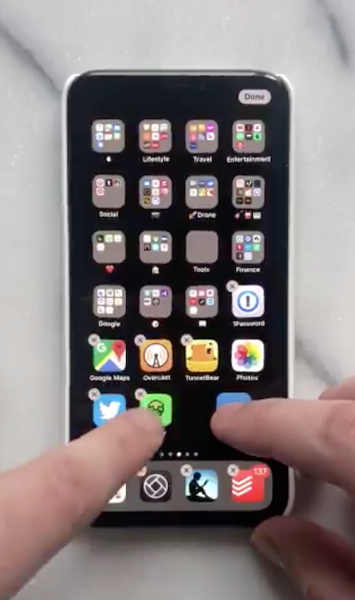
While the feature was actually introduced with iOS 11, it has recently been highlighted by UX designer and developer @ManikRathee on Twitter.
Check out the small video clip in the following Twitter embed for a better idea.
So, uh, did anyone else know you could select multiple apps like this on iOS?
Because I definitely didn’t just discover it. pic.twitter.com/Nq0wfuqzb6
— Manik (@ManikRathee) December 29, 2018
Want to see more of our stories on Google?

P.S. Want to keep this site truly independent? Support us by buying us a beer, treating us to a coffee, or shopping through Amazon here. Links in this post are affiliate links, so we earn a tiny commission at no charge to you. Thanks for supporting independent Canadian media!

