
Tutorial: How to Add Widgets to Home Screen on Your iPhone [VIDEO]

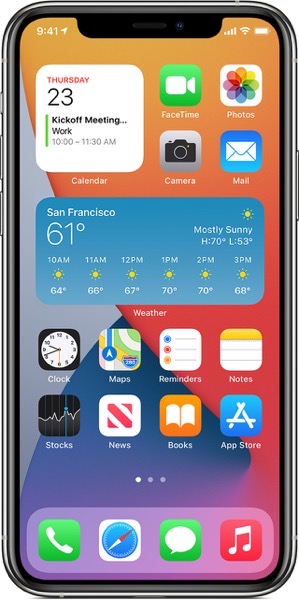
Apple has just shared a new video tutorial on its YouTube support channel, detailing how you can add widgets to your Home Screen in iOS 14 and get timely information from your favourite apps at a glance.

Tutorial

With the release of iOS 14, Apple has introduced the ability to use widgets on your Home Screen to help ups keep your favourite information at your fingertips. Similarly, you can also use widgets from Today View by swiping right from the Home Screen or Lock Screen.

To add widgets to your Home Screen, here’s what you need to do:

  1. From the Home Screen, touch and hold a widget or an empty area until the apps jiggle.
  2. Tap the Add button in the upper-left corner.
  3. Select a widget, choose from three widget sizes, then tap Add Widget.
  4. Tap Done.

Watch Apple’s video tutorial below for a better idea.

Youtube video

Want to see more of our stories on Google?

Add iPhone in Canada as a Preferred Source on Google

P.S. Want to keep this site truly independent? Support us by buying us a beer, treating us to a coffee, or shopping through Amazon here. Links in this post are affiliate links, so we earn a tiny commission at no charge to you. Thanks for supporting independent Canadian media!

Subscribe
Notify of
guest
0 Comments
Oldest
Newest Most Voted
Inline Feedbacks
View all comments
0
Would love your thoughts, please comment.x
()
x