
Ontario Senior Loses $900,000 to a Terrifying AI Crypto Scam
An 86-year-old Ontario woman lost $900,000 to a fraudulent cryptocurrency platform after trusting a sophisticated Facebook AI deepfake video.
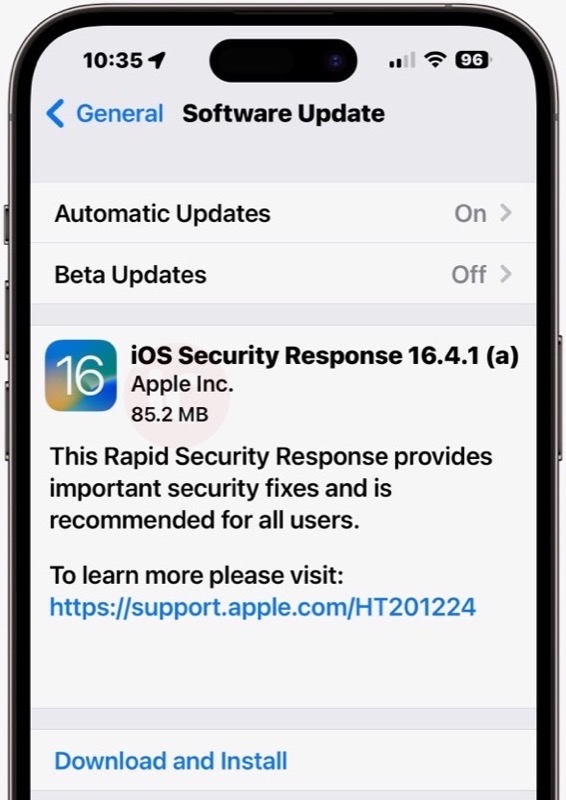
Apple has just released a Rapid Security Response update, version 16.4.1 (a), which the company says “provides important security fixes and is recommended for all users.”
Rapid Security Responses, according to Apple, “are a new type of software release for iPhone, iPad, and Mac.”
These security improvements arrive between software updates. “They may also be used to mitigate some security issues more quickly, such as issues that might have been exploited or reported to exist ‘in the wild’”, says Apple.
The Rapid Security Response for iOS, iPadOS and macOS is available today, starting for iOS 16.4.1, iPadOS 16.4.1, and macOS 13.3.1.
Apple says these Rapid Security Response updates will be applied automatically (depending on your settings) and may require a restart.
Here’s how to set automatic Rapid Security Response updates, according to Apple:
Upon implementing a Rapid Security Response, an additional letter is appended to the software version number, such as in this example: macOS 13.3.1 (a).
The current iOS Security Response for iPhone, version 16.4.1, comes in at 85.2MB for the iPhone 14 Pro Max. These smaller security updates allow the iPhone, iPad and Mac to get faster smaller updates, instead of a huge update.
Update: Looks like this first Rapid Security Response isn’t working right now, even for us. An error message reads, “unable to verify security response”, saying “iOS Security Response 16.4.1 (a) failed verification because you are no longer connected to the Internet”. It then gives two prompts: Retry or Remind Me Later.
We’re connected to the Internet and even after trying this twice, it still does not work.
How did your first Rapid Security Response update go?
Want to see more of our stories on Google?

P.S. Want to keep this site truly independent? Support us by buying us a beer, treating us to a coffee, or shopping through Amazon here. Links in this post are affiliate links, so we earn a tiny commission at no charge to you. Thanks for supporting independent Canadian media!


Ditto. Doesn’t work.
Ditto. Doesn’t work.
Doesn’t work for me either!? Hard to tell that this update was prepared “rapidly”.
Work iPhone SE on work WiFi. Failed.
Didn’t work.
Didn’t work at first but after 10 minutes it installed without issue.
Worked for me – installed at 12:56 PDT
Worked for me on my iPhone … starting Mac #1 now …