
Apple’s AirPort Utility App is Being Removed From the App Store
Apple warns that "functionality is not guaranteed" when using AirPort Utility on iOS 27 or later.
BMO Mobile Banking for iPhone has been updated today to add Touch ID support, making it one of the first big banks in Canada to do so.
What’s New in Version 4.2.2
Touch ID Sign In:
•You can now sign in using Touch ID for quick access to Mobile Banking. Compatible Devices for Touch ID Sign In: iPhone 5s, 6 and 6 Plus running iOS 8 or higher
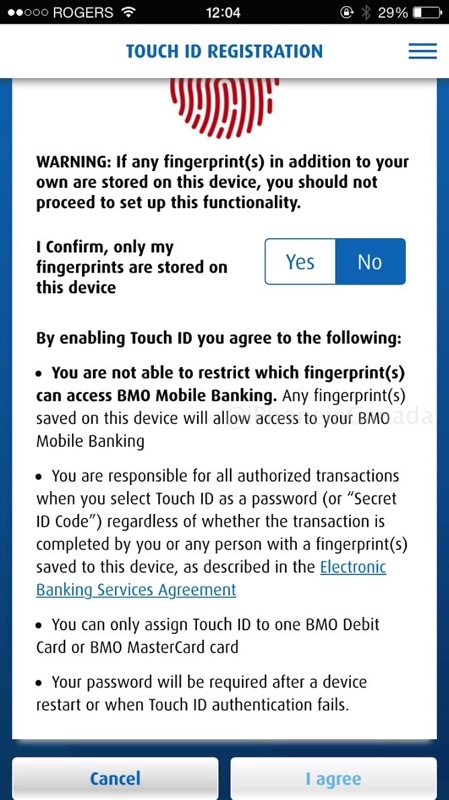
Below is a screenshot of Touch ID Registration, where BMO makes you ‘confirm’ that only your fingerprints are stored on your iPhone. Since Touch ID will enable access to your bank account and make transfers and more, this is a disclaimer the bank is putting on customers.
As for now, let’s hope other big banks will follow with Touch ID support for sign-in.
Click here to download BMO Mobile Banking for iPhone in the App Store. Let us know how you like this update!
Thanks Junior!
Want to see more of our stories on Google?

P.S. Want to keep this site truly independent? Support us by buying us a beer, treating us to a coffee, or shopping through Amazon here. Links in this post are affiliate links, so we earn a tiny commission at no charge to you. Thanks for supporting independent Canadian media!


ABOUT TIME!!!
I thought CIBC will be the first one but..
now lets wait for other banks
Just updated, so cool! Very handy
not working… no registration… called BMO… they said not ’til next week likely.. was it working and pulled??
It was working, now it’s gone. Can’t use it anymore.
Oh, BMO.
At least they are quick to push this update with Touch ID. I’m sure the bug fix update will come soon.
Well the apps back in the App Store, but Touch ID isn’t working. ????
Just checked it a moment back… Touch Id is working…cool stuff this.
Maybe I’ll delete the app and reinstall. I had it working yesterday until they pulled the app
Ok reinstalled, it’s working great, thanks.
And now the app has been pulled from the app store…
Already working for one card, but not working for other card?
Can’t find where to register for a 2nd card.