
Apple’s AirPort Utility App is Being Removed From the App Store
Apple warns that "functionality is not guaranteed" when using AirPort Utility on iOS 27 or later.
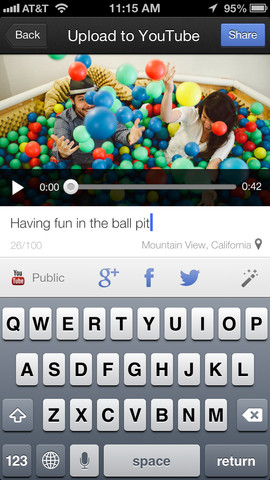
Google has released a new app called YouTube Capture to allow users to quickly record videos, edit them and upload to YouTube. Videos can be quickly shared to YouTube, Twitter, Facebook or Google+. I can see YouTube celebrities taking full advantage of this app for their vlogs:
Film and share videos with YouTube Capture:
- Easy, fast recording
- Touch up videos with colour correction, stabilization, trimming, and music tracks
- Upload to YouTube, Google+, Facebook, and Twitter simultaneously
YouTube Capture is available for iPhone and iPod touch.
YouTube Capture is a free app. You can download it here from the App Store. Let us know how you like this new app.

[via iClarified]
Want to see more of our stories on Google?

P.S. Want to keep this site truly independent? Support us by buying us a beer, treating us to a coffee, or shopping through Amazon here. Links in this post are affiliate links, so we earn a tiny commission at no charge to you. Thanks for supporting independent Canadian media!


I played with it a tiny bit already and, considering I use Camera+ as my default camera app, I could easily see this become my default video recording app. Yet another Google product on my iPhone replacing the default Apple app. 🙂
What a trend we are seeing…Google apps dominating on iOS.
I use GMail as my unified inbox for all my e-mail accounts, so that’s replaced the built-in Apple mail. And I sync my Google calendar to my iPhone as well.
I use Chrome instead of Safari.
Google Maps. Duh. 🙂
And now this.
Yeah the Gmail app has become my go-to app for unified accounts. It loads Gmail IMAP faster vs Mail and replying from other accounts within the app is just golden.
Sounds like your happy to be leaving Apple apps yet you keep the iPhone?
Yes. I like the iPhone. And I’m app agnostic. I’ll use whatever app works best for me at that given moment. I really don’t care who puts it out.
Thanks for the link Gary! Can’t wait to try it!
Just tried this and audio not syncing with video, anyone else?