
Apple’s AirPort Utility App is Being Removed From the App Store
Apple warns that "functionality is not guaranteed" when using AirPort Utility on iOS 27 or later.
Mailbox has received an update this evening to allow users to manually create Auto-swipe patterns with a swipe and hold on actions.
So all you have to do is just swipe an email to ‘archive’ and hold—then you’ll be prompted for further actions. The same goes for a swipe and hold for ’trash’ and ‘snooze’. Once you swipe and hold, a tiny circle animation moves clockwise to indicate you’re creating a new auto-swipe action.
You’ll then be given options on how you want your auto-swipe to proceed. You can check out our screenshots below:
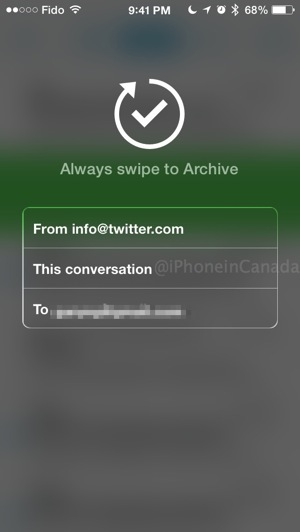
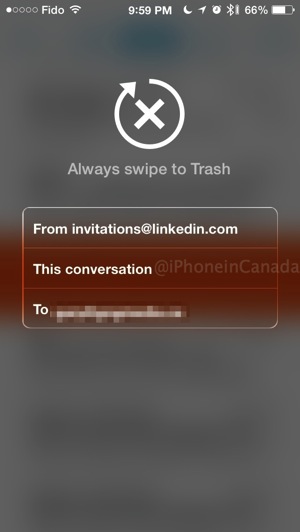
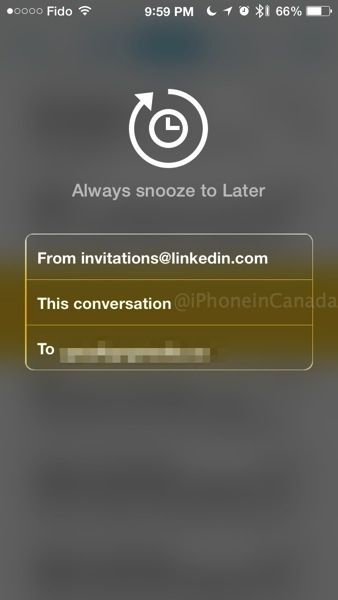
By creating these Auto-swipe actions, it will allow you to manage your exploding inbox even faster.
What’s New in Version 2.0.3
– swipe and hold to manually create an Auto-swipe pattern
– Auto-swipe suggestions added to email view
– other Auto-swipe improvements
– attachment improvements
– various bug fixes
The release notes also mention some various bug fixes and improvements. Mailbox 2.0 and its auto-swipe feature launched back in April.
Click here to download Mailbox—it’s free.
Want to see more of our stories on Google?

P.S. Want to keep this site truly independent? Support us by buying us a beer, treating us to a coffee, or shopping through Amazon here. Links in this post are affiliate links, so we earn a tiny commission at no charge to you. Thanks for supporting independent Canadian media!


so how is this app different (or better) than the original “mail” app that comes on iphone?
It’s faster this way to archive, delete or have messages ‘snoozed’ for later.