
Apple’s AirPort Utility App is Being Removed From the App Store
Apple warns that "functionality is not guaranteed" when using AirPort Utility on iOS 27 or later.
Last month, Starbucks announced it would soon launch an iMessage app to allow users to send gift cards, and that day has arrived in today’s latest update from the coffee chain’s iOS app.
Starbucks® Gifts in iMessage
Send a digital gift card with the Starbucks® iMessage app and Apple Pay. Surprise someone special with an instant gift, seamlessly integrated into your texting conversation.
Starbucks says by sending a gift card via iMessage, “It’s way more delightful than asking someone you love to check their email.”
Once you update the Starbucks iOS app, you need to install the iMessage app. Here’s how to set everything up so you can start sending gift cards today.
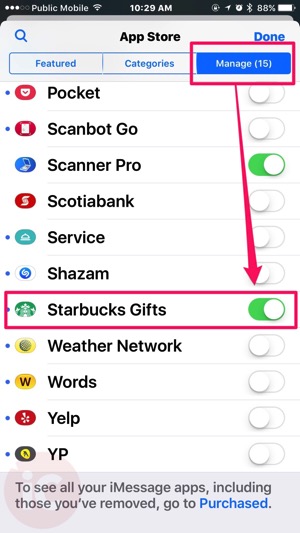
First, within iMessage, head to the iMessage App Store and tap the Manage tab, then enable the ‘Starbucks Gifts’ app so it will install. Once complete, you should see the Starbucks icon within your iMessage app drawer:
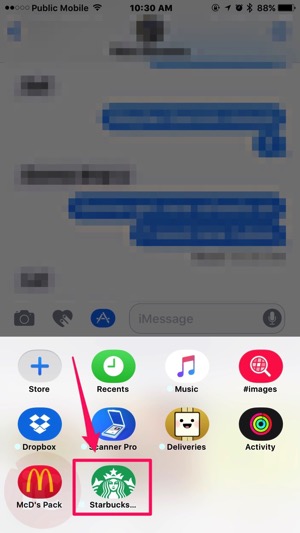
Once you tap the Starbucks iMessage app, you’ll see featured themed gift cards at the top and other cards. Just tap one, and you’ll see pre-populated denominations of $5, $10 or $25 cards:

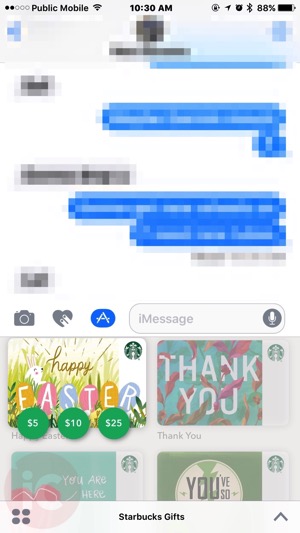
Tap an amount, then hit that large ‘Buy’ button. Next, you’ll see an Apple Pay prompt appear asking you to authenticate with Touch ID, to make your purchase. Once done
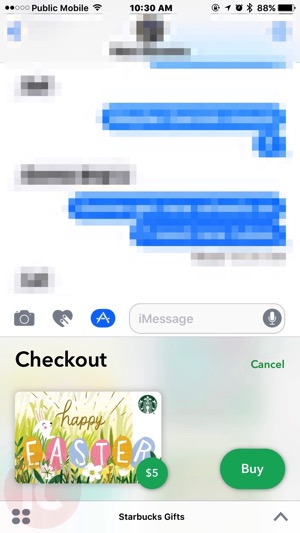
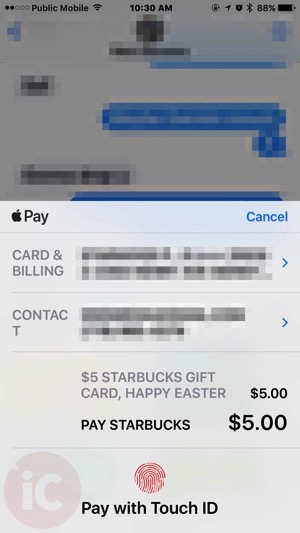
Once done, your receipt will receive card in iMessage and you’ll look so cool. Let us know if you’re going to try this! Apple Pay and Touch ID will make this a pretty easy way to give some gifts instantly.
Click here to download Starbucks for iOS in the App Store.
Want to see more of our stories on Google?

P.S. Want to keep this site truly independent? Support us by buying us a beer, treating us to a coffee, or shopping through Amazon here. Links in this post are affiliate links, so we earn a tiny commission at no charge to you. Thanks for supporting independent Canadian media!


Alright I’m going to give out my number for you to try this. You’re welcome.
haha…did you get it??
What is the iMessage app?
Hey Gary, thanks for sharing! Do you know if this can work with someone living in the US? Will they get $5 CAD and use it as USD? Or it will just not be compatible?
It will work, but it will be $5CAD so the exchange will play a factor when using it.
Woohoo! Thank you!
Tried this already and it wouldn’t process my payment, so it didn’t go through. I don’t get it. I use Apple Pay all the time, why wouldn’t it work for this?
I also am having issues with this. Starbucks iOS app is up to date. I go to Payment methods and click on Setup Apple Pay. It takes me to the Wallet and nothing happens. Same thing is from the iMessage – says Setup Apple Pay and takes me to the Wallet.
I already have setup Apple Pay and it works properly for everything else.
Seems that the app doesn’t talk well with the Wallet settings.
I’m having the same issue. Have you had any luck getting it resolved?
Nope. Haven’t been able to find anyone talking about the same issue anywhere on the net and too lazy to actually deal with customer service or whatever 🙂 just gonna avoid it until you solve it