As pointed out first by game developers CMA Megacorp, the iPhone 5 seems to respond differently than previous generation iPhones when sliding a finger diagonally across the screen in quick succession, a glitch that may pose a problem for game developers, 9to5Mac reports.
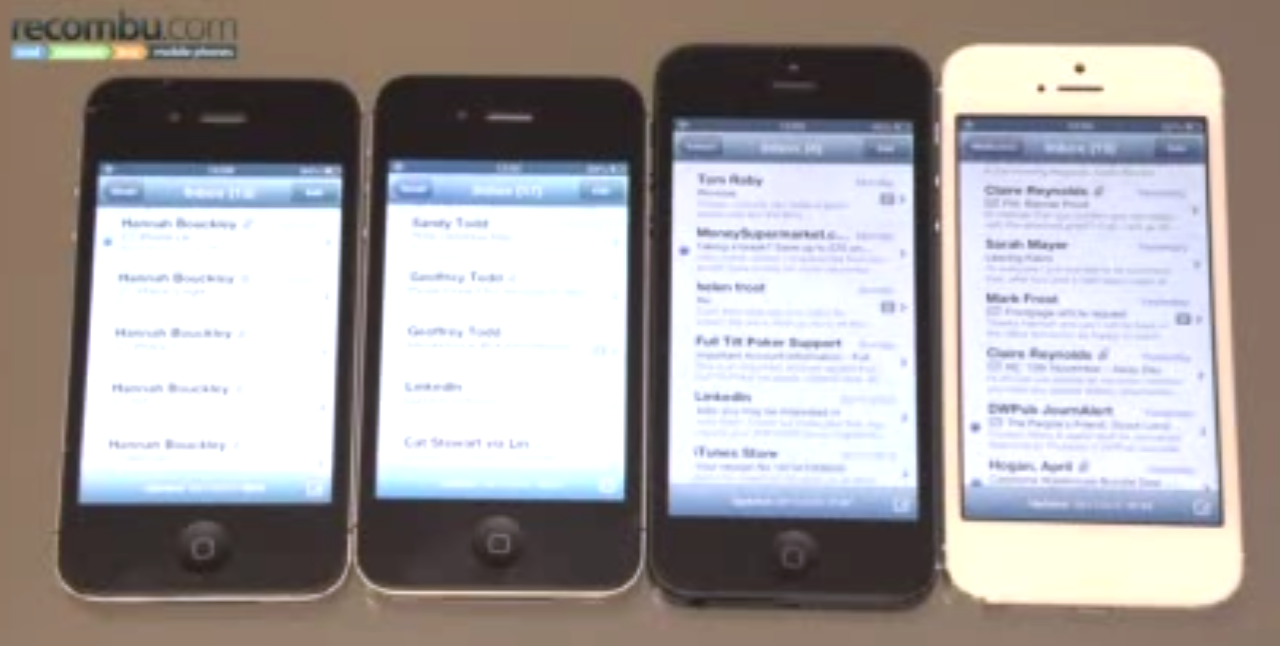
The glitch is not noticeable by all users, though this may be a serious issue for game developers that rely on quick diagonal scrolling and swiping motions.
As highlighted by Recombu in the video, “the problem is exacerbated by scrolling diagonally and as you can see only occurs on the iPhone 5.” In the video we see the theory put to the test on two iPhone 4S’s and two iPhone 5?s- one of each running iOS 6.0 and 6.0.1, indicating the issue might indeed be hardware related.
Check it out and tell us if you’re experiencing this issue as well:




I just tried it and it happens to me too.
do it again without touching blue bar top bottom , stay in the middle
hmmmm, i just replicated the glitch… interdasting
was told at the store the majority of returns are now a screen glitch and there’s a large number coming back.
Got an Iphone 5 and I have the glitch too…
do it again without touching blue bar , stay in the middle
Not to be rude, but who cares? The scrolling doesn’t work at a rapid speed diagonally? It works fine on mine when I need to scroll up and down.
How about games like fruit ninja or infinity blade, if my swipes start not being registered it makes it more difficult to win.
Yup. I have it too. I was wondering when playing Fruit Ninja. I seemed to play worse in iPhone 5 than 4S, even though iPhone 5 has bigger screen and is faster. Now I know why.
in the real world, who would need to do that really?
Think games like Fruit Ninja…
I just replicated the problem, but my screen doesn’t freeze, but would scroll way up or way down. But something is definitely not right. Interested to see if this is just a small batch or if all iP5 screens are like this.
I’m seeing the same issue. It just seems to stop paying attention to the touch input at some point.
Just curious…….does this video have no audio?
Negative here too!
try without touching blue bars
Tried this on my iPhone 5 w/6.0.1 and couldn’t replicate the issue.
I’ve got the glitch!
I’m not sure if its a glitch. I just did it two different ways and got two different results.
1. I did it making sure my finger only stayed with the emails not touching any blue at all and nothing happened.
2. The second time I did it I would every now and then hit the upper and/or lower blue bars (the actual mailbox) and I was able to reproduce this ‘glitch’
Someone else give it a try … To me it seems the touch screen is more sensitive than ever.
I agree with you 100%. I also did exactly the same as you and have exactly the same results and thoughts.
+1 – man people are just looking for problems now…but the guy on the video works for samsung….first of all, who even THINKS to do this to their screen? BORED MUCH? no glitch here, it is only when you rub your finger like an idiot on the blue bar at the bottom…hey here’s my advice, DON’T DO THAT!
I tried in safari using 1″ space in the middle of the screen and I still have the same issue. Perhaps it has something to do with that finger on edge thing they did for iPad mini?
yup same here, good observation man !
Experiencing this too. This would affect my performance in fruit ninja real bad
Mine doesnt freeze
do it again and avoid blue bars
Same here iPhone 5 6.0.1
I’ve had this problem before when playing Temple Run, I thought “I wasn’t touching the screen right” but it’s at least comforting to see that it’s not just me! Could it be the phone?! Their new touch screen glass??
Apple sux
I just tired this on My Galaxy SIII….guess what, same thing. Man, these guys copy everything.
I wonder if this could this be related to the tweaks Apple made to compensate for the the iPad mini in iOS 6. Apple was trying to compensate for accidental touches to the screen due to the thin bezel. It ignores touches if it thinks it was unintended. But this tweak may only be active on certain hardware models.
Apple has had the ignore unintended touch technology for a while, maybe even since the first iphone and ios 1
I have the same prob!
Unfortunately this happens on most iPhone 5 models. But even worse, it happens all the time while connected to the new LTE (4G) Network! As soon as you activate LTE, you will have the damnest Touch-Screen Issues!