
We learned late last night that hacking firm Antisec had leaked out nearly one-million Apple device UDIDs to the public. The UDID is ultimately Apple’s way of identifying each individual iOS device. The string of text is 40 characters long containing a mix of numbers and letters.
The Antisec group claimed they hacked over 12 million UDIDs along with personal information from the FBI earlier this year. Rather than leak out the entire list, the group made one-million UDIDs public without releasing any type of personal information.
Now you may wonder if your device’s UDID is on that list. Luckily, you can check using The Next Web’s database comparison. You will need your iPhone, iPad, or iPod touch UDID on-hand, so follow the instructions below to learn how to find your UDID:

1. Plug in your device and open up iTunes.
2. Click on your device on the left-hand menu.
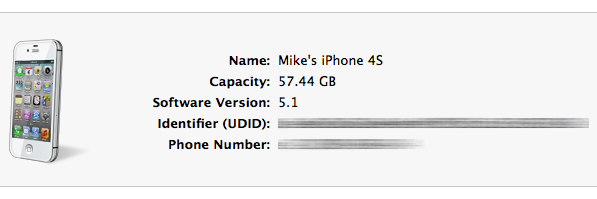
3. Click on “serial number,” found near the picture of your device.
4. The long string of text following “identifier” is your UDID.
5. To copy it, press command + C on a Mac keyboard or control + C in Windows
That’s all, now you can come back here and report your results to us. My iPad, iPhone, and iPod touch weren’t on the list, how about you?



That form to check UDID’s is not secure?
To my knowledge it doesn’t store any data, it searches the database for a match.
Why would anyone go to a non secure,non apple site and freely give away your UDID. If the number is out, theres nothing you can do, If they don’t have it, by doing the “search” you just gave it to them..
I’m good… not on thel ist.
Good News, you have been added to their new list of UDIDs.
My iTunes displays a “serial number” instead of an “identifier (UDID)”….
Click the text that says “Serial Number” and your UDID will come up.
I think I will send them my credit card number too, so they can check to see if it was stolen by those bad people.
I have to agree typing in your UDID to non-apple site is just full retard status and you guys shouldn’t be telling people to go do it.