
iPhone 18 Pro Restarting by Itself? Dozens of Owners Report the Same Bug
New iPhone 18 Pro Max owners report random restarts with "rst wdog" showing in ResetCounter logs. Apple is reportedly aware and a fix may arrive in an iOS update.
Some big news today from Google regarding their Google Goggles feature. In their latest blog update, they have announced that the Google Mobile iPhone App has been updated with Google Goggles (it already has voice search)! This amazing feature first launched for Android, but now it’s available for iPhone users. Essentially, you search for things by taking pictures with your iPhone’s camera. How incredibly cool and scary!
From the Google blog:
In the new version of Google Mobile App just tap on the camera button to search using Goggles. Goggles will analyze the image and highlight the objects it recognizes — just click on them to find out more. You can see how this works in this short video:
Computer vision is a hard problem and Google Goggles is still a Labs product. It works well for things such as landmarks, logos and the covers of books, DVDs and games. However, it doesn’t yet work for some things you might want to try like animals, plants or food.
Google Mobile App with Google Goggles is now available in the Apple App Store. Just search for “Google Mobile App†and download the latest version – it’s free. It will gradually be appearing in all App Stores around the world starting from today.
Goggles is enabled only for English-speaking users, and since it requires an auto-focusing camera it is supported only on iPhone 3GS and iPhone 4 running iOS 4 or above.
The Google Mobile iPhone app update is slowly making its way into the App Store. Keep your eyes out for this cool update!
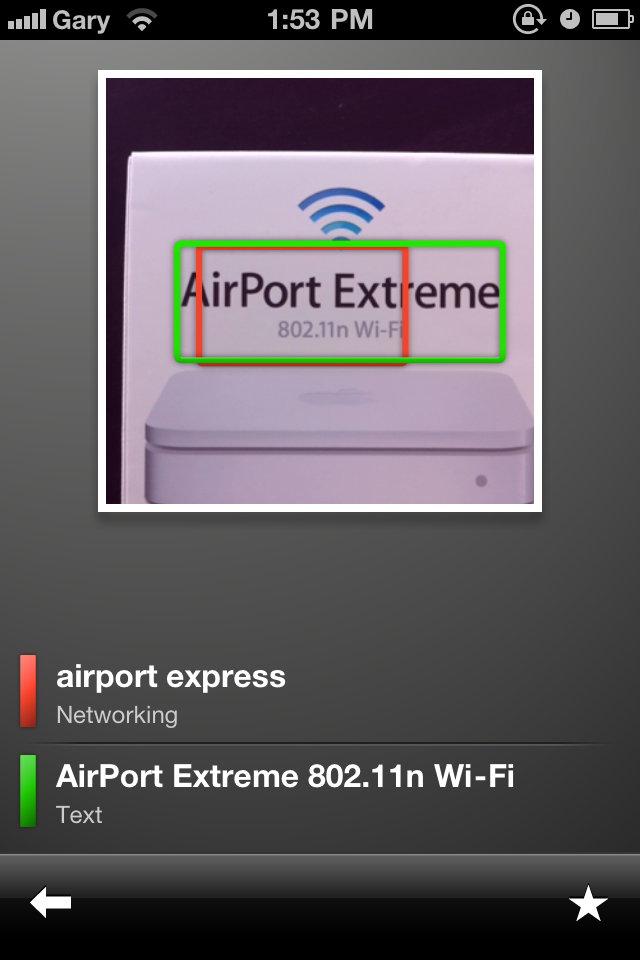
Update 1: The Googles update is now live in Canada. Check out the screenshots below. Google Goggles identified the box to my Airport Extreme easily.

Want to see more of our stories on Google?

P.S. Want to keep this site truly independent? Support us by buying us a beer, treating us to a coffee, or shopping through Amazon here. Links in this post are affiliate links, so we earn a tiny commission at no charge to you. Thanks for supporting independent Canadian media!


thats pretty cool
thats pretty cool
How do you get to Google Goggles? I just put the app on my phone and can’t find that part of it anywhere. I’m running on 4.0 because I’m waiting for the jailbreak, maybe that’s causing it to think my phone isn’t capable of running Goggles, but it’s an iPhone 4.
How i can use it on a french iPhone?
Iphone4 on 4.1 – tried with OS in french and english and I can’t find the option anywhere O_o
Just DLed the update and tried it my Windows 7 logo on my notebook for a test… worked great!
In the search page, beside the text input box there is a camera now. Use that to start Goggle Googles.
Download the app
Go check the Updates within the App Store. Sounds like you got the version before the update was released.
Me neither. iPhone 4 4.0. Someone said it’s a camera next to the search box, but that isn’t appearing for me.
Right you are! There we go!
Right you are! There we go!
Sweet!
FINALLY!
HA HA HA…Windows logo…did it direct you to the FML site?
Poruka.