
Apple’s AirPort Utility App is Being Removed From the App Store
Apple warns that "functionality is not guaranteed" when using AirPort Utility on iOS 27 or later.
VLC for iPhone has been released in the App Store. This open source multimedia player will play almost any video file. VLC was first released for the iPad and now it’s available for the iPhone.
What’s New in Version 1.1.0:
This new version of VLC brings :
– Runs on the iPhone 4, iPhone 3GS, and the recent iPod touches
– You can now delete files from the application, without having to go through iTunes
– Many more extensions are being recognized.
– Much faster decoding thanks to assembly optimizations
VLC’s initial release for the iPad was a bit buggy. Let’s hope the iPhone version works right off the bat.
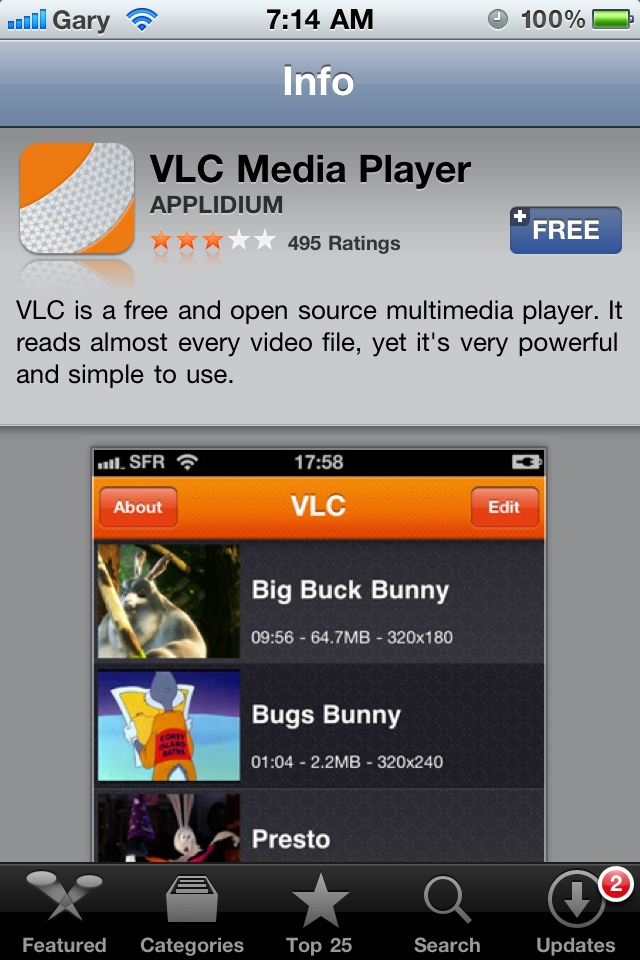
Let us know how this works for you.
Want to see more of our stories on Google?

P.S. Want to keep this site truly independent? Support us by buying us a beer, treating us to a coffee, or shopping through Amazon here. Links in this post are affiliate links, so we earn a tiny commission at no charge to you. Thanks for supporting independent Canadian media!


can’t wait to see if it will play rmvb files. Anyone tried it?
downloaded it and it plays all my videos so far that the iphone wouldnt play before
Sucks on my end. Says my iphone 4 is not fast enough to play content ! I must admit i dumped some 600Mb vids but still !
Sucks on my end. Says my iphone 4 is not fast enough to play content ! I must admit i dumped some 600Mb vids but still !
Awful. Couldn’t play a single WMV file that I threw at it. oPlayer, on the other hand, handles them with ease. I uninstalled VLC as fast as I installed it.
Size doesn’t really matter. oPlayer has no problem whatsoever playing 1.4 or 2.1GB AVIs.
I use AirVideo to stream ANY content from my media server and various computers. .avi, .mkv, .mov, etc, etc… it doesn’t matter. It plays them all over WiFi without having to load any files onto my iPhone or iPad. Even works over 3G if you can get your firewall configured properly. AirVideo is a great App.
Now VLC remote is a fantastic App if you want to control VLC player on your computer from your iPhone or iPad. Great for home theatre computers.
I had it. Did not like it. Got rid of it.
It’s all good so far. We shall see over the long run.
Two programs, two different purposes. No need to compare apples and oranges, although both are fruit.
Tested with rmvb, it can read it but the playback is not smooth and quite horrible. Any idea why, or the codex simply can’t handle it with the iPhone hardware processing speed..
Plays video but no sound… not impressed so far.
I run my Beyond TV server to placeshift my 8TB+ of TV shows and movies (all HD) and manage my recordings and schedules online. Unfortunately, iPhone doesn’t support asx format to stream from Beyond TV. Supposedly, VLC player should work on the Mac for that matter. I was happy that there’s now VLC player for iPhone so I thought it would fix my problem but it doesn’t. For now, I’ll just keep using AirVideo for placeshifting and Beyond TV to manage my recordings/schedules. Would have been nice if VLC works for my use.
Why can i get no sound on my AVIs using the VLC iPhone app? Anyone else with this issue?
Got the same issue here too… using oPlayer instead and it worked fine.
No sound… (iPhone 4, latest iOS).
WOW.. i can finally watch AVI files.. and it works so well too!
I’m not sure what all the complaints are about, but the app worked like a charm for me. Probably one of the best apps I’ve downloaded in a little while and it’s free! Thanks for the info from the Gary and the rest of the staff.
same happened with me, but it was coz the folder i was playing was huge & made for HD on a computer…my netbook can barely play that file without some problems during playback, ofcourse the iphone wont play it! but downloaded an SD version & all was fine
Agreed, no sound for me either – iPhone 4 – iOS 4.1
Cheers! Thanks for reading!
darn, playing rmvb files would be awesome
It can play rmvb but a little choppy most of the time. but still i recommend it, its not like you’ll shed a dollar.