
Apple’s AirPort Utility App is Being Removed From the App Store
Apple warns that "functionality is not guaranteed" when using AirPort Utility on iOS 27 or later.
If you want to watch Xvid movies on your iPhone (VLC is coming soon), you will need convert them to work properly on the iPhone. One of the easiest apps to do so is CineXPlayer, which has been finally released for the iPhone. We first tested out CineXPlayer on the iPad and it was the easiest way to watch Xvid movies (it was FREE at the time!). All you had to do was drag media onto your device via iTunes. There’s no conversion necessary!
CineXPlayer launched yesterday and has a promo price of $1.99. Too bad it’s not free like when the iPad version debuted! It’s by far the easiest way to watch Xvid movies on your iPhone/iPod Touch. Currently this app will only work on the iPhone 3GS/4, and the iPod Touch 3rd/4th generation. It also requires. iOS 4.1.
Here’s the iTunes description:
You love to watch your movies anywhere, anytime and take them with you on your iPhone/iPod. But you realized that some of the most popular movie file formats (such as Xvid) won’t sync or play on your iPhone/iPOD ? CineXPlayer is the solution for you! -Transfer your Xvid movies to your device instantly (no conversion needed)
-Play your movies anywhere, anytime – even when you have no Internet connection (in a train, a car, a plane…)
-Enjoy the full quality and cinema experience
– Full Resume Function – Swipe to Delete (to manage movies)
– Rotate Lock. CineXPlayer plays Xvid movies and we endeavor to support most popular formats. You may occasionally come across an Xvid movie you will not be able to play. Please use our support contact if you encounter such a problem. (mkv, AC3 format not supported currently)
Here are some screenshots:

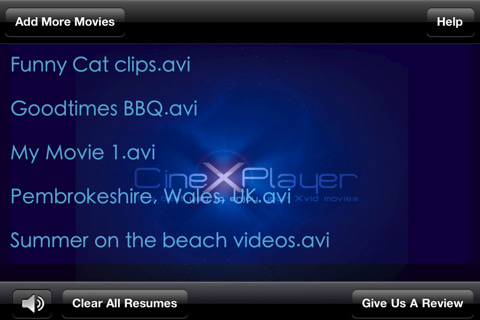
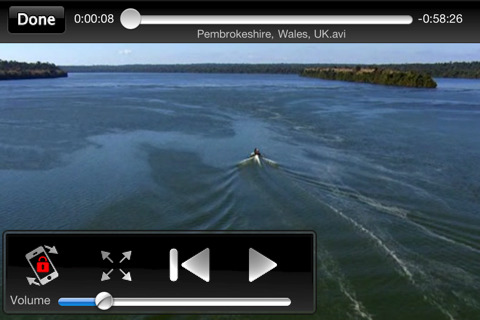
The awesome part about CineXPlayer is that you can just drag and drop Xvid media, and you’ll be able to watch it in high quality on your iPhone. Of course, the downside is that your storage will run out quickly if you’re dragging on full sized movies. It will require some memory management on the end user’s part.
Let me know how CineXPlayer works for you on your iPhone 3GS/4! Click here to download in iTunes.
Want to see more of our stories on Google?

P.S. Want to keep this site truly independent? Support us by buying us a beer, treating us to a coffee, or shopping through Amazon here. Links in this post are affiliate links, so we earn a tiny commission at no charge to you. Thanks for supporting independent Canadian media!


Looks interesting. If VLC isn’t free then I might get this…. But for now I’ll just spend the extra 15mins converting the movies using Videora
I use Air Video app, which is great! The server side portion converts the movie and streams it to your iPhone or iPad. You can also ask it to convert the movie and store mp4 file in some folder on the server. Then you can just move the file to your device via USB using e. g. FileApp
No mention of how well it actually works?
I use the iPad version everyday and it works flawlessly. If that’s any
indication, it should work the same on the iPhone.
I use Zumocast, it converts my AVI / DivX movies and streams it to my iPhone.
I bought this but I find the YXPlayer works much better ATM. CineXPlayer does not support rmvb, mkv, ac3 files. Most videos are encoded with those formats these days which render the app pretty useless.
I paid the $1.99 which I don’t mid but they better improve the app.
For now YXPlayer does the best job plays everything I through at it. I watch AVATAR with srt subtitle support without any problems on my iPhone 4. It was flawless.
Will only be able to download if you update to 4.1 so much for the jailbroken people.
OPlayer ($2.99) from olimsoft can play multiple formats besides XviD. There’s also OPlayer HD ($4.99) for the iPad and free Lite versions of both.
im jailbroken on 4.0.1 and i have this app running fine, all you have to do is modify it to run
Air Video is the way to go. Or Unlimvideos in cydia 🙂
I have being using bit torrent downloader Vuze to convert any video format to work on my iphone. Vuze is free and works great. Simply use the devices section and the program formats any video to work on your iphone and then use itunes to save it to your phone.