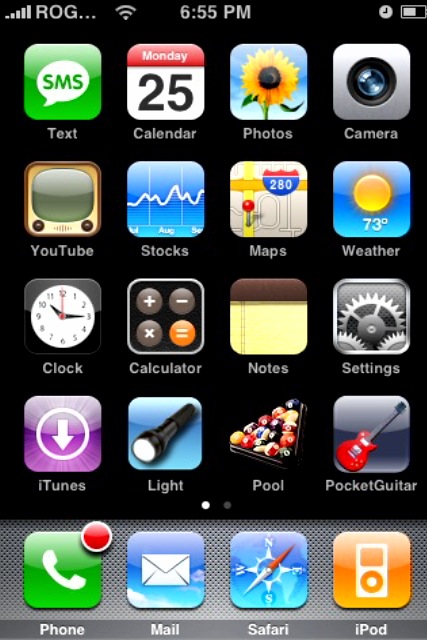
Hey everyone, I thought I’d mix it up today by letting you guys have some input for my next post! Get ready to get interactive! Lots of people who want an iPhone might not have any clue about what the possibilities are with customizing your iPhone homescreen/springboard.
So the task for you guys today is to take a screenshot of your springboard using ScreenShot, then emailing it to me! I will compile as many as I can in an upcoming post I will display a gallery of them with your name next to yours. Let’s see how unique your iPhones really are!
How to take a screenshot of your Springboard
- Launch Installer. Make sure you have a solid list of “sources”.
- Go to Install. Go to the Utilities category. Install ScreenShot (don’t see it? check here). Press the Home button.
- Launch ScreenShot and turn it “ON”. Change your file image save directory to “Camera Roll 100APPLE” (yours may look different; basically this will save images to the photo gallery).
- Press Home. You will see a small icon that says “snap” in the corner. Press it.
- Email your picture to iphone.in.canada AT gmail dot com
- Now cross your fingers and hope your screenshot will be added to the gallery! 🙂
Let me start things off…here’s my amazing screenshot (I’m sure you guys can do better):

That’s it…depending on how many entries I get, the post should be up by the next day or the one after. Happy “screenshotting” (is that a word?!)!! 😉
If you enjoyed this post, please subscribe to my RSS feed, so you won’t miss any updates!



pretty sure is doesn’t work on 1.1.3
Great idea. I sent you mine 🙂
Cool, well I’ll try to hopefully get ya a picture later on tonight! 🙂
I won’t have a chance to do this today, but anyway, my screen is as boring as yours above!
The only difference is that I have 1.1.3, so have put a few bookmarks on the springboard. CBCNews and Wired.
I will be interested to see how many people use Summerboard to customize their view though. I personally really like the standard iPhone interface, so decided I wouldn’t go that route until I got bored with it.
the app doesn’t work for me, i think i have 1.1.3 (though i’m not sure).
aw this sux… you can’t use it on 1.1.3 yet 🙁 too bad my smb is sweet!
Well i was gonna send in my mine but no 1.1.3 🙁
Cool idea. Although the default interface and icon set is very nice too look at. I’m sure I’ll get around to modding it as soon as 1.1.3 can be theme’d.
Not working on 1.1.3
Thanks to everyone who sent in their screenshots! Let’s hope for an update for 1.1.3 users. 🙂
Well I guess I can’t send ya some pics 🙁 I don’t have an email account hooked up with my iPhone as it does not work with Hotmail unless u go through that one site…. I forgot what its called LOL
Maybe ill SSH the picture from my phone to laptop, then try sending it through email… Well see 😛
No email! That’s crazy! This is one of my favorite iPhone features. I have two email accounts hooked up to my iPhone. My Gmail through IMAP for personal use and my work email through Exchange. 1.1.3 has the ability to sync with MS Exchange server, which is totally sweet, (I am not sure this was possible previously. Maybe it was and I overlooked it). When I am at work, the wireless network allows me to receive from Exchange seamlessly, and then at home or anywhere else I just connect to VPN and can get my messages through Exchange there too.
Being able to keep the messages in different inboxes is really nice.
LOL yupperz no email 😛 I guess I could always get an account with another site or check how to get email working with hotmail….. Hmmmmm lol
Dusty: setup a Gmail IMAP account already! Hotmail is inferior!
LOL I think I will, can’t u forward or somehow send ur emails to Hotmail through Gmail? or something along those lines…
I don’t mean to be funny but cant you just press on/off and home simultaneously to get a screenshot??
pretty sure is doesn’t work on 1.1.3
Great idea. I sent you mine 🙂
Cool, well I’ll try to hopefully get ya a picture later on tonight! 🙂
I won’t have a chance to do this today, but anyway, my screen is as boring as yours above!
The only difference is that I have 1.1.3, so have put a few bookmarks on the springboard. CBCNews and Wired.
I will be interested to see how many people use Summerboard to customize their view though. I personally really like the standard iPhone interface, so decided I wouldn’t go that route until I got bored with it.
the app doesn’t work for me, i think i have 1.1.3 (though i’m not sure).
aw this sux… you can’t use it on 1.1.3 yet 🙁 too bad my smb is sweet!
Well i was gonna send in my mine but no 1.1.3 🙁
Cool idea. Although the default interface and icon set is very nice too look at. I’m sure I’ll get around to modding it as soon as 1.1.3 can be theme’d.
Not working on 1.1.3
Thanks to everyone who sent in their screenshots! Let’s hope for an update for 1.1.3 users. 🙂
Well I guess I can’t send ya some pics 🙁 I don’t have an email account hooked up with my iPhone as it does not work with Hotmail unless u go through that one site…. I forgot what its called LOL
Maybe ill SSH the picture from my phone to laptop, then try sending it through email… Well see 😛
No email! That’s crazy! This is one of my favorite iPhone features. I have two email accounts hooked up to my iPhone. My Gmail through IMAP for personal use and my work email through Exchange. 1.1.3 has the ability to sync with MS Exchange server, which is totally sweet, (I am not sure this was possible previously. Maybe it was and I overlooked it). When I am at work, the wireless network allows me to receive from Exchange seamlessly, and then at home or anywhere else I just connect to VPN and can get my messages through Exchange there too.
Being able to keep the messages in different inboxes is really nice.
LOL yupperz no email 😛 I guess I could always get an account with another site or check how to get email working with hotmail….. Hmmmmm lol
Dusty: setup a Gmail IMAP account already! Hotmail is inferior!
LOL I think I will, can’t u forward or somehow send ur emails to Hotmail through Gmail? or something along those lines…
I don’t mean to be funny but cant you just press on/off and home simultaneously to get a screenshot??
I enjoy reading your posts. You seem to know your stuff