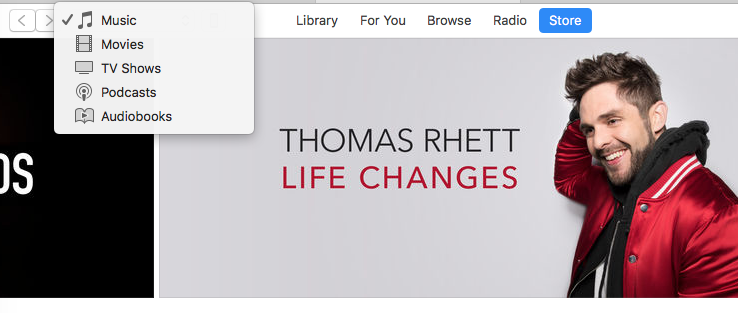
This afternoon Apple released a new version of iTunes, version 12.7 (209MB), which removes the App Store, seemingly slimming down the software. Apple says this new version of iTunes focuses on “music, TV shows, podcasts, and audiobooks.”
Check it out below—the App Store is gone:

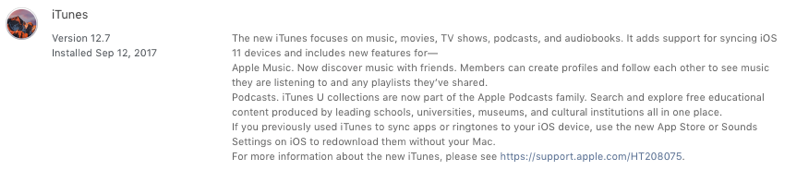
Here’s what’s new:
- Apps: Looking for your past iOS app downloads? Learn how to redownload apps on your iOS device.
- iTunes U: Collections of iTunes U content appear in the Podcasts section of iTunes.
- Internet Radio: Your Internet Radio stations appear in your music library’s sidebar. Click Edit in the sidebar to show or hide Internet Radio.
- Ringtones: iOS 11 supports redownloading ringtones directly to your iOS device, without the need to use iTunes on your Mac or PC.
- Books on Windows: Books on iTunes for Windows are managed in iBooks for iOS. Learn how to redownload books on an iOS device.
Apple says if you’re looking for your old iOS downloads, you can get them from your iOS device, which also is the same for ringtones. Looks like the removal of the App Store is part of the company’s efforts to slim down the all-in-one software, which has been criticized before for trying to do too many things at once.
I didn’t mind seeing the App Store in iTunes, as it was nice to browse app collections and copy links easily. But those days are now gone.
You can find the 12.7 iTunes update in the Mac App Store; Windows users—click here to download it.



Not fond of this move…it was nice to have everything together.
No more downloading apps to iTunes or restoring old IPAs?
I still use iTunes (on Windows no less) to sync my iPad with iBooks. I have lots of PDFs that I read in this manner. I guess I can upload them to Dropbox, but overall I am also not fond of this move.
Don’t update your iTunes
Hmm, what about custom ringtones that we’ve made ourselves? Is there no longer any way to upload these do your phone?
There is, open the .m4r with iTunes and it’ll be autosynced to your iPhone.
That’s good then. Not super intuitive, but if it works, so be it!
Hmm, so, I’ve found that you can add a ringtone by dragging it onto your iOS device in iTunes… but how do I manage them if, say, I wanted to delete one?
Darn good question!
Thanks for this tip!! I was so worried i’d lost my custom ringtones!
Since I never stored duplicate copies of my IPAs in iTunes anyway, I’m ok with this streamlining. Some of my older apps that are no longer in the App Store will be lost but most of them won’t work in 64bits anyway though. Time to move on…
Not surprised by this…I set up a friends’ new iPad a week ago and was curious to see that when I did a restore from backup, it wouldn’t sync apps and said they’d be downloaded instead
When I restored a friends’ new iPad from backup last week, it said the apps would be downloaded and not synced from the PC, so this isn’t surprising to me at least.
iTunes has been the most frustrating experience as far as I am concerned. I welcome this move
Frustrating yes. But I use it to keep all my old apps and to backup my phone to pc. I have many times accidentally updated apps where the latest one was very bloated. There’s no reason for an app to increase 4 or 5x from its original version unless it is a game.
For older devices, how will I keep my IPA files that can no longer be downloaded? Some are just gone from the App Store, and the only way i could get them onto my older device after a restore was to sync it from iTunes.
And I would like to keep some older 32-bit apps because I know they will disappear from Apple sometime. I have several older devices.
Don’t update to ios 11 or update your iTunes
Actually they are probably 32-bit and would not work on iOS 11 anyways
I wish they’d just get rid of iTunes altogether. It’s kind of archaic to have to download use specific software to purchase movies or music in 2017.
If iPhone can ever be operated without iTunes, playing mp3 file songs without iTunes, I may be in heaven.
Darn. I’m going to lose Monkey Island 2 Special Edition forever, now. 🙁
Geez. Another reason not to update to ios 11. To be honest though. Not many people use iTunes for their apps. However I do.
So Are your deleted apps from your phone saved somewhere on your device? I never heard of that. It’s news to me.
Any way. Apple the almighty father says to us to learn to… They also want us to learn to say iPhone 10 when we see iPhone X. It sounds weird though referring to triple 10 rated adult movies.
If that means that when I delete an app from my phone, it won’t now automatically reinstall itself every time I connect my phone to my computer, then I’m all for it.
Syncing itself through iTunes wouldn’t be as important if the App Store worked. But the App store doesn’t manage apps either! If you have hidden any paid apps for some reason, there’s now NO WAY to get them back (to unhide them). The new iTunes won’t let you nor with the new App store. You have to pay for them again – or call Apple to have them unhidden.
So as it turns out…as Elmer Fudd said: “Be careful. Be vevy vevy careful!” and keep a version of the old iTunes around. Recover from Time Machine if you have to.