
WhatsApp Makes Searching Old Messages Easier on iPhone
WhatsApp is officially releasing an in-chat search button on iOS, removing the need to navigate to a sepeate menu.
Apple has just released iOS 7 to the general public as on OTA download for compatible devices. However, those looking for a fresh restore / update to iOS 7 on their iPhone, iPod touch or iPad devices, can download the firmware by using the official direct links to .IPSW files for their respective iOS devices.
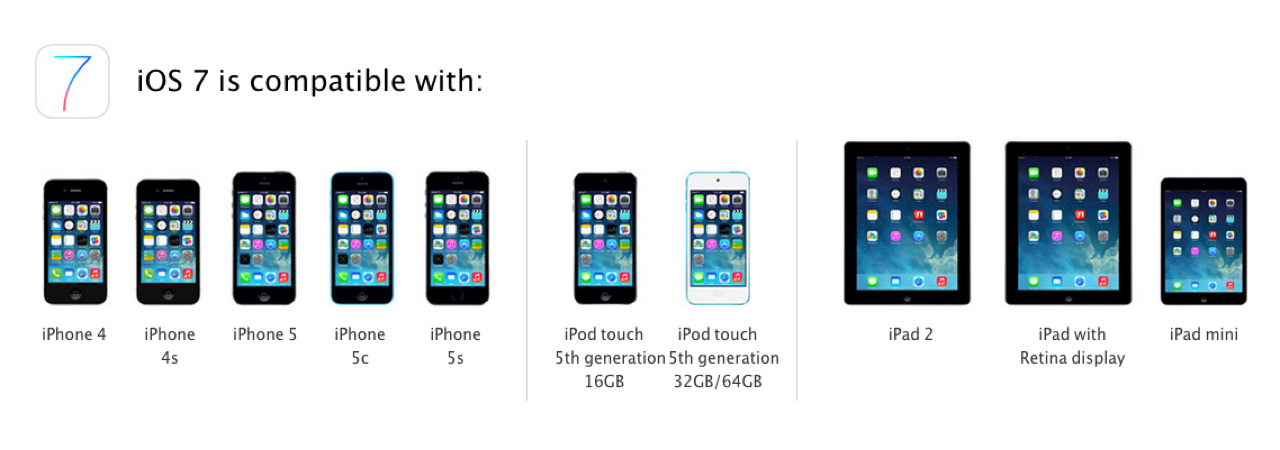
Here are the direct download links for iOS 7:
Here are the direct download links for iOS 7.0.1:
So, what are you waiting for? Get downloading now!
Want to see more of our stories on Google?

P.S. Want to keep this site truly independent? Support us by buying us a beer, treating us to a coffee, or shopping through Amazon here. Links in this post are affiliate links, so we earn a tiny commission at no charge to you. Thanks for supporting independent Canadian media!


guess what Usman? I JUST BRICKED MY IPHONE because of your brillant idea! thanks a lot!
Huh? What happened???
How can an official iOS release / update brick your iPhone?
They probably updated usuing a non fully downloaded file. As when DL the iOS 7 for the iPhone5 I had to download it twive to get it at the proper size (1.2 GB).
There’s always been a “verifying with Apple” phase even when applying manually downloaded updates, I’d be very surprised if this didn’t include ensuring the integrity of the downloaded file.
If your phone is Jailbroken do a fresh restore instead of updating to iOS7. Usually updating from a Jailbroken phone does that. The best bet or hopefully recover the bricked iPhone would be putting it into Restore Mode. Then restore the iOS.
mine effed up – then I did a restore and update and was working fine and now I’m getting an error saying “your iphone could not be activated because the ctivation server cannot be reached” etc.. and try to connect to itunes and now itunes says “we could not complete your itunes store request the network connection was lost”
I need reports on iPhone 4 performance before I risk updating my phone.
the iPhone 4s doesn’t do well on iOS 7 due to it has a A6 chip it cant handle the performance
iPhone 4S has a A5 chip.
And from most of what I read it does pretty well.
iPhone 4 actually has the A4 chip, but I get what you’re saying. I just want to hear from people who try iOS 7 on iPhone 4.
I attempted to download it on my iphone4 because I read that it could download on it. HOWEVER.. I got the error message and my phone is stuck in this.. restore/update period and will not work for anything!
Sorry that happened to you. Have you tried a hard restart? Just keep holding down power and home for several moments.
My iPhone 4s is doing the same thing. I had downloaded the original iOS 7 update and it was fine. Then, a couple days later I got a notification to update to iOS 7.0.1 or 7.1 (I can’t remember which it was). I had time to kill today, so I downloaded it. Everything was fine, but then it told me to connect my phone to iTunes. I did this and when it finally detected my phone prompted me to restore it. In the description of the download it had only said there would be bug fixes (as far as I could remember). So, I restored it, seeing as that was my only option and it pulled up an error box and told me to try again. I’ve tried multiple times and can’t find anything on the Apple site that is helping me right now.
So, now my phone is in a restore limbo.
Welp. Finally, found on the Apple site that this download (iOS 7.0.1) is only for iPhones 5 & 5s.
So, now I have two questions:
1. Why was this download even offered to me if I don’t have either of those verisons of the iPhone?
2. How do I fix this?
Has anyone come up with any easy way to transfer your music to your phone after doing a full restore? I absolutely dread doing it that way as having to hand drag and drop over 30GB of music is a huge task that takes hours.
After Restoring and trying to active my iPhone 5 I get the following message on iTunes:
“We could not complete your iTunes Store request. The network connection was reset”
and I can’t activate the iphone5 from the phone. I get a similar message which says ” You iPhone could not be activated because the activation server cannot be reached”
Any ideas?
the iPad 3 links are messed up, iPad 3 GSM link points to the iPad 3,2 ipsw file which is for the GSM/CDMA version, and the CDMA link points to the iPad 3,3 ipsw file which is for the GSM only version. I found this out after finally getting a successful download of the iPad 3,2 file via the bad link.
Whoops, fixed, thanks.
iPhone 4 links are messed up too. the Rev A link points to the iPhone 3,1 file (which is the NON Rev A iPhone 4) and the base iPhone 4 GSM link points to the iPhone 3,2 file which is meant for the Rev A version.
Thanks, fixed.
after download how to update it?
Hi… I have downleaded the “iPhone3,2_7.0_11A465_Restore” file, but now I do not know how to install it. Can you please help? (to help, the phone is inactive and I lost the password, and when trying to download it via itunes it always fails….). Tks!