If an iOS app supports Touch ID, it should seamlessly support Face ID on iPhone X. However, after setting up our iPhone X over the weekend, some apps failed to properly make the transition without some extra steps involved.
For TD Canada iOS users having issues with Face ID (and previously had Touch ID enabled), you just need to disable Touch ID and re-enable it again, which will then accommodate Face ID.
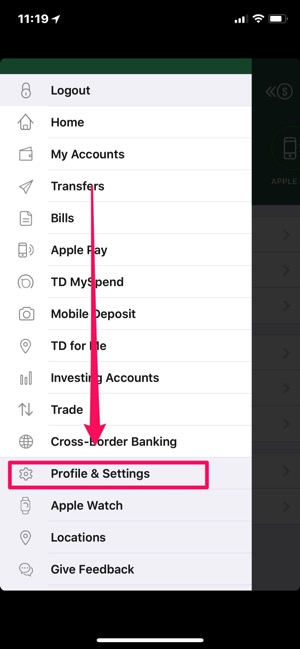
To do this, tap the menu icon in the top left, then go to ‘Profile & Settings:
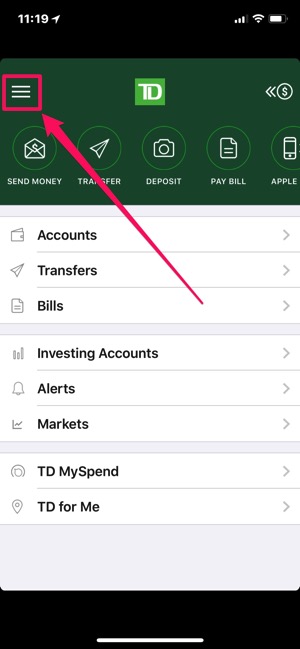

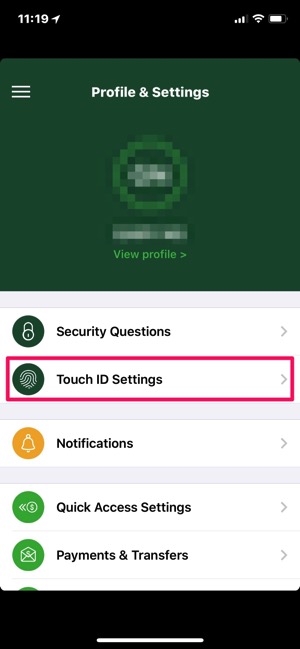
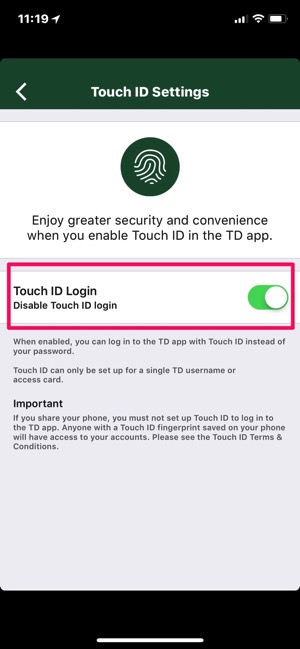
Next, tap ‘Touch ID Settings’, then toggle the Touch ID Login option to OFF, then back ON.
Once you’ve done this, the next time you try to login to the TD Canada iOS app, Face ID will work properly to authenticate you.
Other apps such as Starbucks for iOS failed to open properly after restoring our iPhone X from an iCloud backup. The app would open but logging in would not work. After deleting the app and reinstalling, everything was fine again (i.e. back in the game for mobile orders).
How’s your iPhone X and Face ID so far with apps for logging in and authenticating?



Yeah I can’t get the CIBC app to work with face id either. Tried to enable the touch id but the app says the device does not support it.
Hopefully an update will be out soon.
I hope so too. It’s a go to app in my life and although its not a huge deal to put in a pin I’d like face id to work.
I was told by CIBC on Twitter that they aren’t planning on adding Face ID to their app
Great tip Gary, it worked with the Scotiabank app, as it was not working for me before I read this.
Cheers!
I found out by myself this weekend… I had some apps like starbucks that were not working… at least one crashed on launch… erase app, reinstall… and voila… worked perfectly.
I was freaking as I did not want to wait in line at Starbucks! haha
I thought u liked Tims more. Lol!
I had a few apps that weren’t working. A quick re-install of them fixed it.
I think it has more to do with those apps’ implementation as I had similar issues moving to the iPhone 8 Plus using an iCloud restore.
rbc didnt do it the first time i opened it but it worked the second time. asked me to confirm if i wanted to open with face ID and done
This happens on my phone too… it’s not faceid related.
My TD apps were all good, and the only issue I had with Starbucks was that it locked up at the login screen after accepting the “Use Face ID” prompt — I had to turn off Face ID for the Starbucks app in settings, then login and turn it back on.
Oddly, however, the Capital One app appears to lack any kind of Face ID support, despite still supporting Touch ID on other iPhones. With Capital One having updated it for the iPhone X I’m wondering if they’ve deliberately disabled it.
Same for me, though I force quit the app then shut off Face ID in the settings, logged in, then re-enabled it.
Thanks this post saved the day! Now if they’d get to updating the app for iPhone X it’ll be perfect again 😉