
Apple Invited App Gets Cohosting Perks in Latest Update
Apple's Invites app now, two or more users can plan and manage an event together.
Google Maps for iOS has gained a new feature called Your Timeline, which tracks and records everywhere you’ve been. The feature first debuted for Android and desktop users back in 2015, but now Google says iOS users can “join in on the fun and see a daily snapshot of their life as well.”
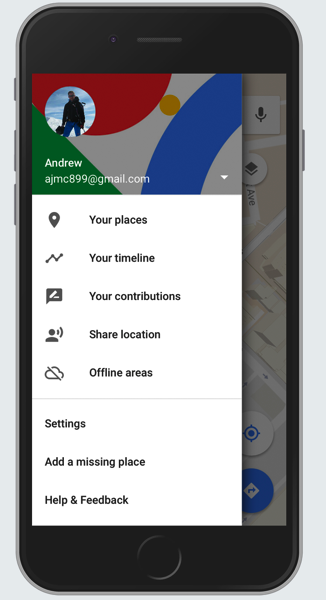
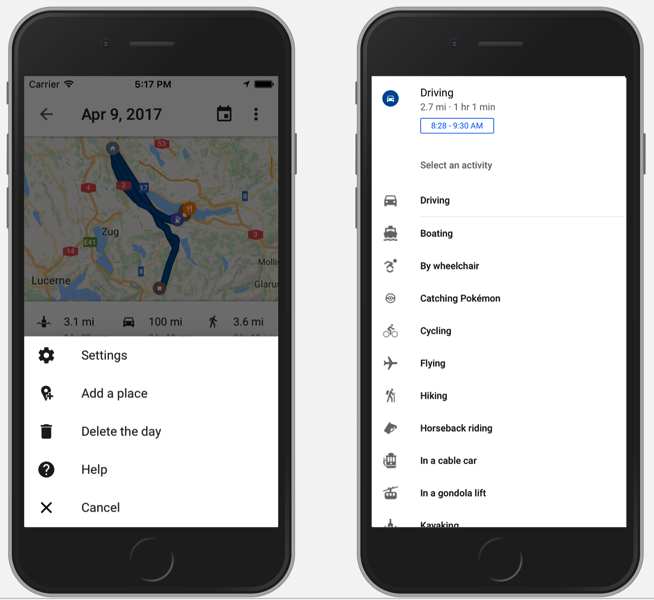
Your Timeline, once rolled out, will show up in the sidebar within Google Maps on iOS. Location history can be edited and customized, so users can delete data by day, date range or full history at anytime. Users can also customize their transportation and activity modes, such as choosing surfing, or horseback riding, for example.
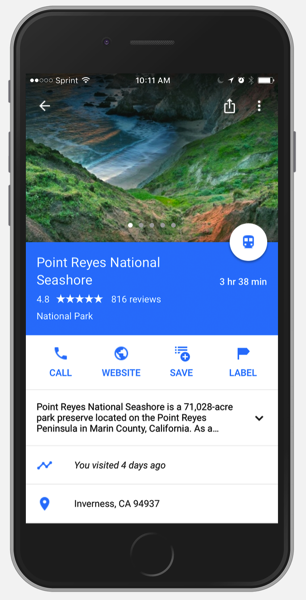
Also, Your Timeline shows up in the places cards of locations and businesses you’ve been to before, only visible to you. So this allows you to revisit when you went to specific places or locations to “rediscover the experience,” says Google.
Your Timeline also has an option to send out monthly emails summarizing your travel activity. These emails can be toggled on or off within settings in Google Maps for iOS.
Google Maps for iOS has gained some significant updates lately, such as being able to share your location in real-time easily with friends. Earlier this week, the app gained a widget to show directions on the lock screen, while also added location sharing via iMessage.
Click here to download Google Maps for iOS in the App Store. We’re not seeing the Your Location feature in Canada yet, but let us know when you do.
Want to see more of our stories on Google?

P.S. Want to keep this site truly independent? Support us by buying us a beer, treating us to a coffee, or shopping through Amazon here. Links in this post are affiliate links, so we earn a tiny commission at no charge to you. Thanks for supporting independent Canadian media!


This is great for husbands to keep track of their cheating wives ????
But I digress. This tracking has always been available when you log into google maps on desktop
They are slowly integrating all the features Google Latitude had 10 years ago
Requires gps to be “Always” on to work and as we know this is a battery killer.
It says no timeline history is available for me. I must have disabled the location saving ages ago as a privacy measure.
I think the app requires location setting set to ‘always’ in either case. I know previously I only had mine set to when app is running
Another thing thy can check on your phone when you cross the border.
my comment is not necessarily related to this post… but it has something to do with the recent Google Maps update…
Since yesterday, Messages and Maps are keeping my iPhone awake 100% of the time. Battery usage shows that usage and standby are showing the same time. Also, the two apps that used the most power in the last 24 hours are messages and Google Maps. This happened right after I tried the new Google Maps integration in Messages.
I’ve uninstalled Google Maps… and Standby/Usage times are back to normal.
anyone have seen this?