Apple has just released iOS 8 for iPhone, iPad and iPod touch. The latest update is now available over-the-air or via iTunes.
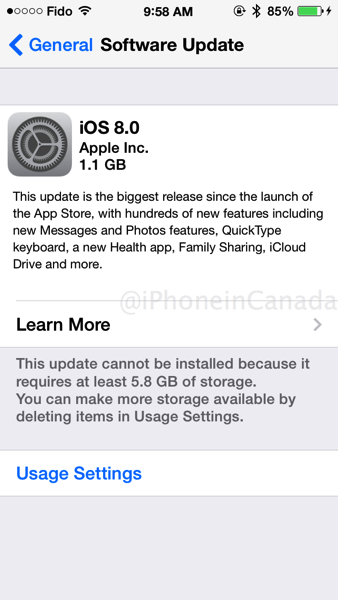
The download comes in as 1.1GB for the iPhone 5s and says at least 5.8GB of free space is required for the install to take place if you’re doing it over the air. Apple’s servers are getting slammed so be prepared to wait.
Update: You’re better off updating in iTunes using ‘Shift + Update’ (on a Mac) as recommended by Mike in the comments.
iOS 8 direct download links:
- Apple TV 2 (AppleTV2,1) version 6.2.1 (Build 11D258), Download
- Apple TV 3 (AppleTV3,1) version 7.0 (Build 12A365b), Download
- Apple TV 3 (2013) (AppleTV3,2) version 7.0 (Build 12A365b), Download
- iPad 2 (Wi-Fi) (iPad2,1) version 8.0 (Build 12A365), Download
- iPad 2 (GSM) (iPad2,2) version 8.0 (Build 12A365), Download
- iPad 2 (CDMA) (iPad2,3) version 8.0 (Build 12A365), Download
- iPad 2 (Mid 2012) (iPad2,4) version 8.0 (Build 12A365), Download
- iPad mini (Wi-Fi) (iPad2,5) version 8.0 (Build 12A365), Download
- iPad mini (GSM) (iPad2,6) version 8.0 (Build 12A365), Download
- iPad mini (CDMA) (iPad2,7) version 8.0 (Build 12A365), Download
- iPad 3 (Wi-Fi) (iPad3,1) version 8.0 (Build 12A365), Download
- iPad 3 (GSM) (iPad3,2) version 8.0 (Build 12A365), Download
- iPad 3 (CDMA) (iPad3,3) version 8.0 (Build 12A365), Download
- iPad 4 (Wi-Fi) (iPad3,4) version 8.0 (Build 12A365), Download
- iPad 4 (GSM) (iPad3,5) version 8.0 (Build 12A365), Download
- iPad 4 (CDMA) (iPad3,6) version 8.0 (Build 12A365), Download
- iPad Air (Wi-Fi) (iPad4,1) version 8.0 (Build 12A365), Download
- iPad Air (GSM) (iPad4,2) version 8.0 (Build 12A365), Download
- iPad Air (CDMA) (iPad4,3) version 8.0 (Build 12A365), Download
- iPad mini Retina (Wi-Fi) (iPad4,4) version 8.0 (Build 12A365), Download
- iPad mini Retina (GSM) (iPad4,5) version 8.0 (Build 12A365), Download
- iPad mini Retina (CDMA) (iPad4,6) version 8.0 (Build 12A365), Download
- iPhone 4s (iPhone4,1) version 8.0 (Build 12A365), Download
- iPhone 5 (GSM) (iPhone5,1) version 8.0 (Build 12A365), Download
- iPhone 5 (CDMA) (iPhone5,2) version 8.0 (Build 12A365), Download
- iPhone 5c (GSM) (iPhone5,3) version 8.0 (Build 12A365), Download
- iPhone 5c (CDMA) (iPhone5,4) version 8.0 (Build 12A365), Download
- iPhone 5s (GSM) (iPhone6,1) version 8.0 (Build 12A365), Download
- iPhone 5s (CDMA) (iPhone6,2) version 8.0 (Build 12A365), Download
- iPhone7,1 (iPhone7,1) version 8.0 (Build 12A366), Download
- iPhone7,2 (iPhone7,2) version 8.0 (Build 12A365), Download
- iPod touch 5G (iPod5,1) version 8.0 (Build 12A365), Download
Is this the same build as the iOS 8 GM seed? Yes it is, Build 12A365. Full iOS 8 release notes can be found here.
…more to follow



957 MB for iPhone 5 and requires 4.7GB of free space. Geez, I had to delete all my music from my phone to be able to install it over the air from work!
how come when iphone is plugged into itunes, it doesn’t show the update?
5.7 GB is just ridiculous!
You could switch to a flip phone, instead. It doesn’t have all those nasty new features that people demand.
If you hit Shift and Update in iTunes, you don’t require all that extra space to update.
Never had this happen before, but I cant do my software upgrade OTA, does that mean the phone company is having an issue releasing it or is it that I have too much stuff on the phone?
Mines installing since 10am still at 39min hopefully by 12 it will be done
Just started and mine says 42 mins remaining. Not as bad as I thought, since it took me 15 mins to make enough space on my ipad for this. 5.8! GEEZ!!!
Let the complaints begin!
Apple servers aren’t slammed… The throttling is likely due to people’s ISP’s. I just downloaded iOS 8 for my 5S in 81 seconds (24.4MB/sec = 195.2 MBits/s) using my VPS which has a gigabit connection.
Edit: Yep. Confirmed. I’m using Shaw Go WiFi and downloading from the Apple server got me 30KB/s, while downloading from my VPS using SCP (encrypted) is averaging 588KB/s). So Shaw is definitely throttling, at least with their “Go WiFi”.
I connected my phone to iTunes and it downloaded very fast like 1 min now its just updating in total took 10 min
iPhone 7,1/7,2? probably for the iPhone 6 and 6 Plus?
I originally attempted to just update everything through iTunes it said, it would take 4 hours to get the update lol so I did this instead, it downloaded the update in less then 7-10 mins.
Why does the location services icon stay on when I am not using apps or anything that requires it at the moment?
I got the same issue which I found an app even closed was using the GPS. You can see on the Location Services which app have the purple icon and turn location off. On mine it was the Transit 360 app. Hope this helps.
I had a very easy go with the update. Plugged the phone into iTunes and that was it.
Yeaaaahhhhh, I think I’ll wait this one out….Let me know how it is 😉
so i downloaded the IPSW from the link above. Plugged into usb and opened itunes. SHIT UPDATE and i get the error 3014
Tried to update iPhone5 to iOS8 on Yosemite w/iTunes. iTunes crashed. Phone bricked. Requiring tethering to iTunes, and iTunes keeps reporting it can’t connect to the iTunes server blah blah blah.. Might be my work connection, will try again at home.
It’s ur work connection. Same thing happened when I tried to update at work. Works fine at home. I’m on mavericks tho
Sigh.. Thanks Shaw.. getting under 10KB/sec at the moment on a 50mb connection. Chrome estimate is in days, not hours. Itunes reporting 36 hours remaining…
Try pausing and restarting the download, same thing happened to me. I just paused and restarted until I got a faster DL speed. It took a couple attempts but I went from 25 hrs to under 5 mins. Hope it works for you.
Interesting. My iPad mini was under 5 minutes but every time I try the full size iPad it’s 30+ hours. I had a friend download on his work connection and send it to me waaaay quicker.
Updated iPad mini via iTunes took just under 10mins from download to install. Won’t bother installing on my 4S, waiting for my 6 to arrive on Friday.
Why does apple TV have an ios8 update, I don’t get it, it doesn’t even run iOS
Yes it does, always has. It’s usually a whole version behind though.
In ios8 I was able to update pages and numbers over lte after a pop up informed me that it would update once I was connected to wifi. There goes my data
Anyone notice that the parallax effect is not as robust in iOS 8?
Anyone find a way to change the units displayed for weather on the pull down from top notification screen on an ipad? The weather app appears to be missing. I see it in the location services, but can’t seem to find any way to add other locations or change from F to C.
Has anyone heard of any problems with an iPad 2 running iOS8 yet? I want to update my older iPad 2 that the kids are using but leery of having problems with it afterwards.
My iphone is iphone 5s gsm with ios 7.1.2 .. which one should i download ??
Can I downgrade from ver 9 to ver 8