iOS 7.1 beta users have long experienced the frustration of the new shift key within the latest keyboard.
The problem is it’s hard to decipher whether or not the shift key is on or not since the keyboard’s letters don’t change from lowercase to uppercase, but rather only the colour of the key, which will invert and turn black with a white background.
Luckily, there’s help to determine if your shift key is on or off thanks to ismyshiftkeyonornot.com:
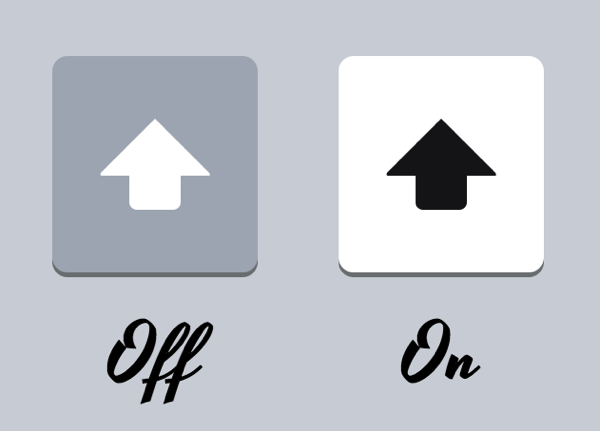
Boy, that was easy.
Caps lock is easier to decipher as there’s an extra line underneath the shift key.
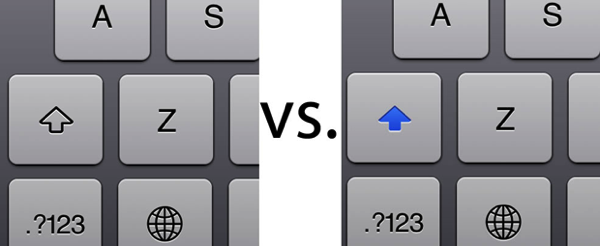
Users may recall it was much easier to tell when the shift key was ‘on’ in iOS 6, as the icon would turn blue when enabled (image via ZDNET):

Anyways, let us know if you love or hate the new shift key in iOS 7.1. It’s driving us mad.



Indeed… it is driving me mad as well! I am actually a real fan of iOS 7’s design however this is one UI element that I think is not working. In fact the fact that you have to have an article about it is evidence that it needs improvement. Hopefully 7.2 will fix that.
hATE!!!
NOO 🙁 Im so fed up with it
Took about 5 minutes to get used to.
If someone added a 100 volt electrical shock to your chair, you’d get used to that too.
Nope. No I wouldn’t. Did you really just compare Apple changing the colour of the shift key to torture? Being a little dramatic, no?
You should not need to get used to it. It should be natural intuition, according to Apple’s own justification for charging such great prices for their stuff. The thing is, it’s confusing. It should not be. You can just make it better from the start, and you will save millions of people millions of seconds from their life. Millions of seconds equal a life time. So, you could save a life with your product (Steve Job’s own words). So, Apple should not tell us in videos how great their products are. They should get back to their previous habit of making products that speak for themselves. (I’m a devoted Apple fan who’s a bit disappointed in Apple lately)
This has been driving me crazy! We see color, why is the stupid keyboard shades of gray?! I liked iOS 6 and earlier much better for this.
Although **YOU** may have little trouble discerning colours, many do. For those with less than perfect eyesight, the contrast provided by black & white makes seeing the keys much simpler. We have been using expensive bleached paper to contain black text for centuries, for the same reason.
I’m sorry, but your argument is absolutely ridiculous. Luminosity is independent of color (look up the HSV color space if this is not apparent to you). So you can easily have a different color that even if converted to shades of gray, yields the exact same difference in luminosity that we see in iOS 7. So anyone with color blindness (and as far as I know, nobody sees strictly shades of gray) will see AT LEAST the difference we see in iOS 7. Therefore this change is aesthetic (which itself is debatable because I think it’s ugly when it lacks color) and one that sacrifices function, senselessly.
That website does not help at all… Refresh the page a few times and you will see it is wrong 1/2 the time… Cruel joke… i’Ve HaD no PrOBleM fIgUriNG IT oUt.
LOL…#FWP
jony Ives is a fucking tool. He’s over-simplified stuff to the point of making things complex, unappealing and unintuitive. He’s waaaayyyy over-rated.
Not very intuitive. =(
They should turn the background black, not the arrow. It’s been driving mad!
Hate the new shift key!!!
#firstworldproblems
Haven’t really had a problem with this, and find the caps lock indicator WAY clearer than before. If you think of the shift key being similar in colour to the upper case letters on the keys when in caps mode, and different in colour from the upper case letters on the keyboard when in lower case mode, it might help.
Intuitive before
Now frustrating
When the arrow is black, caps is on. Is that really so hard….? Really???
If Jobs was alive today, I am sure he’d be firing people left right and centre.
hate it! You used to be able to tell it was on because it looked different to other keys, not it looks different by default and you have to remember in what way it looks different to know.
Glad to know it’s not just me. For a guy that almost cries in those release videos, you’ll think he really put more thought into these things, and these are basic things which people use whenever they type someting.