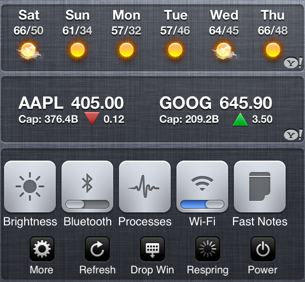
SBSettings is one of the best Cydia tweaks ever built and with its seamless iOS 5 notification center integration, the system toggles have never been easier to access. However, many users with jailbroken iOS 5 devices are not able to enable SBSettings inside the notification center. This simple tutorial will teach you how easily it can be done. Once you’ve installed SBSettings from Cydia, just follow these steps to embed it in iOS 5 notification center.
Step 1:
Launch SBSettings by tapping its icon on the springboard or access it from inside iPhone’s Settings.app.
Step 2:
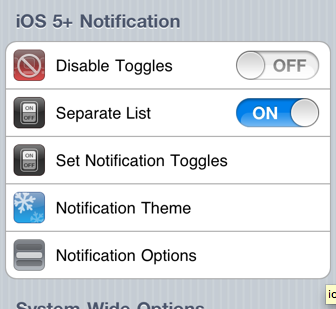
Scroll down till you see iOS 5+ Notification. Tap it and you’ll see options to select from your choice of Toggles and SBSettings theme etc.

Once you’ve set it up, press the home button. Your device will re-spring automatically.
Step 3:
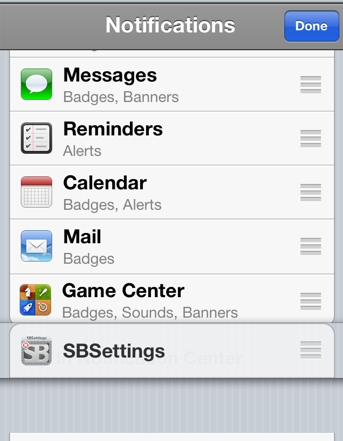
Now go to your Settings.app again and tap on Notifications.
Step 4:
Tap the Edit button on top right and move SBSettings into Active Notifications. Tap Done once moved.

That’s it. You should now be able to access all the toggles from your iOS 5 notification center.
Enjoy!



it’s buggy and doesn’t look clean.
what’s buggy?
Not buggy at all for me on iphone 4.
Credits to DjDATZ who posted these instructions last week in the comments… good screenshots tho Gary
DjDATZ had some great detailed instructions, but we had also posted how to do so before he did. Nonetheless, it’s always nice to have everyone helping out!
That’s what I’m here for!
😀 Fanks!
sb setting just appeared in my drop down window when installed
what theme is that? my sb settings icons are bs
Serious SB Settings HD Theme
Awesome Gary! Thanks for the instruction! I was in a maze to figure out how to do that!
Quirky. Crashes my springboard every time i try to use any of the sbsetting icons when I put them into the NC list:(
thanks
Seems so simple now, thanks!
Thanks it really helped!