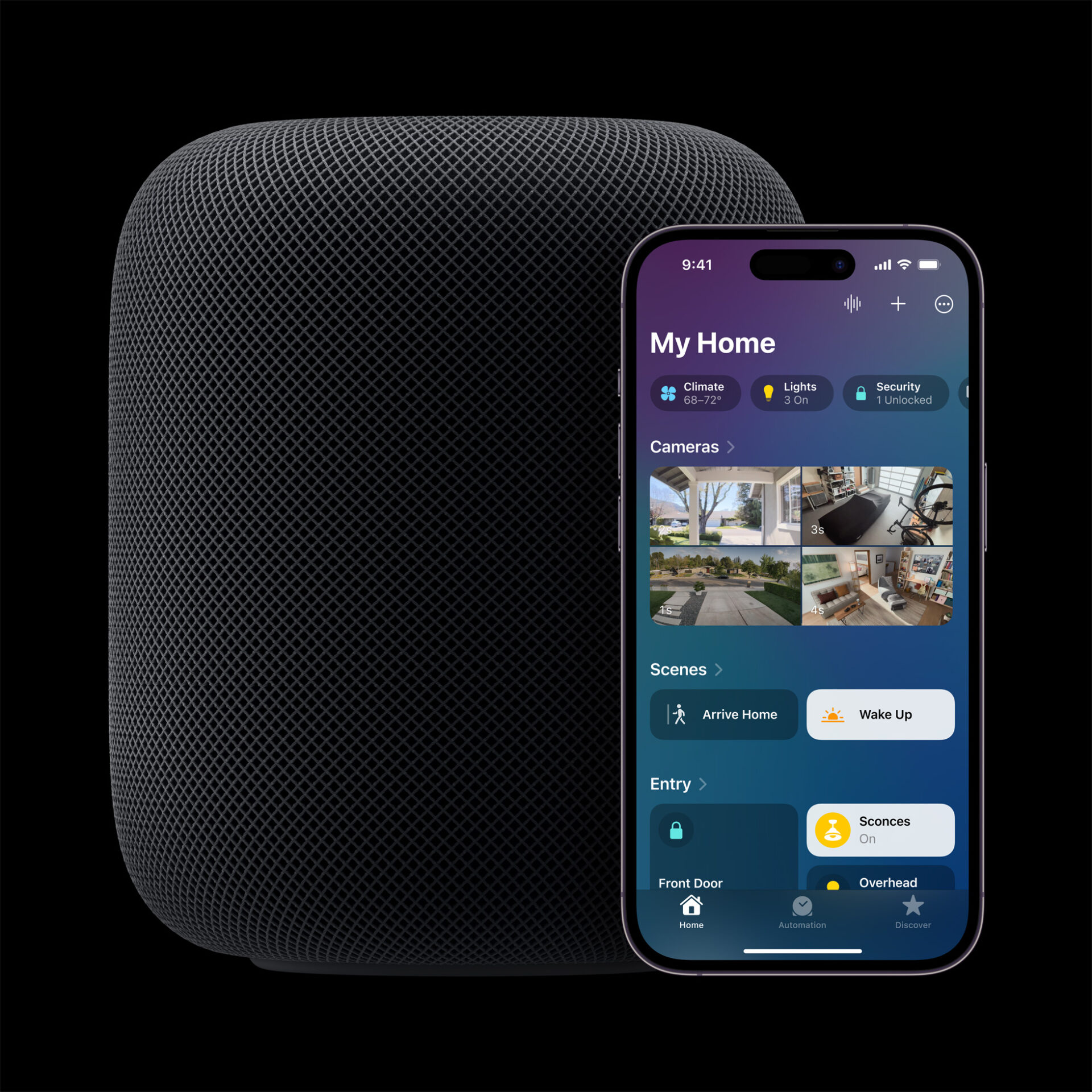
Apple’s Smart Home Hub With Siri AI and Face Recognition Could Launch Next Month
Apple's long-awaited smart home hub could launch as early as next month with facial recognition and Siri AI, according to Mark Gurman.
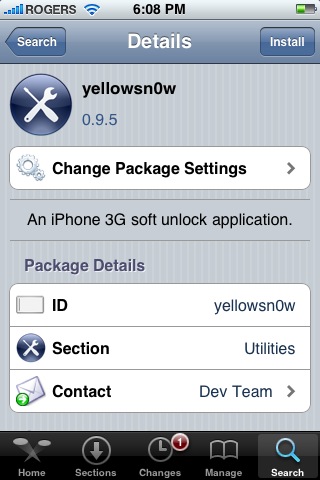
Have you been living under a cave for the past few days? Still recovering from your New Year’s Eve bash? Well, if you haven’t heard the iPhone 3G has been officially unlocked by the iPhone Dev Team! Their tiny app, yellowsn0w, was released in Cydia on New Year’s Day.
Their blog post that lays down the notes on the release has amassed over 10,000 comments already from people all over the globe. If you haven’t tried my tutorial on how to unlock your iPhone 3G with yellowsn0w give it a shot. It will require the latest baseband 02.28.00, so the means an update to 2.2 firmware via iTunes.
How Has yellowsn0w Worked Out for You?
The unlock initially was not very successful for many people. This was version 0.9.1, which was soon updated to 0.9.3, and now 0.9.5. I’ve tried all three versions and each time I still am encountering the same problem: I can’t make outgoing calls with my Rogers SIM after the install.
I’ve tried a variety of fixes to get it to work but to no avail. Resetting network settings, countless reboots, popping the SIM tray out, etc. No dice. But of course with beta developments eventually these bugs will be fixed. Since I’m not going anywhere anytime soon I’m not in a big rush to unlock my iPhone 3G. The important thing is that the easiest iPhone 3G unlock is finally out for the masses!
Warning: Avoid Purchasing yellowsn0w Online as it’s FREE
The Dev Team has issued an announcement reminding people that the iPhone 3G unlock is free and no one should be paying for it. According to them, one particular bloke in the UK, named Jody has been taking credit for yellowsn0w and selling it for profit.
So if you know someone that has purchased an iPhone 3G unlock, tell them to demand their money back. As for Jody, my message to him is to be very, very careful as the Dev Team is not a group of individuals you want to mess around with given their special abilities!
How has yellowsn0w worked for you so far? Check out the worldwide feedback at the following yellowsn0w feedback page and even submit your experience too.
**Looking for an iPhone 3G case? Go get an invisibleSHIELD, the strongest protection for your iPhone backed by a 30 day moneyback guarantee, lifetime replacement warranty, and FREE shipping! Use coupon code iphoneinca for 20% off your purchase! Order today!**
If you enjoyed this post, please subscribe to my RSS feed, so you won’t miss any updates! You can also subscribe via email and have daily updates sent to your Inbox! Want more? Find out what I’m doing right now! Follow me on Twitter!
Want to see more of our stories on Google?

P.S. Want to keep this site truly independent? Support us by buying us a beer, treating us to a coffee, or shopping through Amazon here. Links in this post are affiliate links, so we earn a tiny commission at no charge to you. Thanks for supporting independent Canadian media!


I haven’t been able to get the unlock to work since yellowsn0w came out either. I wasn’t able to make outgoing phone calls.
I have been able to get the unlock to work properly. Here’s how I do it:
1. Power off the phone
2. Eject the sim tray with sim card from the phone
3. Power on the phone
4. Swipe the slider or enter your unlock code
5. Re-insert the sim card with the sim tray
The phone should function properly now.
**Everytime your phone reboots, the process above needs to be used**
Whoops, the post below also works:
Hello fellow Canadians,
Success! with Yellosn0w 0.9.5 for me.
Unlocked a fido locked iphone 3G and used a Rogers SIM to make and receive calls.
Steps used:
1) Remove yellowsn0w 0.9.4
2) Restart using Bossprefs
3) Installed 0.9.5 kept SIM in the phone.
4) Reset Network settings which automatically rebooted the phone.
5) Waited a bit to open Home screen, after which I saw that it was connected to Rogers.
Hope this helps!
Thanks Dev-Team.
I followed these instructions exactly posted on Hackintosh by Iphone Enthusiast last night (http://www.hackint0sh.org/forum/showthread.php?p=378815) and I can use my official (Rogers) SIM, unnoficial SFR (France) sim and AT&T (US Pay as you go) sims. I too was having the troubles other reported on 0.91, 0.94, although 0.95 worked on reboot you have to play around too much, not like 2G unlock where you just pop sim in and voila…all working with no fiddling around – hope this works for you too!
before it was posted that any version BEFORE 2.2 can be unlocked. and then the update said that 2.2 CAN be unlocked. Now it has to be updated to 2.2 to be unlocked??
Yes, the requirement is 2.2 firmware to be unlocked.
what is the purpose to unlock the phone? does this mean you will not need rogers service anymore. Like an FTA sat dish?
It means you’re no longer locked to the cellular carrier that you got the phone from. If you get a Rogers phone and try to use your SIM from any company other than Rogers, it won’t work, because the phone has been locked to only work with Rogers. Unlocking a phone removes that limitation, and you can then use any SIM from any cellular provider. Probably most useful when travelling.
So you still have to pay a cell phone bill then? It doesn’t open the phone up to use the towers for free?
Nope, just lets you choose who to pay. Go to England for a vacation, buy a SIM from a local company when you get there to use while you’re there, and it’ll be cheaper than paying your Canadian cell phone company overseas roaming charges. Or, after your initial contract period is up, keep same phone, switch to another company. Things like that.
Ok i understand now, thank you for the information. No need for me to unlock, i still have a contract with rogers for another 2years or so.
it’s been a while since I’ve done a jailbreak on an original gen iPhone and original iPod Touch…
I’m wondering, with the latest QuickPwn 2.2 tool and iPhone 3G, does the jailbreak process wipe out all your 3rd party apps and data and require you to restore them all afterwards? or after jailbreak is everything still there as it was prior to the process? just curious.
I have a quick question but can’t seem to find the answer. If the jailbreak/unlock doesn’t go well can I just use iTunes to restore the phone and all will be back to normal and official?
Also if I jailbreak can I still use apps from the App Store?
Thanks and sorry if these are stupid questions.
Work for me, I use rogers. But now can I use fido, AT&T, or telcel( Mexico) thanks for your post. Wonderfull work. I use yellow snow 9.5 and follow the instructions for the repository in cydia( bigboss prefs and terminal) I had to do it 3 or 4 times but at the end work.
i still cant get my fido iphone 3G to work on rogers can anyone help me on how to get this working
thanks
can someone help me i cant get my fido iphone 3g to work on rogers i did like everything but still i get nothing
hi im not to sure if i should unlock my phone what benefits do i get … is it actually possible to tether the 3g network if u have the 6gb plan .’
is Voip for real .
is it worth it?
There’s a full explanation about the benefits of unlocking in the comment thread above you. Try reading that and asking again if Cays comment makes no sense….
Hey 0.9.6 is out!!
Yes it is and it works perfectly now! Tested on my iPhone 3G.
Help wanted!
I’m trying to unlock my fido 3g (Ver.2.2/02.28.00) before heading out of canada on a trip. However, keep getting stock during step 2 in QuickPwn 2.2. The software just won’t pickup my phone for some reason (IPSW). Any idea?
PLEASE HELP, the last thing I want to see is a huge roaming bill from already over-charging fido/rogers.
I haven’t been able to get the unlock to work since yellowsn0w came out either. I wasn’t able to make outgoing phone calls.
I have been able to get the unlock to work properly. Here’s how I do it:
1. Power off the phone
2. Eject the sim tray with sim card from the phone
3. Power on the phone
4. Swipe the slider or enter your unlock code
5. Re-insert the sim card with the sim tray
The phone should function properly now.
**Everytime your phone reboots, the process above needs to be used**
I haven’t been able to get the unlock to work since yellowsn0w came out either. I wasn’t able to make outgoing phone calls.
I have been able to get the unlock to work properly. Here’s how I do it:
1. Power off the phone
2. Eject the sim tray with sim card from the phone
3. Power on the phone
4. Swipe the slider or enter your unlock code
5. Re-insert the sim card with the sim tray
The phone should function properly now.
**Everytime your phone reboots, the process above needs to be used**
Whoops, the post below also works:
Hello fellow Canadians,
Success! with Yellosn0w 0.9.5 for me.
Unlocked a fido locked iphone 3G and used a Rogers SIM to make and receive calls.
Steps used:
1) Remove yellowsn0w 0.9.4
2) Restart using Bossprefs
3) Installed 0.9.5 kept SIM in the phone.
4) Reset Network settings which automatically rebooted the phone.
5) Waited a bit to open Home screen, after which I saw that it was connected to Rogers.
Hope this helps!
Thanks Dev-Team.
Whoops, the post below also works:
Hello fellow Canadians,
Success! with Yellosn0w 0.9.5 for me.
Unlocked a fido locked iphone 3G and used a Rogers SIM to make and receive calls.
Steps used:
1) Remove yellowsn0w 0.9.4
2) Restart using Bossprefs
3) Installed 0.9.5 kept SIM in the phone.
4) Reset Network settings which automatically rebooted the phone.
5) Waited a bit to open Home screen, after which I saw that it was connected to Rogers.
Hope this helps!
Thanks Dev-Team.
I followed these instructions exactly posted on Hackintosh by Iphone Enthusiast last night (http://www.hackint0sh.org/forum/showthread.php?p=378815) and I can use my official (Rogers) SIM, unnoficial SFR (France) sim and AT&T (US Pay as you go) sims. I too was having the troubles other reported on 0.91, 0.94, although 0.95 worked on reboot you have to play around too much, not like 2G unlock where you just pop sim in and voila…all working with no fiddling around – hope this works for you too!
I followed these instructions exactly posted on Hackintosh by Iphone Enthusiast last night (http://www.hackint0sh.org/forum/showthread.php?p=378815) and I can use my official (Rogers) SIM, unnoficial SFR (France) sim and AT&T (US Pay as you go) sims. I too was having the troubles other reported on 0.91, 0.94, although 0.95 worked on reboot you have to play around too much, not like 2G unlock where you just pop sim in and voila…all working with no fiddling around – hope this works for you too!
before it was posted that any version BEFORE 2.2 can be unlocked. and then the update said that 2.2 CAN be unlocked. Now it has to be updated to 2.2 to be unlocked??
before it was posted that any version BEFORE 2.2 can be unlocked. and then the update said that 2.2 CAN be unlocked. Now it has to be updated to 2.2 to be unlocked??
Yes, the requirement is 2.2 firmware to be unlocked.
Yes, the requirement is 2.2 firmware to be unlocked.
what is the purpose to unlock the phone? does this mean you will not need rogers service anymore. Like an FTA sat dish?
what is the purpose to unlock the phone? does this mean you will not need rogers service anymore. Like an FTA sat dish?
It means you’re no longer locked to the cellular carrier that you got the phone from. If you get a Rogers phone and try to use your SIM from any company other than Rogers, it won’t work, because the phone has been locked to only work with Rogers. Unlocking a phone removes that limitation, and you can then use any SIM from any cellular provider. Probably most useful when travelling.
It means you’re no longer locked to the cellular carrier that you got the phone from. If you get a Rogers phone and try to use your SIM from any company other than Rogers, it won’t work, because the phone has been locked to only work with Rogers. Unlocking a phone removes that limitation, and you can then use any SIM from any cellular provider. Probably most useful when travelling.
So you still have to pay a cell phone bill then? It doesn’t open the phone up to use the towers for free?
So you still have to pay a cell phone bill then? It doesn’t open the phone up to use the towers for free?
Nope, just lets you choose who to pay. Go to England for a vacation, buy a SIM from a local company when you get there to use while you’re there, and it’ll be cheaper than paying your Canadian cell phone company overseas roaming charges. Or, after your initial contract period is up, keep same phone, switch to another company. Things like that.
Nope, just lets you choose who to pay. Go to England for a vacation, buy a SIM from a local company when you get there to use while you’re there, and it’ll be cheaper than paying your Canadian cell phone company overseas roaming charges. Or, after your initial contract period is up, keep same phone, switch to another company. Things like that.
Ok i understand now, thank you for the information. No need for me to unlock, i still have a contract with rogers for another 2years or so.
Ok i understand now, thank you for the information. No need for me to unlock, i still have a contract with rogers for another 2years or so.
it’s been a while since I’ve done a jailbreak on an original gen iPhone and original iPod Touch…
I’m wondering, with the latest QuickPwn 2.2 tool and iPhone 3G, does the jailbreak process wipe out all your 3rd party apps and data and require you to restore them all afterwards? or after jailbreak is everything still there as it was prior to the process? just curious.
it’s been a while since I’ve done a jailbreak on an original gen iPhone and original iPod Touch…
I’m wondering, with the latest QuickPwn 2.2 tool and iPhone 3G, does the jailbreak process wipe out all your 3rd party apps and data and require you to restore them all afterwards? or after jailbreak is everything still there as it was prior to the process? just curious.
I have a quick question but can’t seem to find the answer. If the jailbreak/unlock doesn’t go well can I just use iTunes to restore the phone and all will be back to normal and official?
Also if I jailbreak can I still use apps from the App Store?
Thanks and sorry if these are stupid questions.
I have a quick question but can’t seem to find the answer. If the jailbreak/unlock doesn’t go well can I just use iTunes to restore the phone and all will be back to normal and official?
Also if I jailbreak can I still use apps from the App Store?
Thanks and sorry if these are stupid questions.
Work for me, I use rogers. But now can I use fido, AT&T, or telcel( Mexico) thanks for your post. Wonderfull work. I use yellow snow 9.5 and follow the instructions for the repository in cydia( bigboss prefs and terminal) I had to do it 3 or 4 times but at the end work.
Work for me, I use rogers. But now can I use fido, AT&T, or telcel( Mexico) thanks for your post. Wonderfull work. I use yellow snow 9.5 and follow the instructions for the repository in cydia( bigboss prefs and terminal) I had to do it 3 or 4 times but at the end work.
i still cant get my fido iphone 3G to work on rogers can anyone help me on how to get this working
thanks
i still cant get my fido iphone 3G to work on rogers can anyone help me on how to get this working
thanks
can someone help me i cant get my fido iphone 3g to work on rogers i did like everything but still i get nothing
can someone help me i cant get my fido iphone 3g to work on rogers i did like everything but still i get nothing
hi im not to sure if i should unlock my phone what benefits do i get … is it actually possible to tether the 3g network if u have the 6gb plan .’
is Voip for real .
is it worth it?
hi im not to sure if i should unlock my phone what benefits do i get … is it actually possible to tether the 3g network if u have the 6gb plan .’
is Voip for real .
is it worth it?