Quantcast The Easiest Way To Transfer Ringtones to Your iPhone (Contest!) | iPhone in Canada Blog - Tips, Tricks, News, and Tutorials for Canadian iPhone Users

The Easiest Way To Transfer Ringtones to Your iPhone (Contest!)

by Gary on January 13th, 2008

Putting ringtones on your iPhone can be an easy task if you know how to do it. With 1.0.2, it was very easy using iBrickr to transfer ringtones to and from your iPhone. With 1.1.1, a bit more work was involved to get ringtones to your iPhone via SSH. With 1.1.2 it’s also fairly simple to add ringtones as iTunes enables you to do so (I’ll post these guides later). However, if you’re looking for one of the easiest ways to put ringtones on you iPhone, minus all the hackery, then I have to say iPhoneRingToneMaker is definitely one of the best out there!

iPhoneRingToneMaker was one of the first applications made to transfer ringtones to your iPhone. What makes the application so great? Well, you can easily locate, edit, create, and transfer a ringtone to your iPhone in literally less than 30 seconds. The GUI is really simple to use and it’s clear that they made this program for people of all levels of ability to use. I was curious about iPhoneRingToneMaker so I emailed them asking for a trial version to test and review. They quickly obliged and here are the results of my findings.

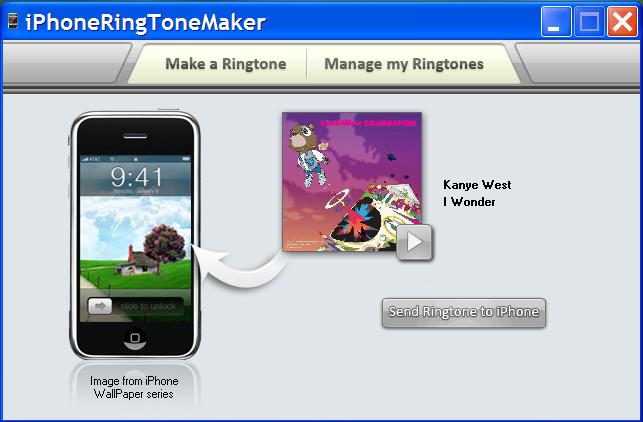
This small application looks like this on the start up. To make a ringtone, just locate an audio file on your computer. Next, once it’s opened, just drag a start and stop slider to edit the size/time of your ringtone. Click “create” and you’re done! You can preview your ringtone at any time.

iphoneringtonemaker_iphone.JPG

To transfer your ringtone, ensure your iPhone is plugged into your computer. Click “Send Ringtone to iPhone” and that’s it! iPhoneRingToneMaker lets you view your ringtones library on your iPhone, and advanced options let you control the fade in/out of each song, and even add volume boost.
iphoneringtonemaker_iphone2.JPG

iPhoneRingToneMaker would be an awesome application if it was free, however it’s not. It costs a reasonable $7.50 for a copy of the program. Given how easy and simple it was to locate, edit, create, and transfer ringtones to your iPhone, I think it is definitely worth the small investment. If you are comfortable with using other methods to add ringtones, that’s fine too.

iPhoneRingToneMaker Contest Giveaway!

Anyways, I asked the creators of iPhoneRingToneMaker if they would be willing to donate free copies of their software for iPhone in Canada readers–they agreed! Three lucky readers will receive a FREE copy of iPhoneRingToneMaker! All you have to do is post a comment below and I will draw 3 names from a hat. If you want three extra entries into this contest, post about this contest on your blog and link back this post. This is what I’m looking for:

iPhone in Canada is giving away three copies of iPhoneRingToneMaker. All you have to do is post a comment in this contest thread and you can win!

The contest will close on 11:59PM, Tuesday, January 15th. Only one comment per person. Good luck and tell your friends! :)

*edit* FYI, if this is your first time leaving a comment, it will be waiting to be moderated, therefore it will not show right away. Once it’s approved, future comments will appear immediately.

If you enjoyed this post, please subscribe to my RSS feed, so you won’t miss any updates! 
**Looking for an iPhone 3G/3GS case? Get the invisibleSHIELD by ZAGG, the strongest protection for your iPhone backed by a 30 day moneyback guarantee, lifetime replacement warranty, and FREE shipping! Use coupon code 'iphoneinca' for 20% off your purchase! Order today!**

Don't forget to follow iPhone Fan on twitter!

Posted under: 3rd Party Applications, Contests, How To...

No related posts
Sign up for my iPhone in Canada newsletter and get access to the latest tips, tricks, and news that others won't!
  • Lynda
    Hi, This is a very old post. Wondering if this program works for the new iPhone 3GS? I am a new iPhone owner/user and have found it very frustrating to not be able to use my own music. I have even creaded ringtones for my other phones over the years, they are in MP3 format, but will not transfer to my iPhone.

    Thanks
    Lynda
  • bob
    http://audiko.net/
    Find
    download
    drop in itunes
    sync
  • Adam
    That looks like a sweet program, if i don't win it, i'll buy it.
  • dave
    ...does anyone know if you can adjust the volume of the song with this program? I've read that making the song louder will allow it to be better heard when it rings...
  • Brandon
    i have 1.1.2 and need this program because i axxidently removed my installer.app and dont wanna jail break my phone and the ringtones suck bad on it
  • Did I mention I love this program, thanks again!
  • John C
    hope to get a windows version , looks great!
  • Dusty
    The draw has been made and Congrats to the 3 winners! ;)
  • Jay
    Great post! I enjoy all your posts, they are very informative. Keep up the good work.

    Jay
  • Christy
    This application sounds fabulous!
  • Eric Lewis
    That looks very simple and easy to use..and its exactly what i need.

    thanks
  • Reef
    Looks like a great program.

    And thanks for keeping up this awesome site - i got my iPhone (in Canada) a little more than a month ago and you've provided some valuable tips and tricks. cheers.
  • Mat
    ithink the iphone is so cool, but when will it be released in canada, maybe at macworld tomorrow, they will anounce it. I cannot wait.
  • Justin
    This is the best iphone site!!!
  • Great!
    It has been post at http://myblogcontest.com/iphoneringtonemaker-gi...

    Submit and find blog contests, sweepstakes, giveaways and free stuff at MyBlogContest.com
  • Matt
    lol 42%, not bad odds. :P
  • Kumail
    So? Did I win?

    Thanks iPhone Fan
  • Jason
    great job i love your site. helped me alot with my iphone purchase. keep up the great work.
  • Dave Brake
    January 15th is my birthday!
  • Thanks for entering everyone! So far, only 7 entries--that means you guys have a 42% chance of winning! LOL!
  • Creature
    Great idea... finally! Can't wait to try it out. My favorite songs are now making my iPhone ring...
    Great job, guys!
  • Matt
    iPhone Fan! I love you! lol, long time reader, first time poster - I would love the iPhoneRingToneMaker, looks sweet!

    Matt
  • E
    Love the iphone In Canada Blog. Just purchased my iphone in the USA, Buffalo, NY at the Galleria Walden Mall. Have order the StealthSim unlock card and cannot wait to receive it. I have looked at the video instructions and hope is it not going to be too difficult to unlock for a reasonably non techy like myself. Your blog if a fountain of knowledge. Cannot wait to join the ranks of the many other Canadian iphone users. Can't wait until I can customize my ringtones
  • Dusty
    @Tom
    Ya thats the same one I checked into, it works great. Thanks for sharing...
    Dusty
  • tom
    i actually used this tutorial: http://www.iclarified.com/entry/index.php?enid=439

    i found it to be really helpful, just in case anyone wanted to know...
  • KASS
    Wow! Can't wait to get it.
  • Drew
    Hey,

    Looks like a sweet program. I would for sure use that.

    Drew
  • Dusty
    Awesome! This program looks very simple and easy to use, well done iPhoneRingToneMaker creators and thanks iPhone Fan for posting this contest ;)
    Dusty
blog comments powered by Disqus
Sign up for my iPhone in Canada newsletter and get access to the latest tips, tricks, and news that others won't!
  • Get the best iPhone cases at OtterBox.com!
Blogroll

BackBeat Media