Along with Wednesday’s iOS 9.1 release came a 22.1 carrier update for Rogers and Fido users. This new carrier update launched VoLTE (wideband, high-quality phone calls) for iPhone 6s and iPhone 6s Plus users, as confirmed by the company in an email to iPhone in Canada.
Essentially VoLTE means you will be able to use both voice and data simultaneously over LTE networks.
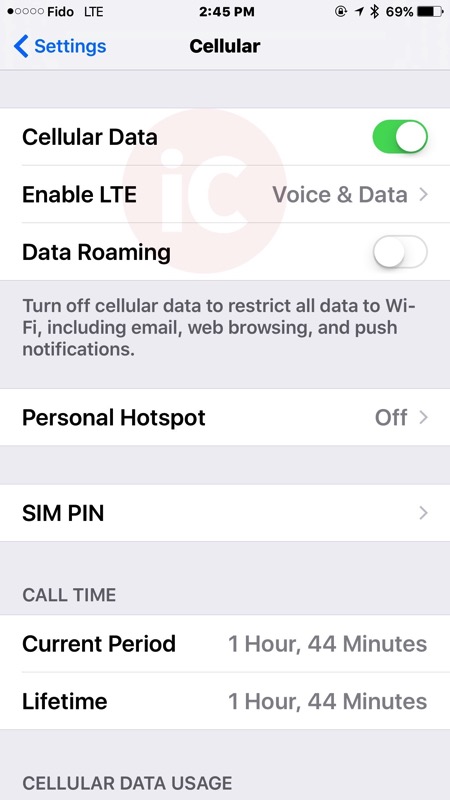
Rogers explains this new addition will allow customers using Wi-Fi Calling in Canada to “move seamlessly between a Wi-Fi connection and the Rogers/Fido LTE network.” Last month, the Rogers/Fido 21.1 carrier update introduced iPhone Wi-Fi Calling.
Last year the company detailed how it was preparing VoLTE for more customers “in the near future,” and this spring VoLTE launched but was only supported by the LG G3 Vigor.
For iPhone 6s and iPhone 6s Plus users, they now have VoLTE. We’ve asked why iPhone 6 and iPhone 6 Plus users lack VoLTE support, despite the hardware being able to support it. Apple’s support page on carriers that support VoLTE has not been updated yet to list Rogers.
How to enable VoLTE on your iPhone 6s or iPhone 6s Plus?
Go to Settings > Cellular > Enable LTE > Choose ‘Voice & Data’ (as shown in our screenshot above)
Let us know if you’re going to enable VoLTE on your iPhone 6s or iPhone 6s Plus!
Update: Rogers replied to say they are “looking to roll VoLTE out to as many customers as possible” and right now in regards to the iPhone, “it’s only available on the newest model.”
Thanks Andrew L.!



I’ve said this in countless other places, but tech support said no 6/6+ support, but he spoke with a tier 2 support who said it should work.
Currently have an open ticket.
I had wifi calling working with iOS 9.0.2 but since moving to iOS 9.1 wifi calling doesn’t work. I.e I don’t get Fido wifi in the top left corner. Of course Fido tech support says to backup and restore phone to fix it. 🙁
What if you go to airplane mode and turn wifi on?
Thanks everyone. I left my phone and didn’t backup nor restore and wifi calling is working again. I had Fido remove my wifi calling (tech support is only allowed to do this) and I reset up my wifi calling on the iPhone and it is now working with voice and data over LTE. When on a call my data is now showing LTE!
I’ve been having troubles with my wifi calling as well, although VoLTE is working great. WiFi calling was working great before iOS 9.1. I’ve called tech support, had them remove it, even opened a ticket, waited a few hours and re-enabled it. Was working for a few hours, then woke up this morning and it’s back to not working. So much frustration :(.
WiFi Calling is working for me on Rogers with iOS 9.1. I would try what xeronine992 is asking. If it still doesn’t work, it is possible something happened during the update and I would concur Fido tech support and try a restore, test it, then restore your backup. It’s a pain, but it’s a sure fire way to determine if it’s the iOS or your data profile. Had to do this with a problem with my iPhone. Took a day to find my answer, but I found my answer.
I’m having the same problem on Rogers.
I was in the US for a week, just returned this morning. Wifi calling was working perfectly before I left.
While I was gone I did the iOS 9.1 update, and at some point my carrier settings were updated to 22.1. I can now enable Voice & Data for LTE, but my wifi calling is no long working. I just got off the phone with Rogers tech support, they tried removing the wifi-calling feature and I re-enabled it. Still not working.
They left me with the last option of doing a backup/restore. My phone has about 80GB of stuff on it, so it’s gonna take a while, but I’ll give it a try.
Weird. I did 2 restores last night, and wifi calling still didn’t work. Left it to syncing overnight to restore all my music, and this morning wifi calling is working. Hopefully it will last.
Tried on 6+ with WiFi calling..calls do not go through at times on Fido.
Gary, tick off or tick on? It’s confusing how it’s worded. Perhaps slide to green to turn on instead?
Updated to clarify screen should look like our screenshot.
Since there are no long distance charges in Canada on Wifi calling, how does a call get billed if say a call is initiated on Wifi but then seamlessly switches to LTE afterwards if someone doesn’t have Canada wide calling on their plan?
Not entirely true with Rogers. If you do not have a long distance plan or long distance minutes included with you voice plan, long distance charges will still apply when making a *native* Wi-Fi Calling.
Long distance charges do not apply when using the Rogers One Number *app* — but that isn’t compatible with Rogers Wi-Fi Calling.
I was wondering also, would a switch to wifi mean your minutes gets used? How does this differ from say an audio call over FaceTime?
Does that mean when I make a call I should still be able to use LTE? If so, it’s not working for me. I am I’m Toronto.
Yes, thats exactly what it means. Also that if you use wifi calling, then if you leave wifi and transition to LTE, there should be a soft handoff of the call instead of a hard drop.
So glad they finally support the iPhone!
For those having trouble activating it:
You must go in Settings > General > About and ensure your carrier version is 22.1. If it’s not, you’ll be prompted for an update on that About page.
Then you can change the LTE settings for “Voice & Data”.
Updated article with Rogers’ explanation why only the latest iPhone is supported.
Well, that doesn’t actually explain why only the newest model, it just restates that it is only the newest model.
Rogers sucks. They screwed up the iOS wifi calling launch and now they are screwing over iPhone 6/6+ customers with some unnecessary restriction.
Well, remember that Bell launched Wi-Fi Calling only for iPhone 6s & 6s+…
They probably want to see how the network reacts to a sudden load of iPhone 6s on their network. If they were to add the iPhone 6 too, it would probably be just too much. VoLTE has been there for more than a year at Rogers, but I guess they want to make sure everything works correctly.
Which was just stupid (Bell limiting it to 6s only).
For VoLTE I guess it make a little more sense, but not really.. After you launch 4 or 5 handsets that work with VoLTE I think it’s safe to say it works okay. Plus there are probably more 6s users than 6 at this point 😛
I really do hope they support the 6 phones as well at some point. I wonder if when the iPhone 7 comes out if it will have support out the door or if we’re going to have to wait for support with every new phone.
Yeah but I bet the total sales of these 4-5 handset are still far behind than the number of iPhone 6/6+ & iPhone 6s/6s+ out there :P.
But I feel you frustration, I was frustrated too. But notice that they were all Android devices. And it’s no surprise since the carriers have more control on Android phones than on iPhone.
From what I understand, a profile needs to be made by each carrier for each specific model of phone. This would go a long way to explaining why you can’t just “turn it on” on a phone and have it work. Telus supports VoLTE in Alberta and BC on iPhone 6 and 6 plus, it works very nicely.
Well, I’m running 22.1/9.1/5S, and LTE is set for Voice & Data. Anyone else?
post a screenshot…i have a hard time believing your 5S has it
I’m with Fido, on 21.2 and no prompt to update 🙁
How about Bell?
and it counts against your data, oh rogers
Woah this is awesome! I don’t have long distance so this makes
wifi calling a huge value add.
So, contrary to everything everyone else has been told, @RogersHelps just told me that Canadian iPhones are not the same model numbers as US iPhones and that the Canadian iPhone 6 DOES NOT support VoLTE. Hence: 6S only. Asking them to confirm and I have a hard time believing this is the case (that Apple made an hardware change JUST for Canada) but that’s what @RogersHelps is saying.
Thanks for the update. I find it pretty hard to believe as well. Hopefully Rogers will do what’s right and enable VoLTE for iPhone 6 and 6+.
Now that Telus has enabled vOLTE for iPhone 6 Plus, that kind of blows that argument away,doesn’t it…
so is this only for iphone 6s and 6s+ and not for iphone 6 and 6+ ?? anyone tested on 6+?