Finder is essential to everyone’s workflow on OS X, as it’s where you save, open and locate your precious files. The Finder sidebar is equally handy as you can drag your favourite folders there for quick access when opening and saving documents.
But lately, I’ve run into an issue where favourites I’ve dragged to the sidebar disappear out of the blue. Normally the situation is this: when the save or open dialog pop up appears, my Finder sidebar favourites are nowhere to be found, as seen below:
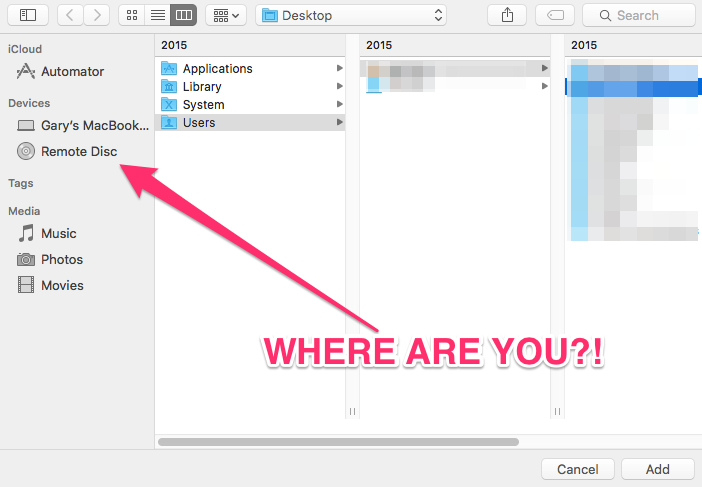
As you can imagine, this is infuriating as it means you need to tediously navigate through the drop down menu to find a specific location, wasting precious time (which could be better off surfing Facebook or playing Clash of Clans; I refuse to deny nor confirm such claims).
Anyways, it appears I’m not alone in suffering from this bug, found in OS X El Capitan and earlier versions too.
How fix this annoying bug? The solution that worked for us is to reboot your Mac. Yes, I know that sounds too simple, but it works as I just did this (again) the other day.

For those that rarely reboot their Macs, this is something you may not really think of as a solution, but it does bring back sidebar favourites within Finder.
Let us know if this quick fix works for you!
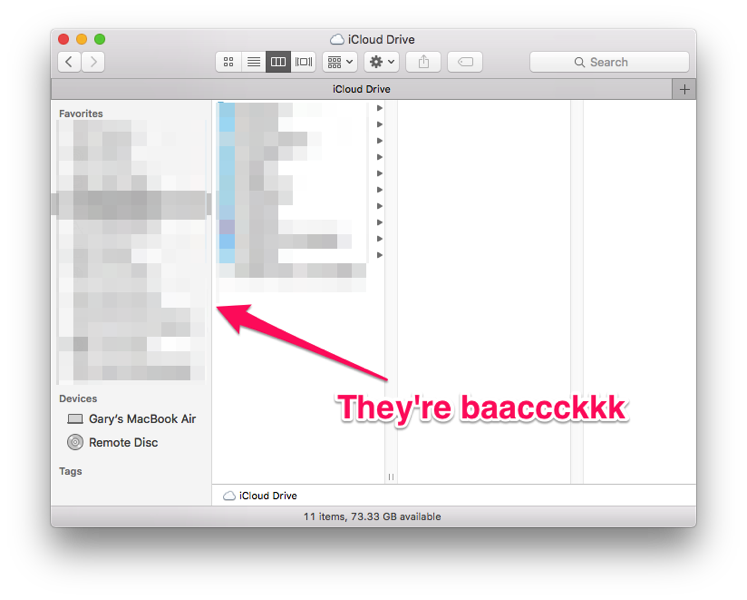



Don’t quote me on this, but I’m pretty sure when I’ve run into this problem I just had to force quit the Finder, open it again and the regular folders should be there after that.
I tried that, didn’t work for me but the reboot did. Really annoying bug as it happens when you need sidebar folders.
I had favourites showing in Finder, but not in any system save dialogs. Force quitting Finder fixed the problem immediately, even before I opened Finder again. Thanks for this tip! Definitely easier than rebooting.
Reboot definitively works. It’s a super annoying thing that keeps happening, and I’m waiting for a more permanent fix.
Good luck waiting. 10.11.6 is out, Sierra is out. They’re never going to fix this.
It will never be fixed, because Apple’s arrogance won’t allow them to admit mistakes. They’re too busy buying headphone companies and making their products thinner and thinner to be bothered with something as basic as file access. Remember when everything from Apple “just worked?” Those were the days…
Glad it worked for you, but rebooting does NOT definitively or definitely work.
I tried 3x and the items do not reappear.
Restarting works, of course, but I wish Apple finally fixed the bug. I always edit a few documents at a time, with another half a dozen supporting documents open for reference, and it’s a real pain to have to find your place in all of them after restarting, but it’s equally annoying not to be able to access the folders easily. This is a bug that has been plaguing OS for a few years! It used to be that the shortcuts disappeared only from save as dialogue box, but now they disappear from Finder, too. Today, for the first time, I actually experienced an actual crash of Finder: it closed and reopened with the same tabs, except all the shortcuts were gone, even the generic Media etc. shortcuts!
I’m sorry, rebooting? Am I using Windows and no one told me?
Nowadays, yes, pretty much. Especially when you discover 45 minutes later that the favorites are gone again and you have to reboot again.
This isn’t a fix. 45 minutes later they were gone again. Having to reboot every 45 minutes is not a “fix”.
I agree; an alternative way to waste time, NOT a fix.
Restarting only the finder did work for me.

I rebooted, didn’t fix it at all. Still gone.
The reboot/relaunch is not working for me. In fact the Finder relaunch instantly removes the favourites I had just created.
No, that did not work for me, unfortunately.
Still a bug! dot releases are not fixing these issues. Tired of OS X
I FOUND IT! The actual problem is that there is a little switch in the upper right of your sidebar for “show/hide”, right next to the word “favorites”. The only problem is that you can’t see it unless you INTUITIVELY mouse over it. That’s it! I’ve spent 3 hours trying to find this, rebooted, etc. That’s not the problem, it’s just a little switch that -apparently- my cat found before I did. The mouse in the photo is making it visible.

Enjoy an extra couple seconds, several times a day, maybe help someone else out!
thank you John!
No, not helping. I can’t even see the word “Favorites”. I can go to Finder-Preferences and check some of the default-favorites there (desktop, …), but then I only see those I checked, not all the folders I had dragged into the sidebar before. This is really annoying!
You are amazing John. Thank you so much.