Some users are experiencing higher than normal cellular data usage on their new iPhone 6, iPhone 6 Plus and older models, according to users on the Apple Support Communities, MacRumors forums and InsideCupertino.
The problem exists in iOS 8 and iOS 8.0.2. Users, after checking their data usage, are seeing higher than normal usage (including ourselves). Part of the problem may be possibly related to new options in iOS 8 which use cellular data as part of iCloud. Here are some possible fixes to try and reduce your data usage.
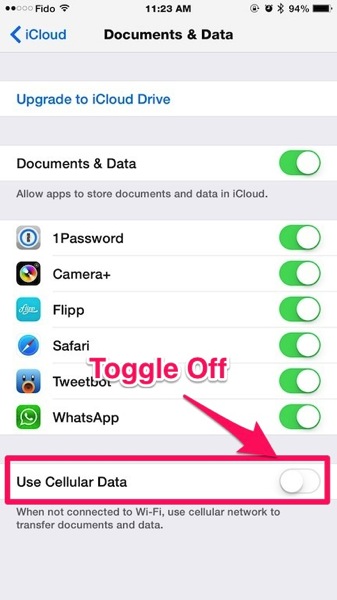
Under Settings > iCloud > Documents & Data, toggle off ‘Use Cellular Data’ and any other apps you don’t want to use data.
I would highly suggest toggling off WhatsApp before launching it on a newly restored device setup as a new iPhone. Why? At the first launch (if you’re not in Wi-Fi range), the app sees your iCloud backup and starts restoring from it and will do so over cellular. The same goes for Camera+, especially if you have lots of photos being stored in iCloud.
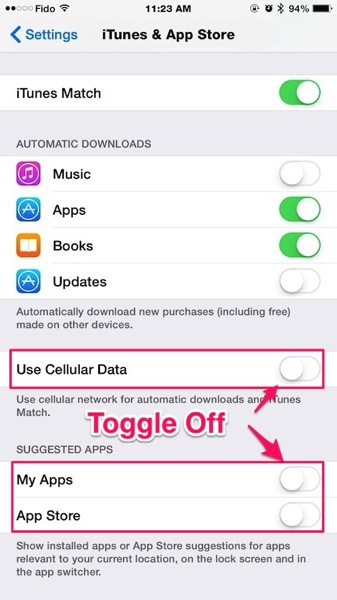
Another area is under Settings > iTunes & App Store, make sure Use Cellular Data is off. Also, another step would be to toggle off My Apps and App Store if you don’t care for suggested apps based on your location (battery drain).

Another way to manage data is to go to Settings > Cellular, then scroll down to see which apps are allowed to use data. You can turn off data usage for individual apps here. Under ‘System Services’, you can also see what is using your data as well. In our case, Documents and Sync leads with 115MB of usage.
We also recommend installing DataMan Next ($1.99) or DataMan Pro ($4.99) to track your data usage. There’s a widget that can be added to Notification Center so you can quickly see your data usage. Compared to the Fido My Account app used to track our usage just now, DataMan was off only by showing 10MB under official Fido data.
In iOS 8.0.2, we’ve already used close to 500MB of data in just the first five days of our billing cycle. That is unusual as normally we are typically within Wi-Fi range.
Last month’s billing cyle saw our data cap over our our allotted Fido 2GB data bucket, which hasn’t happened in a long time. So maybe there’s something else causing high data usage, similar to what Rogers, Bell and Telus users experienced with iOS 6 back in 2012?
The ‘Last Resort’ Option: Setup your iPhone as New
One user on the Apple Support Communities forums suggests restoring your iPhone and setting it up as completely new, as it apparently solved his iOS 8 data drain bug:
Settings > General > Reset > Erase all Content and Settings
We did this after our iPhone 6 Plus restored from our iPhone 5s iCloud backup was causing excessive battery drain in iOS 8. The result? Battery since then has been phenomenal. iCloud brought back contacts, pictures and settings, but we had to redownload our apps and set them up again, which takes a lot of time. But we were able to purge a lot of unused apps. Did it solve the early data dilemma? Not really, but we continue to monitor our usage.
Worst case scenario, if you’re still experiencing high data usage, turn on AirPlane Mode at home and then re-enable Wi-Fi, so you can still be connected somewhat.
Are you experiencing high amounts of data being used on your iPhone in iOS 8? How much data have you used so far and on what device?



The problem I’m having, and it might be a defective phone – but my 6 Plus will show I’m on WiFi but I’m on cellular. I know this because I have “use cellular” off for a lot of apps including Netflix. So sometimes I’ll get a pop up saying I’m on cellular yet the phone shows the WiFi is connected. I’ve read this is an issue for a few others as well. I was hoping 8.0.2 would have fixed it, but it didn’t. I’ll wait to see if the next update does the trick before returning the phone.
But that could be another issue for people seeing a lot of data usage.
That is weird! Hmm I should do some tests for this too.
Netflix uses a shitload of data. So, if it’s turned on even momentarily that could be the problem. I have the iPhone 4S, and I have yet to go over 21.0 MB of data, and I use my iPhone for everything.
Imaginary issue.
wrong.
I blew through 2.1Gb yesterday afternoon. This was on the heels of doing a restore going from 5S to 6 earlier that day. I’m almost 800Mb over my allotment for the month. Thankfully, billing cycle starts again tomorrow.
Yeah DataMan is pretty nice.
Haha the Fido My Account app is so old, why they didn’t upgrade the app as Rogers does with their app.
I’m over my 6GB limit, that’s insane! I have to turn off my cellular for the next week
Yeah the Fido My Account app is ridiculously old…can’t believe it’s been allowed to deteriorate so badly.
I’m also over my 6GB limit, FFS. This never happened before, ever! I usually hardly break 4GB a month.
Whoa. Any streaming of music or videos or anything?
I use sound cloud for streaming, and the odd YouTube video here and there, but that’s it. Pre-iOS 8, with same amount of usage, I would average just under 3GB. 4GB was max, but with a lot of YT video usage. Read this article, looked at my usage, and I was like WTF?!
me too! FIVE GIG’S in 2 weeks of regular usage, nothing special or extraordinary. FB and Safari used at least 3 of those gigs. Just got off the phone with my carrier and they’re blaming it on the hi-def of the phone itself. I’ve got 24 hours to figure out if I should return it and swap it back for a 5 which only ever used 4 gigs a month or under… sigh and i waited a long time for this phone!
Same here, I’m with Bell and now it’s been 2 subsequent cycles of >5gb in 2 weeks.
Same problem – 2 x iPhone 6, iOS 8.1.1, 2GB Shared plan on Bell, and my husband and I *never* break 1.5GB in a month. This *week* we hit 2GB, with 25 days left in our billing cycle. No unusual activity or device changes. very weird.
Same problem. iPhone 4s never blew threw 6gb and now the past 2 months I’ve hit 6 gb in under the first 2 weeks…
Problem resolved on its own, maddeningly. No major changes to settings, and now back to low data usage. For clarity, our two iPhone 6’s were both fine for two months, then crazy for a week, and now back to fine. Very odd, and likely a carrier or Apple thing since our data usage seemed to be very system-centred.
I used over 500MB in a wk already and that’s almost equals what I used for a regular month…. check the settings and I don’t have any of those cellular option turned on, how to fix this?! @@
Yeah…that’s what we’re trying to figure out around here
I ended up breaking my contract and returning my phone after blowing through 3 data plans within 8 hours of having the phone, during most of which, it was sitting in the box turned off. When I did turn it on, I connected to wi-fi. I hadn’t had the chance to turn the cell usage off yet, because all I did was turn the phone on, activated it (AT&T), and began the initial setup–boom, 2 overages. I turned off cellular data asap, 2 days later–another overage. So by then I’d used 4 data plans in 2 days and 8 hours. I’m sitting here with no phone service until someone figures this out. The only thing that sucks more than waiting 3 weeks for an iPhone 6, is having to give it right back after a few of days. I didn’t even get to try the slo-mo camera feature. -_-
I used 6G today and I was on Wifi all day. We used 10G one day last week when we used 5g the rest of the month. I was downloading music over wifi.
6GB in one day??
Yes, without realzing it. I was on wifi much of the day, make a couple short phone calls, browses the web for about 5 minutes when away from wifi and took some pictures. 6GB. There is an issue or some unexplained activity
taking high-res pictures which are then auto uploaded to icloud could do it.
I can top that…. I have used 163GB in less than a week. I can’t seem to find out why my IPhone 6 is suddenly plowing through data. Luckily I have an unlimited data plan, but that is INSANE!!!
HELP ME!!!! LOL
I actually am still on ios 7.1.1 on my 5s (guess I should update that soon – but the last update wiped my music library so I’m gun shy) and I’ve noticed insane data use recently as well. Went over my 2gb limit last billing cycle and I’ve never done that. This billing cycle is only half done and I’ve already used 2gb so I have none left. What’s going on!!!
Just checked my system services and it says My personal hotspot has used 240mb but I haven’t had that turned in for months. For me messaging services is the biggest user. Does that include photos that people text to me? Even if it did I really don’t exchange that many photos by text (certainly no more now than in the past) so I don’t get it.
I’ve used 10gb of data in 9 days, for the most part. I had a 6gb plan and noticed it was over 5gb so Telus increased it for me. Now i’m at 10gb and have had my cellular data turned off since monday because of it. Have an appointment here at the Apple store in Calgary this afternoon. They want to set up the phone as new. They say thats the only thing that fixes it. I have to wait 9 more days for my billing cycle. I don’t stream anything and have not used my iPhone 6 any different than I would my iPhone 5s.
What happened with your iphone 6 when you went to Apple? I am also on Telus with iphone 6 and its using 1.5-2 gb a day and everything we can think of is turned off. This re-setting up the phone fix the problem? I live in northern BC and no Apple store close. Thanks Melissa
Apple did nothing. They said to fix it I would need to do a restore. I waited for the billing cycle to end and no apps were using any crazy amount of data so I never restored and everything is fine now. I think when I first hooked the phone up it disconnected from my home wifi as I was having Telus wifi issues. Thats all apple Telus and myself can figure out. They said though if the problem persists to bring in my phone and they would replace it for free. I hope you can figure it out.
i’m having a problem. when i t urn cellular data on it’s like i’m turning 3g on i don’t want that 3 days 1.5gb used and my battery dies faster… how can i fix this? sorry foy my bad english
For what it’s worth … I ended up doing a reset and clean install to mitigate the same issues described here. Problem solved…….. also noted the increased battery performance described above (I thought it wasn’t bad before either)
Is this for a new iphone 6 or an older model like the 5s ? I did get some similar issue of excessive data used on my 5s. I’ve used more than usual with all the updates going one, but I’m usually at 1.5Gb per month on a 6Gb plan. Now I’m left with 200mb for the next 4 days… still draining about 100mb per day, with almost everything turned off.
I’m not sure if its iOS8 or my 6Plus but Tweetbot, facebook, Instagram and safari use roughly 15mb per 10 minutes of use
I’m also over my 6GB limit by $30 and i have another week left.
I’ve never been more than 2-3GB.
I checked data usage and my Facebook app is at 4.1GB!
I turned the auto-play video off. Hoping that may help a bit…?
I have been monitoring my usage a lot lately as I was getting close to my 2GB allotment. I have actually turned off cellular data usage in Settings>Cellular then turning it on if I really need to use it. I did this today, in the 20 minutes I had it on, according to the Current Period Data Usage that is shown on the phone I went from 317mb to 347mb. I was googling halloween costumes and sent 3 texts (one picture text). I am not sure what is going on, but I have definitely noticed an increase in my data.
3.1gb in a day here on Vodafone AU. What a nasty piece of work. Boycott apple.
I think it has to do with iMessage! I went in to the AT&T app and completely turned off my date with my service provider to prevent me going over my data, however when I was home on wifi I could not send iMessages….I thought this was strange so I turned back on my date with AT&T and Waaloa, iMessage worked again and I was still on wifi!! I bet there is a flaw and iMessage is using cell data even when you are on wifi!! Can someone test this theory?
I purchased a 5s 7 days ago and its up already over 1GB!! with fido. Thats with data/roaming/3g etc turned off! I was advised to backup on itunes and reset the phone or go to the nearest Apple store to troubleshoot.
Not happy right now….just changed to an IPhone 5s and used up all data allowance in the first week. This never happened with our Droids. Now we have shut down all Cellular Data on these phones, so now we have a real nice looking paper weight. What’s the use of having this phone if we cannot use it to its potential. Even in Wi-Fi it switches to 3G (Yes…we saw somewhere we needed to also turn off our LTE – Let me know if that was a crock). I hope someone can shed light on this data hog ~ Thanks
My iPhone 5s clock 800MB in a day, meanwhile my month usage is 1G???? the phone was in my pocket all day and the Carrier is washing their and just suggesting a bolt on, is this some kind of BS pact between apple and carriers?? Fuming!
Thank you for this post. I thought I was the only one! I have a 2GB plan for each month. I have NEVER gone over, and for the past 2 months I have been getting my warning text saying 75% of my data has been used, after just a week! I will try switching all these settings, as it is irritating having to carefully monitor each and every time I use my phone outside of my house.
i had one apple guy say this is a problem and another say it isn’t even possible to back up icloud via cellular
There was a bug where the wifi would randomly disconnect, so if you were at home or within wifi range and watching any videos on your phone, it probably switched over to 3G often, I noticed it in mine and then saw the bug as apple mentioned it to be fixed in the new 8.1 update! Now I have an additional $75 to cover in data without it even being my fault!
this is happening with my wife’s phone. she has never gone over her 2gb limit on Verizon until this month after updating her iphone 5 to ios8. battery life is worse and now she has to pay an extra $15 on her verizon bill for the overage.
airplane mode at night doesn’t help. every morning a 50-90mb entry shows on verizon’s website when looking at her usage. Apple has to fix this ASAP it is costing people money.
I have similar issue on my 4S running 7.1.2. Few days ago DNS Services under System Services burnt 200MB while the phone was sitting idle. Today Document and Sync burnt more than 300MB while idle. Both were burnt in very short time. Around 30 minutes. This only happened recently.
I went from averaging 2.0 GB per month on an iPhone 4 while using 0 WiFi, all cellular data to using nearly 2.5 GB in 15 days on the iPhone 6 while using WiFi 80% of the time.
Definitely seeing this problem with our iOS 8 phones as well. What I’ve noticed is that the WiFi craps out a LOT while on my all-Apple home WiFi network, which has never been a problem in the past. Thankfully I have unlimited data grandfathered but my son has been blowing through his allotment every month since upgrading his 5C to iOS 8.
Ugh… 1gb in 2 days while I barely use 1 go in a month… 🙁 apple should pay my phone bill this month!
Really need help figuring this out.
that diagram is shit, those settings are not even in iOS under iCloud
I have the iPhone 6 and I am on day 4 of a new billing cycle and have already used over 500mb… My 2gb limit will be hit in no time flat. Before the iPhone 6, I had an iPhone 4… And very rarely hit the 1gb mark.
Me too…before I upgraded my phone the provider went back through my usage to see what plan I should have, and rarely went over 600 mb of data in a month. I’m at 1gb at 18 days on the new phone….and not very happy.
I just threatened to cancel my services with Bell because I used 11 gb of data in just a month. I have never gone over my 6 gb mark until I got my iphone 6. I was using it for songza but quit using it because it was using my data and added an extra 3 gb to my phone for the last week and a half of my billing cycle and still managed togo over 2.3 gb…my cell phone bill for the month is almost 300.00. I am so not impressed and almost want to take my new iphone 6 back and leave it at the store.
I’m currently using iphone six. But its use so much data! I’ve been used 2gb for just one week. And if i used 1gb, I just can use for 3 days!????
I’ve also face the same problem. I’m currently using iphone6. When I purchase 2gb of data, and i would finished in just only one week! Then i purchase for the addtional data of 1gb and it finished in just 3 days???? i’have follow all the tips above and its don’t really work. How can i solve this problem??
I noticed the same issue on my iPhone 4 but with iOS 7.1.2. Both the ‘Use Cellular Data’ switch in iCloud and iTunes were turned off and I was on a WiFi network. What I suspect now is that the ‘Use Cellular Data’ toggle switch has no effect in actually controlling the iCloud backup process. Irrespective of whether this switch is on or off, the backup is done using cellular data. My data allowance for the month has vanished!!!
upgraded 2 iphones to iphone 6 in october. before both used under 2gb of data. now one iphone6 is normal use under 2gb. the other phone went thru the roof with 6gb right after it was connected and on wifi, wasn’t even being used. now a month later all was good under 2 gb data normal til yesterday the last day of the billing cycle and all of the sudden it went to 6gb usage 3 times the norm. verizon is no help…don’t know what to do but can’t afford this crap with pooooor explanation from verizon blaming apples ios. somenone better find a fix soon.
I switched to Verizon 3 days ago… Somehow I’ve used over my 3 gb already.
It never happened with AT&T.
I just talked to my provider in the UK, O2, funny enough I am a Canadian living over here, they told me it was my wifi and its happening when I am sleeping. It seems when apps update they use cellular data, I think my provider finally got the message when i said many people are having this issue with the new Iphone. Hopefully it will be fixed shortly. My provider did give me an extra 500 mg so I dont go over while they look into it…She advised me to turn off cellular when home for now
I’ve used almost 3 GB in 3 days…..wtf is wrong with my phone
I’m having this problem too on Verizon in NYC. SOS!
Thank goodness, I’m not the only one with this horrid problem, blew through my gigs so fast and I hardly was going anything! So angry right now
!
Let’s all tweet Apple to fix the problem or we’re switching to Samsung.
I have only been in my cellular cycle for 4 days and am at 900MB?? Last month I used 3GB over a month! I have not upgraded or done anything differently? I am so confused! Have pretty much turned everything off at all times! And only turn my data on if I need it. 200mb since yesterday and I had turned my phone of for the day??
my son just used 10G in 2 weeks after getting his new iphone 6plus. He is within wifi range 99% of the time. In his last 4 days, we turned on the airport mode, with wifi on. After he used 1GB watching netflix, I double checked his phone, yes, he has ariport mode on! WTF?
This article addresses part, but not the main source of the ‘problem’, which probably most, like myself, would overlook. What I’ve come to find out is that with the new iPhone 6 and iOS, your phone will no longer automatically use your WIFI connection when you are connected to your WIFI. Sounds pretty silly, right? Well, from what I’m told with the new “technology”, that whenever your phone is opening a page, using an app, etc. that requires data use, the phone will use whatever source is seen as faster. Many times, the power of the phone and LTE speeds (I have AT&T) will actually be faster than when connected to a public wifi hotspot, or even your own personal router at home (especially if it’s outdated).
Like the article mentions, if you’re on a low usage plan, make sure to toggle OFF the data usage option whenever you know you are on WIFI. A pain in the a$$, if you ask me, considering you would think there would be an easy option to automatically use data when connected to WIFI. Either way, that’s what I discovered to be the main source of the issue.
Side note, my biggest data hog was hands-down the SnapChat app.
thanks for this… I just switched plans in Sept, and didn’t look at a bill until today… I have 2 gbs, and have been going over each month… I typically use around 500 MB a month, and it has gone up to 2.5 GBs.
I just bought the DataMan app, and opened a game while at home on Wifi, and then checked the app… and it showed usage of Data… I have switched the cellular data off for now.. but what a nuisance… effing new technology my a$$. Hopefully there is a better alternative than to turn on/off cellular data each time I leave my home. Can’t even blame the provider and ask for a bill adjustment because it was clearly used by me.
SnapChat App data usage is ridiculous! I agree. My son used 11GB in less than days while on wifi so makes sense now why it’s still using up data. Must be using the LTE over our NEW AT&T router we have just upgraded to (That’s when I noticed our data usage skyrocketed)! Thank you for your post. It all makes sense now!
I used 15gb in a month I have never used more than 2gb I just got a new iPhone 6 plus but I didn’t think I was doing anything that bad with it. I know if you open setting then go to cellular data it tells how much specific apps are using my YouTube app used 10gb which is crazy! I don’t really use it much without wifi
It’s crazy, I had a 4s for 3 years and never went over 1gb a month, just upgraded to the 6 and in 4 days blew threw 2gb and never increased my habits. I’m trying these options in hopes it works.
I have used 12.2gb this billing cycle (still 9 days to go!) and I have turned mobile data off for nearly everything and only use iCloud for the basics!! There has to be some bug in the system as my iPhone 5 hardly ever went over 5gb and I used to use it as a hotspot for my MacBook!! I have even resorted to turning mobile data off when I am not using the phone and overnight to prevent background use …. Never had to do this on my 5!
I am using an up-to-date 6+
Got iPhone 6 last month, got billed $50.00 for going over my 6GB data limit. This has never happened with any other iPhone (4 and 5). I have never gone over 3GB ever in the time I’ve had the plan. Fido confirmed. They said I have to take the phone to apple to get diagnosed then send a fax to Fido if it’s faulty. Lol. Pathetic. Just started my next billing cycle jan 09 2015 and its alread 1GB used in 5 days. Today is the 13th. Not impressed at all.
In a month i normally use up to 4g because i only have wifi during school but i just used 20g in TWO WEEKS.
My phone has used 9gb in 4 days… this is fucking ridiculous! Before i had the iphone 6 plus I had an iphone 4 on IOS 6 and I would barely use 500mb in 4 days, plus I have been using my internet alot less which makes this even more confusing, someone please find a solution!