FINALLY! Apple has a released their first update for firmware 2.0 today. I’ve been waiting for this for a long time. Ever since I’ve had my iPhone 3G it’s been very slow, sluggish, and would reboot by itself automatically at randome times (FAIL!). The firmware version 2.0.1 update is roughly a 250MB download and will fix some of the following issues iPhone 3G users have been experiencing:
* sluggish keyboard responsiveness
* lag in the Contacts application
* slow backups
How to Update your iPhone 3G Firmware to 2.0.1 via iTunes
Step 1: Launch iTunes (you should have version 7.7.1). Plug in your iPhone 3G
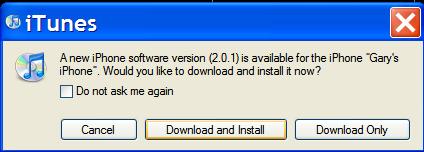
Step 2: iTunes will have a pop up that asks if you want to download and install the lastest firmware update to 2.0.1. Click YES!
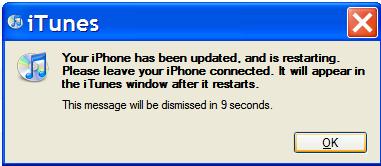
Step 3: Let iTunes do the job. The 250MB update will download, install, then your iPhone 3G will reboot.
Step 4: Voila! Update completed (took me about 10 mins). Try syncing–you’ll notice it’s much faster now!
Direct firmware downloads:
First gen iPhone
iPhone 3G
iPod Touch users

Observations after Updating my iPhone 3G to Firmware 2.0.1
After updating my iPhone 3G firmware to 2.0.1, I tested out the sync. Previously my speed up your iTunes sycning post didn’t help people as expected. I was blown away at the speed my iPhone 3G was being backed up in iTunes. It was lightning fast and everything was completed in less than a minute!
The sluggish keyboard responsiveness is pretty much gone. It actually feels weird now being able to see the keyboard letters rise and fall so quickly now (in tune with my finger presses) when I type in emails and SMS. Contacts so far are pretty fast and no lag whatsoever. Also, I noticed when switching between pages in Safari the pages do not reload again, which will make you Google Reader users very happy (including yours truly!). Overall, the iPhone 3G is operating in a manner it should’ve been the day I took it out of the box.
I am going to test the battery life again and see if that will improve (I have another unit coming from Rogers!).
Special Note for Jailbroken iPhone Users
FYI, Pwnage and WinPwn are in the process of being updated to handle the new firmware update. So if you’re jailbroken and unlocked (first gen users), I’d hold off clicking update in iTunes. Just wait for an update to the jailbreaking game as always.
Now that Canada has the iPhone, having these worry free one click firmware updates are awesome. Yes, I know jailbreaking is pretty neat and has tonnes of advantages. However for what I’m using my iPhone 3G for right now I see no benefit to jailbreaking (aside from being able to use Customize).
I’m thinking back to the days of my first gen when I’d be scouring the forums for the easiest way to activate/jailbreak/unlock my iPhone when Apple released firmware updates. Those days are gone now that I can easily one click update in iTunes!
For those that have updated, how do your experiences compare to mine?
**Looking for an iPhone 3G case? Go get an invisibleSHIELD, the strongest protection for your iPhone backed by a 30 day moneyback guarantee, lifetime replacement warranty, and FREE shipping! Use coupon code iphoneinca for 15% off your purchase! Order today!**
If you enjoyed this post, please subscribe to my RSS feed, so you won’t miss any updates! You can also subscribe via email and have daily updates sent to your Inbox! Want more? Find out what I’m doing right now! Follow me on Twitter!



It feels nice to properly update
Yeah, tell me about it. One click, worry free updating is awesome! 🙂
I had an experience I don’t want to have happen again. But…, I have read around and it seems that I was just an unlucky dude. I plugged the sync cord to the phone, iTunes opened, I clicked to check for updates and as expected there was one. After starting the upgrade and accepting the fomalities, away we go. All was
A
One thing it didn’t fix for me. Is that, sometimes as I am typing, when I hit the backspace key to make a correction, the damn thing gets locked somehow and goes on a runaway. At times I can’t stop it and it erases all that I have typed. Am I the only one? Is this a problem others have had, are having? Does anyone know, is there something that one can do about this?
ok… The first part of that message had all been back spaced of of my screen, and I thought it was lost, and there it is!!
As I had started to say, the download crashed and itunes said that the upgrade could not be done and gave no reason why. The iphone was no longer on the sidebar of iTunes, and the iPhone was a brick, a live one that I couldn’t shut down. I had to hold both the power and the wake buttons for about a min. till it finally did. Ow to make an eve. Longer story short, when I got it plugged in and iTunes saw it, it had to start from fresh like a phone that never had been programed at all, basically sort of fomating it, relax the firmware, and redo from the latest backup. In total, it sat there for an hour and a half, and hoped the phone would be ok. In the end the phone was ok, and the upgrade was there.
Sorry for the long story.
x
I’m not so sure about this update. It’s only been a few hours but the only thing I’ve noticed is that my iphone has crashed two times while scrolling through songs/videos in the ipod app (as in locked up and then reboots after a minute, the reboot takes pretty long too). This has never happened before.
I’ve never had a problem with keyboard lag or any of that so I’m not so sure there. And I never really use the contacts app (just pull up my contacts in the phone app) so no idea about that either.
The link for the direct firmware download: for the ipod touch users seems to be broken.
My update was smooth without any problem. Will have to test drive it later to see if there’s any improvement. Most importantly on batter usage. Wonder if this latest version helps in anyway?
Now that I have a legit iPhone from Fido. I love the instant upgrade too. I used to have the 1st gen iPhone and I had to wait and wait… until everyone tried it and stable.
My iphone does not see a new update, it says 2.0 is the current version…. what the Eff… how can that be?
The update failed on me and reformatted the iPhone. You would think that Apple would be more careful in releasing these important updates. I have lost everything on my iPhone. Good luck!
im not sure since i dont have a iphone 3G but it could be that you nee itunes 7.7.1
Peace
I’m trying to access Terminal.app to disable the backup process when syncing?
Where/how do I locate Terminal.app ???
Thanks
I have an ulocked first gen iphone running 1.1.4. I am with rogers. If I were to update with itunes I know it will lock it but will I be able to use it since now rogers and fido offer the iphone (I mean without signing for an Iphone plan)?
My update crashed 2 or 3 times while it was in the process of installing, each time it kept thinking that my phone was disconnected from the computer.
Since the update the phone has crashed a couple of times while running various apps, including once while trying to load the Usage settings page.
Kind of dissapointed so far
I updated my phone last night around 11 pm. All looked good that night and in the morning. Around 11:00 am, I noticed the ipod portioned crashed. Then while sending out a text i got a lot of keyboard lag like before. Then just to check, I went into my contacts and it was laggy like before. So far i have noticed absolutly no difference between 2.0 and 2.0.1. Still laggy. Still crashy.
i hate this 3g crap i have totaly lost intrest in this site.. wishing i could setup my own blog type site but have no idea what to write about but reading this makes me sad to see iPhone in canada go down like this
HELP!!!!!! My voicemail notification does not work! I was advised by someone trying to leave me a message that my mailbox was full…i checked, and low and behold, I had 10 messages. Anyone have any idea why I am unable to receive voicemail notification on the 3G?
please help: how/ where can I locate Tetminal.app?????
Helpppppppppp!
“i hate this 3g crap i have totaly lost intrest in this site.. wishing i could setup my own blog type site but have no idea what to write about but reading this makes me sad to see iPhone in canada go down like this”
This comment was much too funny! Why complain about content if you have nothing to say yourself? What are you talking about the site “go down like this?” Anybody “dissing” the 3G is just jealous they don’t have one.
Really sucks for those who had their iPhone/download crash on them. My upgrade went smooth, contacts are snappy, no keyboard lag (yet), and even the Apps seem to launch a little faster.
Thanks for another great post iPhone Fan!
Hi, just update to the new firmware. Everything went well.
Regarding Safari, my unit still reload the page when switching
between pages. Is there any setting to change that?
Thx
I noticed that after I did the update some of my apps that needed the Internet didn’t work anymore. Like facebook and showtimes. And I’m having trouble with the app store. Nothing shows up at all. I was wondering if anyone has heard anything about this?
Well a day later and my computer/iphone does not say there is a new update. I guess i’ll break down in a few days and restore to factory settings and see how it goes from their.
Ps. I’ve been using this site since its been up and running and I don’t seen any downgrade in content, actually I see more current content then before.
Good work iPhoneFan!
hi guys! i just have a quick question: i have my iphone 3G jailbreaked (FW 2.0/itune 7.7). Can i just update my itunes to 7.7.1? and then update the FW to 2.0.1?
or do i have to like wait for the winpwn 2.0.1?
or do i have to do a full restore and then update FW to 2.0.1?
Thanks for the kind comments everyone. If you are running into errors, I would suggest a full restore to 2.0, then updating to 2.0.1 afterwards. The version of 2.0 that came from Apple is different from the version that is on iTunes.
Does anyone know if the update fixes the app crashing problem???
p.s. its feels grrrreat to update
almost makes it worth $90/month(didn’t get my first bill yet)
I did the upgrade last night. Everything went as expected, however a friends crashed and he lost everything. No big deal he just reset to factory and recovered from a backup. It took him about an hour but he’s happy.
This is a nice change from my old 1st gen iphone!
I’m still undecided on unlocking my new 3G iphone. Maybe I’ll wait for the whole pwnage tool to be more stable.
Did the update with no issues whatsoever.
Oh, btw… I love this 3G crap! I’ve totally got more interest in this site! I’ve set up my own blog because there’s so much I have to write about, but it pales in comparison to this blog! It’s exciting to see iPhoneinCanada growing the way it is. I know that the exposure on Global news last month helped! Congrats iPhone Fan and as always, thanks! 😀
I am having the same problems with Facebook and palringo after the upgrade…they just crash.
Update to my previous content…
Phone still feels snappier, but keyboard lag is once again present while texting. Boo 🙁
Fixed my app issue…you need to install a free app then it fixes the other problems.
Thank you very much for this site and the person who maintains it. A few tricks learned. Two or three things to mention:update, case AND StealthSIM
Update went just fine yesterday. Didn’t notice much difference. Coming from a Palm Treo 600 then 650 then finally 680 platform, everything is slow for me on the iPhone. I also have a BB World Edition from the business.
Best case for me was the Griffin Nu Form in black and I use my old Treo leather side-case for the belt and get the best of both worlds with protection.
StealthSIM: Received it today after ordering yesterday from iphonestealth.ca total was 125.00 US$ Did the “cut” on a European Vodafone SIM that I keep with me for travel in Europe. A video on facebook or something recommended taping both so that the Stealth doesn’t get lost inside but it was two thick so took it off. Inserted very slowly and eventually it went in just fine. Had to get it in and out a few times because initially was getting messages of “SIM Failure” and “Invalid SIM”. Then started doing on and off the “Airplane Mode”. As I was getting ready to send an email complaint it just flashed a message: StealthSIM # —————– Decline Accept. id the accept and made my first phone call. Perfect. Started coming in and out with cycling messages of invalid SIM/SIM failure for a few minutes then stabilised and continued to work well. It showed Rogers 3G with no roaming which was really funny. My vodafone card does not have data roaming for now so I couldn’t test the data support. I did test the sync with iTunes and it went just fine. Put back Rogers SIM and everything works well. I noticed that the reception on the netwrok is slightly weaker with the StealthSIM installed with Vodafone. Made long distance calls and received calls. The phone nubers that come out on both sides are funny so I don’t think the Caller id is working well but this might be a problem with international and when I use the Vodafone in its country of origin, I might not have a problem. Will let you know.
Soryy for the long note and thank you again for this site.
R
Yea, the 2.0.1 update worked like a charm for me. First it bricked my phone; then when I had finally restored it I had lost all wifi and bluetooth capabilities! After trying every restart and restore possible my only choice now is a replacement phone. Only 2 days old too. I must say also the Rogers support staff that I dealt with were excellent. This is a know issue for this update effecting a small number of phones, that has no solution.
hello there
i have iphone 3G and i wanna ask
if i upgrade this frimware i need jailbreak or winpwn or something else or i don’t need anything and will be open like before???
i am afraid do to it
please help me
I have this serial number for the iphone 3g 6L73489A***. I am planning to purchase it online from a user. I am looking to understand what the serial number means?
From what i have read that digits 4 and 5 shows week of production, so can week 34 be still for a phone version of Iphone 3G
It feels nice to properly update
It feels nice to properly update
Yeah, tell me about it. One click, worry free updating is awesome! 🙂
I had an experience I don’t want to have happen again. But…, I have read around and it seems that I was just an unlucky dude. I plugged the sync cord to the phone, iTunes opened, I clicked to check for updates and as expected there was one. After starting the upgrade and accepting the fomalities, away we go. All was
A
One thing it didn’t fix for me. Is that, sometimes as I am typing, when I hit the backspace key to make a correction, the damn thing gets locked somehow and goes on a runaway. At times I can’t stop it and it erases all that I have typed. Am I the only one? Is this a problem others have had, are having? Does anyone know, is there something that one can do about this?
ok… The first part of that message had all been back spaced of of my screen, and I thought it was lost, and there it is!!
As I had started to say, the download crashed and itunes said that the upgrade could not be done and gave no reason why. The iphone was no longer on the sidebar of iTunes, and the iPhone was a brick, a live one that I couldn’t shut down. I had to hold both the power and the wake buttons for about a min. till it finally did. Ow to make an eve. Longer story short, when I got it plugged in and iTunes saw it, it had to start from fresh like a phone that never had been programed at all, basically sort of fomating it, relax the firmware, and redo from the latest backup. In total, it sat there for an hour and a half, and hoped the phone would be ok. In the end the phone was ok, and the upgrade was there.
Sorry for the long story.
x
ok… The first part of that message had all been back spaced of of my screen, and I thought it was lost, and there it is!!
As I had started to say, the download crashed and itunes said that the upgrade could not be done and gave no reason why. The iphone was no longer on the sidebar of iTunes, and the iPhone was a brick, a live one that I couldn’t shut down. I had to hold both the power and the wake buttons for about a min. till it finally did. Ow to make an eve. Longer story short, when I got it plugged in and iTunes saw it, it had to start from fresh like a phone that never had been programed at all, basically sort of fomating it, relax the firmware, and redo from the latest backup. In total, it sat there for an hour and a half, and hoped the phone would be ok. In the end the phone was ok, and the upgrade was there.
Sorry for the long story.
x
I’m not so sure about this update. It’s only been a few hours but the only thing I’ve noticed is that my iphone has crashed two times while scrolling through songs/videos in the ipod app (as in locked up and then reboots after a minute, the reboot takes pretty long too). This has never happened before.
I’ve never had a problem with keyboard lag or any of that so I’m not so sure there. And I never really use the contacts app (just pull up my contacts in the phone app) so no idea about that either.
The link for the direct firmware download: for the ipod touch users seems to be broken.
My update was smooth without any problem. Will have to test drive it later to see if there’s any improvement. Most importantly on batter usage. Wonder if this latest version helps in anyway?
My update was smooth without any problem. Will have to test drive it later to see if there’s any improvement. Most importantly on batter usage. Wonder if this latest version helps in anyway?
Now that I have a legit iPhone from Fido. I love the instant upgrade too. I used to have the 1st gen iPhone and I had to wait and wait… until everyone tried it and stable.
Now that I have a legit iPhone from Fido. I love the instant upgrade too. I used to have the 1st gen iPhone and I had to wait and wait… until everyone tried it and stable.
My iphone does not see a new update, it says 2.0 is the current version…. what the Eff… how can that be?
My iphone does not see a new update, it says 2.0 is the current version…. what the Eff… how can that be?
The update failed on me and reformatted the iPhone. You would think that Apple would be more careful in releasing these important updates. I have lost everything on my iPhone. Good luck!
The update failed on me and reformatted the iPhone. You would think that Apple would be more careful in releasing these important updates. I have lost everything on my iPhone. Good luck!