
You Can Now Jailbreak iOS 16.4.1 with Palera1n 2.0.0 Beta 6
Codenamed Bakepale, the latest v2.0.0 beta 6 update to jailbreak tool Palera1n has just been released, which fully supports iOS 16.4 - iOS 16.4.1 jailbreak.
With iOS 5 came the Notification Center. It was a vast improvement over the way iOS used to handle notifications, but there is always room for improvements. In cases where we are not getting what we want from Apple, we look to the jailbreak community and Cydia.
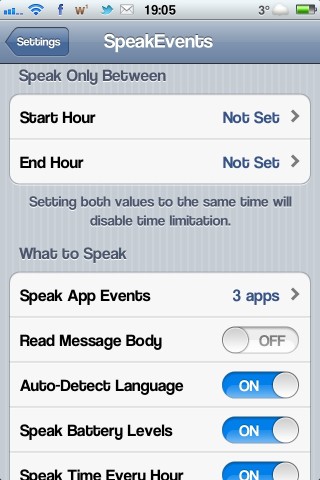
A tweak has recently been released called “SpeakEvents”, that allows your iPhone to automatically read incoming notifications to you. It will also read your emails and text messages. It uses the native “Siri” voice. You can set it to work with any app on your device, and set it to only work at certain times of day. It works with iPhone, iPod Touch, and iPad and requires iOS 5 and up. It supports multiple languages.
Here’s a video from iDownloadBlog showing how it works:

SpeakEvents is available in Cydia now in the BigBoss repo, for $1.99. You don’t pay for it in the traditional way. You have to purchase the license in the Settings app.
Want to see more of our stories on Google?

P.S. Want to keep this site truly independent? Support us by buying us a beer, treating us to a coffee, or shopping through Amazon here. Links in this post are affiliate links, so we earn a tiny commission at no charge to you. Thanks for supporting independent Canadian media!


Speach?
Updated.
It won’t show up in my settings? Wtd
Make sure you have PreferenceLoader package from Cydia installed