
Apple’s AirPort Utility App is Being Removed From the App Store
Apple warns that "functionality is not guaranteed" when using AirPort Utility on iOS 27 or later.
When I first got my hands on an iPhone, my IM needs were handled via Meebo on the web. Their iPhone-optimized web interface supports multiple IM accounts and worked amazingly well. Today, Meebo for the iPhone has been released in the App Store–for FREE and with Push Notifications!
Meebo IM iPhone App is Free, Fast, and Comes With Push Notifications
Here is the description for Meebo:
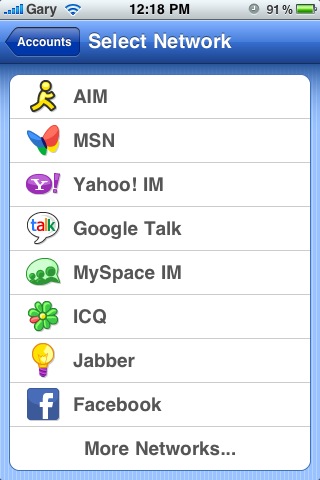
Meebo supports all the major IM networks:
AOL / AIM, Yahoo!, MSN / Windows Live, Gmail / Google Talk, Facebook, MySpace, and 100+ other networks!Reliability / Connectivity
– Push notifications even when the app is closed
– Stay connected as you move from Edge to 3G to WiFi
– Meebo’s proven multi-network access protocols
– Automatically reconnect if you lose coverage so you don’t miss a messageAccess / Integration
– Searchable, synchronized chat history on your iPhone and meebo.com
– Get Meebo on the web, your desktop, or your iPhone
– Tap any links to open the built-in browser
– Advanced chat session management lets you go seamlessly back and forth between Meebo on the iPhone and meebo.comChat features
– Swipe to switch between multiple conversations
– Rotate for landscape mode and a wider keyboard.
– Message preview from the Chats List
– Full Meebo emoticon support
– Push notifications
– Searchable Chat History
– Sort chats by most recent or full view
– Support for all the major IM networks, and many moreAccount features
– Buddylist search as you type
– View profile info, status messages, and buddy icons
– Add/Remove individual buddies
– Add/Remove network accounts
– Open and close buddy groups in your Buddy List
– Set custom status messages
– Sign on/off individual accounts
– Set presence to Available/Invisible/Away for individual accounts, or all at once
Testing Out Meebo for the iPhone
I downloaded Meebo to test immediately. Registering a Meebo account is required to get started (it’s a pain but worth it). I setup my Google Talk account to test it out and chatting was fast without any problems. The app did crash on me after registering (but my registration did go through) though, so clearly this first revision has some bugs (not unexpected). I tested Meebo with an iPhoneinCanada.ca fan boy, Darryn:

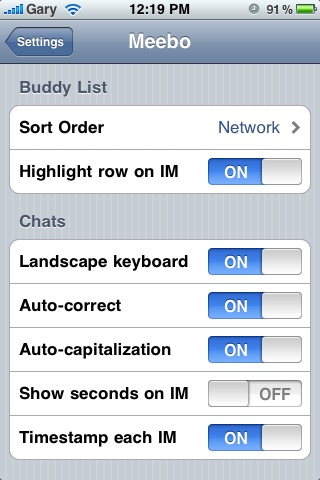
The Push Notifications work great! You can change settings for Meebo to customize how your contacts appear and to turn on/off sounds. The whole purpose of Meebo is to do chat well, and I believe the team has succeeded. There are build in emoticons that Meebo to Meebo users will be able to see. The interface is extremely clean and is quite nice. Swiping left to right to switch among chats is a great feature (just like IM+).
Unlike paid IM apps with Push, such as IM+ or Beejive, Meebo is absolutely FREE (you can also try eBuddy too). You can’t send pictures, videos, or GPS locations like the paid apps. But chat is fast and works well. If you’re looking for a new free IM app to try, give Meebo a chance!
What do you think of Meebo so far? A worth IM app?
Want to see more of our stories on Google?

P.S. Want to keep this site truly independent? Support us by buying us a beer, treating us to a coffee, or shopping through Amazon here. Links in this post are affiliate links, so we earn a tiny commission at no charge to you. Thanks for supporting independent Canadian media!


FREE?!! That's the best price!
Haha…we all love FREEE!
so far this app rocks! Besides the fact that every time i try to update my status it crashes, haha but it's the first version so it's expected. One thing that i love compared to e-buddy is that it doesn't drain the battery at all! Probably the biggest plus of yet!
It's good but doesn't seem to be any way to turn off preview when you get a push notification. Not really a fan of that, don't like my messages being shown right on my screen for anyone to see.
Does anyone know how long Meebo keeps you connected to the push servers when the app is not running?
You could try turning off “Badges” under Push Notifications on the iPhone
under Meebo. That will remove the badge pop up.
Great question, I'll try to find out.
Okay. That's the last barrier that kept me from getting an iPhone. Sign me up. 😉
This app isn't bad….but BeeJive is much better, only b/c it allows session timeout, this app doesn't….i'll stick with BeeJive….it RULES!!!
True, but beejive ain't FREE! 😉
Gary
i wan meet everyone for a bussiness,especially in phone.
i wan meet everyone for a bussiness,especially in phone.
Indeed, even if I use Facebook or YM on my IPhone, always I use meebo.
And FREE is the new price.