Quantcast How to Download Books to Kindle iPhone App in Canada | iPhone in Canada Blog - Tips, Tricks, News, and Tutorials for Canadian iPhone Users

How to Download Books to Kindle iPhone App in Canada

by Gary on April 2nd, 2009

The US iTunes App Store has some programs that we can’t get in Canada. Some examples are Skype, AOL Radio, and Amazon’s Kindle app. Now that I’ve told you guys and girls how to create a US iTunes account without a credit card, you’ve been able to download Skype in Canada.

For those with US iTunes accounts, I’m going to show you how to download and use the Amazon Kindle iPhone App in Canada, along with downloading books. Let’s get started!

How to Download Books to the Kindle iPhone App in Canada

1. Download the Kindle iPhone App with a US iTunes account (click here on how to create a US iTunes account).
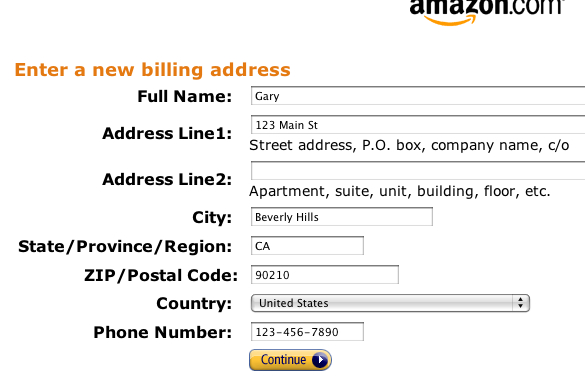
2. Create an Amazon.com account. Enter the address of your Brandon Walsh, resident of Beverly Hills, 90210, or anyone else.

ishot-81

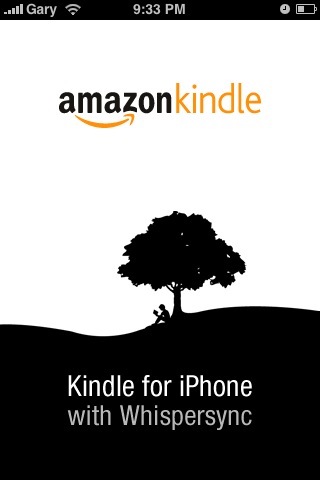
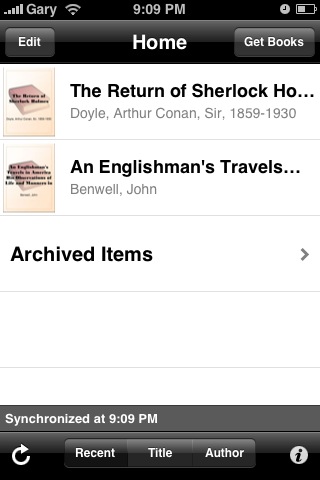
3. Launch the Kindle app on your iPhone. Login with your Amazon.com details.

kindle_iphone_canada

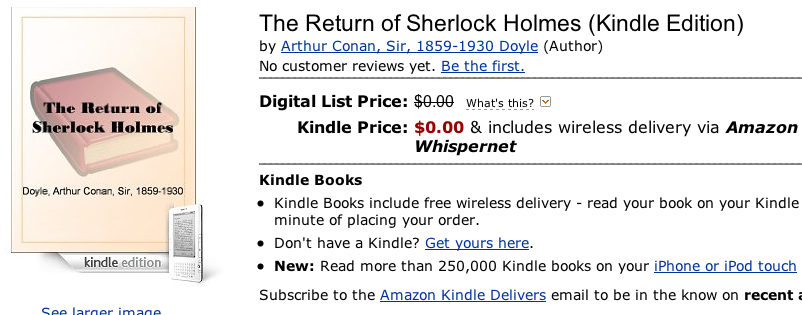
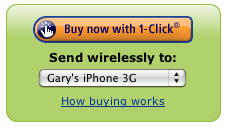
4. On Amazon.com, surf to any free Kindle book and click to download it. The Kindle app on the iPhone will automatically pull purchases from your Amazon.com account.

ishot-83ishot-82

5. Want to buy a book? Use a Vanilla MasterCard from Shoppers Drug Mart if you don’t have access to a US credit card.
6. Buy books on Amazon.com, and they will continue to be synced to your Kindle iPhone app.
7. That’s it!

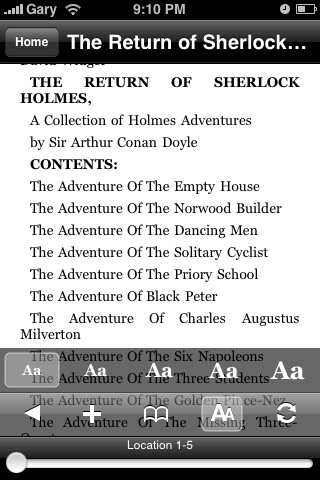
The Kindle app on the iPhone is pretty neat, you can change the font sizes, bookmark pages, and turn the page by swiping your finger on the screen. Although I haven’t tried reading an ENTIRE novel on the iPhone, I don’t know if my eyes can handle that much time staring at the screen. You now can say you have a Kindle in Canada!

kindle_iphone_canada2kindle_iphone_canada3

It’s too bad the Kindle app is not available in Canada, but of course if you follow the tutorial app above you’ll be downloading books to the Kindle iPhone app in no time! Happy reading!

(thanks to @PeterOA for the tip on getting this working)

**Looking for an iPhone 3G/3GS case? Get the invisibleSHIELD by ZAGG, the strongest protection for your iPhone backed by a 30 day moneyback guarantee, lifetime replacement warranty, and FREE shipping! Use coupon code 'iphoneinca' for 20% off your purchase! Order today!**

Don't forget to follow iPhone Fan on twitter!

Posted under: App Store, How To..., Tips & Tricks, iPhone 3G

No related posts
Sign up for my iPhone in Canada newsletter and get access to the latest tips, tricks, and news that others won't!
  • Bob P
    I attempted your solution to acquire Kindle app for the IPhone. When asked to supply a credit card type and number, my IPhone did not give me the option "Other" The options on my phone are: Visa, MC, Amex and Discover only. I think that I downloaded the latest IPhone software.
  • saltygoat
    do you have any updates since april 2009. I cant get the amazon kindle app to work. thanks
  • Steve
    When I tried this tonight it would not let me download a book as I was not in the country I had registered in (I said I was in the US but I'm in Canada). In order to complete the "purchase" (a zero dollar book) I was to either contact Customer Service if I was "traveling outside my country" or follow some other instructions if I had "recently moved to a different country". This seems to be because Amazon traced my IP address to Canada. I ended up using a VPN tunnel to my companies offices in the US to complete the transaction.

    This was all done without any default payment method or gift card as this was a free download. I wonder if that had anything to do with the problem? Perhaps if I actually did buy a gift card...either that or they have recently changed how things work and won't let you buy unless you physically in the US (or using a VPN tunnel to get a US IP address)

    Anyone have a better way to do this?
  • user86
    I FIGURED OUT HOW TO DO THIS!!!

    I've spent days and hours fiddling with this and finally figured out how to buy Amazon Kindle ebooks for your Canadian iPhone.

    The KEY is to REGISTER YOUR IPHONE through the Kindle app to a U.S. Amazon account, of which you have chosen NO PAYMENT METHOD FOR THE 1-CLICK SETTINGS. Then, purchase an Amazon online gift card, and apply it to your U.S. Amazon account.

    You'll only get the "geographical restrictions" message if your 1-click settings have a Canadian credit card as the default payment method.

    I deleted my Kindle app on my iPhone to start all over again.

    Here's the step-by-step.

    1. Delete/deregister the Kindle app if you have already downloaded it to your iPhone.
    2. Open a NEW U.S. amazon.COM account with a U.S. address and phone number. DO NOT enter any payment method.
    Enter a U.S. address for the 1-click settings, but do not enter a payment method! Very important.
    3. Purchase an Amazon.com U.S. gift card, and email it to yourself.
    4. "redeem" the gift card on your Amazon.com U.S. account.
    5. Through the U.S. iTunes app store on your iphone (or online), download the Kindle for iPhone app. (see previous postings on how to open a U.S. iTunes account without a U.S. credit card)
    6. 1. Enter your Amazon.com account e-mail address and password when you first launch the Kindle for iPhone application.
    2. Tap the "Register" button.

    You can also tap the "i" icon on the Kindle home screen, to access the Info screen and view or change your account registration.

    You should now be able to purchase Kindle books that will be sent to your iPhone using the gift card balance.
  • chrome262
    its a bit simpler then that: All i did was put a US address as my one click default (one of my relatives addresses already there), and on my amazon account, which has always been .com because its just easier to sent things to my US relatives. I bought my self a gift card (using my canadian card on the US site) and redeemed it, i also had one click off. So even in my settings i having one click off i picked one of my US address as the default for one click. Then buy a book, it will have the one click option you click that, but since you dont have one click on for a credit card it takes the gift card balance. No need to have two accounts, just the one, i often order from .com and get it sent here to Canada, so i Don't know why anyone would bother with the .ca site. Unless you like your books sent to indigo store.
  • Dan
    This approach didn't work me - using the Vanilla Mastercard gift card I was able to setup an iTunes US account and download the Kindle app. I was also able to create a US Amazon user. When I tried to purchase a Kindle book, however, even a free one, I get the "We could not process your order because of geographical restrictions on the product which you were attempting to purchase." error. Maybe Amazon has become wise to the Vanilla Mastercard trick?
  • VK
    I've been able to download free Kindle books to my ipod touch here in Asia for the last month or so. I used a bogus US address and my Asia credit card. I'm not actually purchasing anything so I think that's why it allowed me to even though I don't have a US credit card. Just two days ago, I got a free book. This morning, I get the message that I can't any longer due to "geographical" restrictions. Sigh. I knew it was too good to be true. Now, I'm thinking of trying the Vanilla Mastercard option (I have relatives in Canada that can send me one.) Have any of you that have been using this "work around" successfully with the Vanilla Mastercard discovered that it is NO LONGER working? I want to know before I try this option. I don't plan on purchasing any books. Just downloading the free ones.
  • VK
    Hmm. Weird. I deleted all credit card information as I didn't want all that floating around for no apparent reason. On a whim, I tried again and this time it worked! I was able to download 2 free books, including the one this morning I couldn't download. Hmm. Hope Amazon doesn't catch on and close this loophole too but it's too late for me to keep it a secret. :D If any of you discover that your Vanilla Mastercard option is no longer working, please let us know. I would like that option one day when I want to buy a book.
  • Tim Gray
    Managed to buy a book w/o credit card. I opened a us amazon account under the canadian me and bought a $50 gift card and emailed to my us me. Set up one click with no credit card - had to make sure my ship to address was my us me address. At that point I managed to download a free chapter and then a free book. After a couple of days tried a book for a couple of bucks, and it downloaded with no problem, deducting the amount from by gift card amount.
  • Tim Gray
    Kindle installed fine. My problem is funding the Amazon account – the process of buying a vanilla master card, registering that, then sending a gift cert to yourself, subject to lots of “make sure you do this and that” isn’t sustainable. Is there an easier way?
    Could I snail mail them a US draft?
  • dynagrrl
    Kevin, You rule!!! That totally worked! Taking the mastercard out of the amazon page was the key. Thank you so much!!!
  • Kevin
    Vanilla Mastercard only works if you buy yourself an amazon gift cert..email it to your US self..KEY: redeem your cert & make sure under your account/payment options at amazon.com that you have erased all Vanilla Sky info..then go into amazon.com with your iphone..ensure that your phony US phone number is synced with your phony US address.... which turns 1 click ordering on...then register your iphone thru amazon for kindle....head back to amazon.com/kindlestore thru your computer and buy kindle books...amazon will automatically deduct the cost of your books from your amaz gift cert and Voila.... will send the books to your iphone
  • devo777
    So do you have to keep buying Vanilla Mastercards in Canada and buying yourself US Amazon gift cards? With the exchange rate it would seem that you would always leave a small balance on the card.
  • Jack
    Sorry, I'm not sure then. It worked for me, I already bought two books. The only thing I can suggest is to make sure you have a gift card balance available in your Amazon account and that you have the 1-click settings turned "on" for your purchases. Also, make sure the vanilla mastercard is registered online with a US address?? that's all i can think of. Good Luck
  • dynagrrl
    This didn't work for me, either. I bought the gift card, applied it, the whole thing, and nothing is working. Any one sorted it out?
  • Jack
    For anyone who is still having the "Geographic Restrictions" problem and has a Vanilla MasterCard. Here's a solution. Use the Vanilla MasterCard that's registered with the US account to purchase a gift card with the same account. Send the gift card to yourself or print the card or whatever. It will take probably a day for you to receive the gift card as Amazon has slow service and they need to convert the CAD to USD. Once you receive the cards in your EMAIL, copy & paste the "gift code" into your account in Amazon under "Apply a Gift Certificate/Card to Your Account". The balance will be applied to your account, but it doesn't actually take effect until 15min-1hr later. Wait patiently than go get your Kindle Book. It worked for me. Good Luck.
  • dynagrrl
    Sorry, but I purchase US gift cards through Amazon.com for my US family members all the time. Could I just purchase a US gift card with my Canadian credit card and use it in my us account? That would be easier then monkeying around with the Vanilla Mastercard, but am totally game to do it (and love it for itunes! so much easier than waiting until I get to the US to buy an itunes card!)!
  • Eric
    I'm having the same errors as well. I tried the Vanilla Mastercard, Amazon rejected it on the Geographic Restrictions. Tried it again while using HotSpot Shield to block my IP address and it still gives me the same error. Has anyone else found a way around this?
  • I've tried both the Vanilla Mastercard and sending a virtual gift card from my Canadian Amazon account to my USA Amazon account. The Mastercard gives me the geographical error and the gift card simply wouldn't be accepted by the USA account.

    I even tried using a socks proxy through a California host and matched my registered phone and address up with that. All to no avail. Anyone have success recently?
  • Kevin
    Re: Amazon payment options for getting books from Kindle using the Vanilla MC GC
    Amazon requires a name that matches the credit card or Gift card???? activation codes are for amazon gift cards.
  • Melady
    If you don't want to make the trip to Shopper's, just buy a giftcard as your Canadian self, and send it to your American self. Then paste in the activation code and voila! Your American self has a credit at Amazon. Yay!
  • pbug
    Just tried this with a Vanilla Mastercard and a newly created Amazon.com account with a U.S. address. The transaction was blocked because of geographical restrictions. Did you do anything else differently?
  • MrSuit
    I had the same problem, using the Vanilla card.
  • Thomas
    Thanks for these instructions and the earlier ones about Skype. This has made a big difference to my opinion of the iPhone. It has become vastly more usable because of these 2 applications. I still have problems with the device, and am probably not going to get one on my next purchase, but this site greatly helps. Thanks for the time and effort you've put in here.
  • Thanks Thomas for taking the time to comment. The iPhone just keeps getting better in my books! ;)
  • Thomas
    Yeah, I agree. Some of the issues I've had are being addressed. It's all going to get better. I think because of sites like this and social action we will be the motivators for a better mobile experience. Cheers and keep up the great work!
  • Guest
    Right on!

    Cheers iPhone man ;)
  • What will you be reading, Dusty? :)
  • Teebs
    Brandon Walsh, you sly devil...
  • Haha...I knew someone would pick up on that. There are still legions of loyal 90210 fans out there. Steve Sanders is my idol. ;)
blog comments powered by Disqus
Sign up for my iPhone in Canada newsletter and get access to the latest tips, tricks, and news that others won't!
  • Get the best iPhone cases at OtterBox.com!
Blogroll

BackBeat Media