
You Can Now Jailbreak iOS 16.4.1 with Palera1n 2.0.0 Beta 6
Codenamed Bakepale, the latest v2.0.0 beta 6 update to jailbreak tool Palera1n has just been released, which fully supports iOS 16.4 - iOS 16.4.1 jailbreak.
I’m sure you’ve had a chance to see the iPhone OS 4 preview last week, and are excited for all the new features. There are copies of the first beta floating around the internets right now, but you have to have your device registered with Apple’s iPhone Developer Program to activate your iPhone, after the install. Unfortunately, you cannot downgrade to 3.1.3, afterwards, so you’ll be stuck, if you don’t install the beta properly.
So, what are the main reasons you want to upgrade to 4.0? Multitasking? Folders? Custom wallpapers on your home screen? Well, you can get all of that, if you have a jail broken iPhone. You just need to install “Backgrounder” for multitasking, “Categories” for folders, and “Winterboard” to change your home screen wallpaper.
Now that you have the functionality of iPhone OS 4.0, you want to top it off with this simple theme I made. It is now available in Cydia, under the ModMyi repository This theme includes the new dock, the new calculator icon, and the wallpaper featured in the keynote that previewed the new firmware.
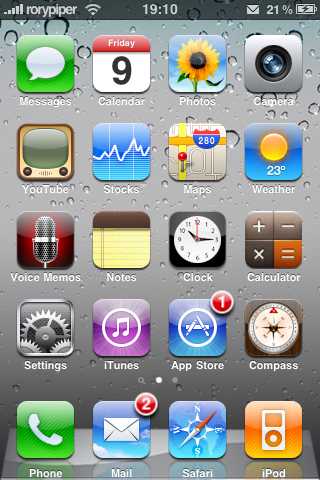
To install this theme, simply open Cydia, search for “iPhone OS 4 Theme”, and tap install. You’ll need Winterboard to activate it. Once activated in Winterboard, your device will respring with the look of iPhone OS 4.0.
If you want to keep up with all my ramblings, you can follow me on Twitter: @rorypiper
Want to see more of our stories on Google?

P.S. Want to keep this site truly independent? Support us by buying us a beer, treating us to a coffee, or shopping through Amazon here. Links in this post are affiliate links, so we earn a tiny commission at no charge to you. Thanks for supporting independent Canadian media!


awesome rory! Just like your simple ipad theme this is going to be amazing! BTW do I need Shrink installed to get the dock reflection or is that part of this winterboard theme?
Oh ya and what did you do to get the new mail icon at the top of your status bar?
Yes, I used Shrink for the dock reflection. A very common question is “How'd you get those icons in the status bar.”. It is a free app in Cydia called Notifier. 😉
Looking very slick. Now all we need is for 4.0 to HTFU and arrive! 😉
Hahahaha!
For multitasking I recommend the free ProSwitcher app which give you Palm Pre-style cards UI.
I suggest Pro Switcher as well for iPhone, it provides a full functioning multi-task interface like the Palm Pre.
I have a question, hopefully you guys can help me out, I tried looking for this theme and i can't find it in cydia, i don't have the modmyi source for some reason and I can't re-jailbreak it to get it because that would involve wiping the phone. Please help me out, this theme looks amazing!
Thanks Rory, it is amazing! I love iphone 4.0!
I'm having trouble with the theme, it faded all of my labels in the undocked icons and then as you go further down the list it gets brighter.
anyone know how to fix that?
I'm having trouble with the theme, it faded all of my labels in the undocked icons and then as you go further down the list it gets brighter.
anyone know how to fix that?
Hi, I love the theme. However, on my 3G, the icon proportions do not look correct. The dock icons are above the dock, and the icons on the springboard look crunched in. Did I do something wrong? I downloaded and installed from Cydia. Thanks!