Nate True, part of the iPhone Dev Team has released the iPhone 1.1.3 jailbreak! In order for this 1.1.3 jailbreak to work, you must start with an existing jailbreaked 1.1.1 or 1.1.2 iPhone! This release currently is for Windows users only, with a Mac version coming later. Let’s get into what is involved with this 1.1.3 jailbreak…shall we?
Basically, the run down on the steps involved go as follows…according to Nate True’s blog:
Here’s how you do it:
– Start with a 1.1.1 or 1.1.2 jailbroken phone with Installer.app installed.
– Plug in your phone via USB to your computer.
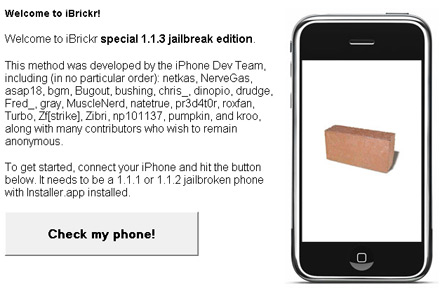
– Download, extract, and run iBrickr Special 1.1.3 jailbreak edition (ibrickr.exe in the archive).
– iBrickr will determine what firmware you are running on your phone and make sure you can run the update.
– iBrickr will then guide you through the process of obtaining and modifying the 1.1.3 firmware (make sure to read everything thoroughly).
– iBrickr will upload the new firmware image to your phone. Note that this only puts the file on your phone and does not modify it at all, yet.
– When iBrickr finishes (should take about 10 minutes), it will tell you to go to Installer and install the “1.1.3 soft upgrade” package. Do that.
– When the installer finishes (this should take another 10-15 minutes), your phone should reboot with a fresh activated 1.1.3 firmware.

This update doesn’t come without some controversy though. According to Jon Zdziarsk’s blog:
January 24, 2008: Dev Team Member Gone Rogue, Unauthorized Release
NateTrue has recently leaked a v1.1.3 Jailbreak without the Dev-Team’s permission, getting himself kicked off the team. Against our wishes, he’s included both files belonging to Apple and patches which contain copyrighted information by Apple, making his personal release illegal and unethical. This is directly contrary to the spirit of true hacking, honorable competition, and sharing of knowledge. He’s a disgrace to developers everywhere. I’d like to strongly advise against using his system for upgrading, and make it known that the rest of the dev team does not support software piracy or copyright infringement. The method the Dev Team was/is planning on releasing allows you to perform the jailbreak without violating federal law.
*Warning* – As with any other jailbreak/upgrade, there are risks involved! Please back up, and only attempt this if you’re well aware of what the consequences might be!
I haven’t tried this yet, as it’s such an early release that I’m going to hold off for the time being. I will check out the forums and see how this 1.1.3 jailbreak/upgrade is working out for them and report my findings back to you guys. Other than that, this is a great day for people with iPhones looking to upgrade!
If you enjoyed this post, please subscribe to my RSS feed, so you won’t miss any updates!



Im watching a live blog on Apple iPhone School and this is awsome news. i see you’re on top of it too.
Quick question… what if mine was a 1.0.2 out of the box and now 1.1.1. will it work?
Kurnail:
YES ! I have (since oct07) an 1.0.2 OTB —
upgraded to 1.1.1 jailbreaked, AnySIM 1.1 = iPhone UpandRunning.
I just did this yesterday night, but my only issue was that I couldn’t see it on the INSTALLER.APP, I click in the UNINSTALL looked for the INSTALLER.APP and as a weird thing the right upper button appears as “REINSTALL”
I did that, reboot — now I see the 1.1.3 Upgrade
run it, wait forever, — my iPhone rebooted and VOALA!
iPhoned 1.1.3 Jailbreaked and Unlocked!
eriku
from Mexico
PS
MUCHAS GRACIAS NATE! ERES UN DIOS! NO HAY MAS QUE DECIR!
Does your EDGE connection works?
Funciono tu conexcion de Edge?
con telcel?
el mio no….
This is fabulous news!
I have a 1.1.1 jailbroke phone (working on Rogers in Canada). So theoretically, if I do this soft upgrade, will I end up with the 1.1.3 features and still be able to use the phone on the Rogers network?
Hello Steve!
YES SIR ! Please go and do that … if you got something weird in the process (bet you won’t) gimme a shot and I will be glad to reply here —
Go for the 1.1.3 !!!!
eriku
Hello,
These are some rumors taht I have heard about. Firstly that the google maps locate me will not work unles you have a valid at&t cell account and secondly I also heard that edge settings can’t be changed in the new firware crack and crashes the phone. From what I understand the company that locates all of the towers and records them has done this in Canada. So technically the locate feature should work. This was the main reason for me to upgrade so if that doesn’t work then there is no point in upgrading. Thanks for all the hadr work!!!
there are 3rd party apps that work with 1.1.1 and 1.1.2 that give you part of what 1.1.3 offers
“locate me” (soneso.com) works with wifi, not with cel towers
it will drop a pin on your current location and give you a route to your destination, which you can designate from address book
customize (thespicychicken.com) lets you rearrange the icons and hide apps you don’t use (or in my case can’t delete, and don’t work
since these are the big kickass features of 1.1.3, I won’t be upgrading and losing all the other 3rd party apps i love, much as i would like to play with the jiggly icons
Well I have been following comments throughout the night and I’m gonna hold off a while before updating to 1.1.3 and jailbreak it… Seems some issue’s have been figured out but ppl are still having problems, this is good news though! 🙂
Thanks bud 😉
Here’s a good link….
How to Jailbreak and Update to 1.1.3 iPhone Firmware Using Windows
http://www.iclarified.com/entry/index.php?enid=604
This might help some ppl out with there questions too.. (Not my experience, it’s quoted from a forum site)
OK FOR ALL THE PEOPLE THAT KEEP ASKING THE SAME QEUSTIONS!!!!
Q: Does the *sim still work after the jailbreak?
A: YES, It will work regardless of your bootloader (3.9/4.6)
Q: Is it normal that the install freezes half way in installer?
A: YES, it is not freezing it is a very big install and takes awhile.
Q: Why is the 1.1.3 soft upgrade not showing up in installer?
A: Refresh your sources and go to recently added.
Q: Can i go back to “FACTORY SETTINGS” Afterwards?
A: YES
Q: Does this jailbreak include a baseband upgrade?
A: NO
Q: Does this jailbreak delete all my data?
A: Your Music, contacts, call log, sms, notes, wallpaper, and so on will remain. This jailbreak does get rid of all of your 3rd party apps.
ACTUAL EXPERIENCE: It went great i have a 1.1.2 otb usa iphone and everything came out great. Just follow and read the steps carefully and make sure you be very patient and give it atleast 20 min.
does your iphone 1.1.2 otb have bootloader 4.6 or 3.9
this is all well and good…but where the 1.1.2 unlock? there are way more people waiting for that than there are waiting with 1.1.3’s
You’re kidding right? A 1.1.2 unlock has been out for quite some time now.
@Slick
A software unlock for 1.1.2OTB not the ***SIM solution. Unless u created a 1.1.2OTB software unlock… lol 😛
@jan – locate me dose use both wifi and cel towers… but dose not work on the 1.1.3
@slick – do ur research dude… u probably shocked tom.
@ everyone – u can use the new mapping feature if u knwo how to upgrade ur baseboard… i dont so i havent done that yet and becareful this is risky stuff.. so do it only if u knwo what ur doing… there is a video on appleiphoneschool.com that has been posted and its clear and dummified enough for everyone.
information of working and not working features using Nate’s illegal version of the jailbreak…
Things that do not work so well:
~ Google maps Hybrid feature does not work…either does the Location feature (it just spins)
~ Edge symbol does not show up though it seems Edge is working
~ Previously installed 3rd party apps do not show up on SpringBoard though they are in the Uninstall list in the Installer.app – you have to go in and uninstall and reinstall them all.
~ Cannot OpenSSH into the iPhone even after reinstalling BSD Subsytems. HOWEVER, we finally got it to work after installing MobileFinder and using it to delete LocalPackages.plist in private/var/root/Library/Installer/. We could then install BSD Subsystem and OpenSSH and were able to OpenSSH into the iPhone. Note: Deleting your LocalPackages.plist removes all of your installed apps and you will have to install everything again (which you have to do anyway so that they will show up on the SpringBoard).
~ SummerBoard and Customize do not work and will not install.
~ It does not keep any custom add-ons like dialer, chat bubbles, battery image, slide to unlock text, carrier icon…etc.
~ BossToll is no longer in affect and all my old Applications are in Private/var/Applications and all new apps are in /Applications
~ Ringer does not work but all other sounds do.
Things that work:
~ Wiggling Icons work
~ Rearranging icons and dragging them to the next page work
~ Keeps all information like previous text messages, notes, emails, music, podcasts, photo albums, camera roll, appointments in calendar, alarms etc. It does not keep your WiFi WEP code.
~ You can install most 3rd party apps. Some of the ones we have installed include; Installer (obviously), MobileFinder, BBInfo, Apollo, iSnake, iSolitaire, NES, EvolutionRGB, CameraPro, Flashlight. LocateMe does not work…it installs but does not find location.
New Features of 1.1.3
~ Wiggling Icons
~ Rearranging icons and dragging them to the next page
~ Settings – Contacts option has been removed from main menu…still available under Phone Setting. Under Phone Settings in AT&T Service option dialing codes for options now present ex) directory assistance – 411. Added International option under General Settings…though this was part of 1.1.2.
~ iTunes – New Redeemed button under downloads…for use of iTunes giftcards.
~ Safari – Instead of plus sign to the left of the address bar it is a magnifying glass which opens your search option. Plus sign (bookmarking ability) moved to the center of the bottom menu bar.
~ Text messaging now shows entire text message not just small portion of the message and the options are close or reply instead of view or ignore
well i did the jailbreak 1.1.3 as above, followed all the rules and instructions…..but now it’s sitting at a screen were it says to plug in my iPhone into itunes!!….any idea’s what i did….and whati should doo?…
thanks.
I had a 1.1.2 unlocked, jailbreaked, n rogers….if that helps.
what if it locks while doing this?
Do you mean the “Auto lock?” You’re supposed to set it to “Never”…
…if you mean, what if your iPhone freezes? You can always do a restore to bring it back…
I downloaded the soft upgrade first before running the iBrickr part, can i stil run iBrickr to restore my phone with 1.1.3?
I have an Iphone that was recently Jailed which is 1.1.3, i’m having problems receiving calls and the update that apple just issued in Late January for owners such as myself to go on line and retrieve different Apps i no longer have the capability to apply those application to my phone. Could please help me resolve this
prolblem that im having at this time…
Hi !
I just jailbreaked my iPhone 3G, and I have a network issue. Indeed, my Rogers connection (Canada) doesn’t exist anymore.
Does someone know how to make it work properly ?
Thx a lot for your answers
Im watching a live blog on Apple iPhone School and this is awsome news. i see you’re on top of it too.
Quick question… what if mine was a 1.0.2 out of the box and now 1.1.1. will it work?
This is fabulous news!
I have a 1.1.1 jailbroke phone (working on Rogers in Canada). So theoretically, if I do this soft upgrade, will I end up with the 1.1.3 features and still be able to use the phone on the Rogers network?
This is fabulous news!
I have a 1.1.1 jailbroke phone (working on Rogers in Canada). So theoretically, if I do this soft upgrade, will I end up with the 1.1.3 features and still be able to use the phone on the Rogers network?
Hello,
These are some rumors taht I have heard about. Firstly that the google maps locate me will not work unles you have a valid at&t cell account and secondly I also heard that edge settings can’t be changed in the new firware crack and crashes the phone. From what I understand the company that locates all of the towers and records them has done this in Canada. So technically the locate feature should work. This was the main reason for me to upgrade so if that doesn’t work then there is no point in upgrading. Thanks for all the hadr work!!!
Well I have been following comments throughout the night and I’m gonna hold off a while before updating to 1.1.3 and jailbreak it… Seems some issue’s have been figured out but ppl are still having problems, this is good news though! 🙂
Thanks bud 😉
Here’s a good link….
How to Jailbreak and Update to 1.1.3 iPhone Firmware Using Windows
http://www.iclarified.com/entry/index.php?enid=604
This might help some ppl out with there questions too.. (Not my experience, it’s quoted from a forum site)
OK FOR ALL THE PEOPLE THAT KEEP ASKING THE SAME QEUSTIONS!!!!
Q: Does the *sim still work after the jailbreak?
A: YES, It will work regardless of your bootloader (3.9/4.6)
Q: Is it normal that the install freezes half way in installer?
A: YES, it is not freezing it is a very big install and takes awhile.
Q: Why is the 1.1.3 soft upgrade not showing up in installer?
A: Refresh your sources and go to recently added.
Q: Can i go back to “FACTORY SETTINGS” Afterwards?
A: YES
Q: Does this jailbreak include a baseband upgrade?
A: NO
Q: Does this jailbreak delete all my data?
A: Your Music, contacts, call log, sms, notes, wallpaper, and so on will remain. This jailbreak does get rid of all of your 3rd party apps.
ACTUAL EXPERIENCE: It went great i have a 1.1.2 otb usa iphone and everything came out great. Just follow and read the steps carefully and make sure you be very patient and give it atleast 20 min.
this is all well and good…but where the 1.1.2 unlock? there are way more people waiting for that than there are waiting with 1.1.3’s
You’re kidding right? A 1.1.2 unlock has been out for quite some time now.
there are 3rd party apps that work with 1.1.1 and 1.1.2 that give you part of what 1.1.3 offers
“locate me” (soneso.com) works with wifi, not with cel towers
it will drop a pin on your current location and give you a route to your destination, which you can designate from address book
customize (thespicychicken.com) lets you rearrange the icons and hide apps you don’t use (or in my case can’t delete, and don’t work
since these are the big kickass features of 1.1.3, I won’t be upgrading and losing all the other 3rd party apps i love, much as i would like to play with the jiggly icons
@Slick
A software unlock for 1.1.2OTB not the ***SIM solution. Unless u created a 1.1.2OTB software unlock… lol 😛
@jan – locate me dose use both wifi and cel towers… but dose not work on the 1.1.3
@slick – do ur research dude… u probably shocked tom.
@ everyone – u can use the new mapping feature if u knwo how to upgrade ur baseboard… i dont so i havent done that yet and becareful this is risky stuff.. so do it only if u knwo what ur doing… there is a video on appleiphoneschool.com that has been posted and its clear and dummified enough for everyone.
Kurnail:
YES ! I have (since oct07) an 1.0.2 OTB —
upgraded to 1.1.1 jailbreaked, AnySIM 1.1 = iPhone UpandRunning.
I just did this yesterday night, but my only issue was that I couldn’t see it on the INSTALLER.APP, I click in the UNINSTALL looked for the INSTALLER.APP and as a weird thing the right upper button appears as “REINSTALL”
I did that, reboot — now I see the 1.1.3 Upgrade
run it, wait forever, — my iPhone rebooted and VOALA!
iPhoned 1.1.3 Jailbreaked and Unlocked!
eriku
from Mexico
PS
MUCHAS GRACIAS NATE! ERES UN DIOS! NO HAY MAS QUE DECIR!
Hello Steve!
YES SIR ! Please go and do that … if you got something weird in the process (bet you won’t) gimme a shot and I will be glad to reply here —
Go for the 1.1.3 !!!!
eriku
well i did the jailbreak 1.1.3 as above, followed all the rules and instructions…..but now it’s sitting at a screen were it says to plug in my iPhone into itunes!!….any idea’s what i did….and whati should doo?…
thanks.
I had a 1.1.2 unlocked, jailbreaked, n rogers….if that helps.
what if it locks while doing this?
Do you mean the “Auto lock?” You’re supposed to set it to “Never”…
…if you mean, what if your iPhone freezes? You can always do a restore to bring it back…
I downloaded the soft upgrade first before running the iBrickr part, can i stil run iBrickr to restore my phone with 1.1.3?
does your iphone 1.1.2 otb have bootloader 4.6 or 3.9
I have an Iphone that was recently Jailed which is 1.1.3, i’m having problems receiving calls and the update that apple just issued in Late January for owners such as myself to go on line and retrieve different Apps i no longer have the capability to apply those application to my phone. Could please help me resolve this
prolblem that im having at this time…
Does your EDGE connection works?
Funciono tu conexcion de Edge?
con telcel?
el mio no….
Hi !
I just jailbreaked my iPhone 3G, and I have a network issue. Indeed, my Rogers connection (Canada) doesn’t exist anymore.
Does someone know how to make it work properly ?
Thx a lot for your answers