
Apple’s AirPort Utility App is Being Removed From the App Store
Apple warns that "functionality is not guaranteed" when using AirPort Utility on iOS 27 or later.
If you didn’t get a chance to download FlyCast, the mobile satellite radio app for your iPhone, then get on it! It’s just one of the coolest free apps out there in the App Store. Speaking of free apps, today we’re going to check out Air Sharing, a free store file application that lets you mount your iPhone or iPod Touch as a wireless drive on a PC/Mac/Linux computer. You’ll be able to drag and drop files and view them on the go too!
Air Sharing currently is the top free App in the App Store (also get Koi Pond if you haven’t already!). It’s only available free for a limited time, and after Sept.22 (free 2 weeks end on the 22nd) it will be $6.99. Let’s take a look at some of the features of Air Sharing and what it can do for you! According to Avatron, the company behind the app you’ll be able to…
All you need to do is enable your WiFi connection, launch Air Sharing, and follow the simple instructions included to connect your iPhone to your computer. You’ll be able to drag and drop any file onto your iPhone and view them directly through Air Sharing. Here are the supported file formats:
This app is pretty cool because now you can take your files with you anywhere. There is the option to set a password and also a public access folder for guests. The app works across all platforms so that means Windows, Mac, Linux, and also any web browser. It’s like your iPhone is now a wireless USB thumb drive!
Check out the following gallery:
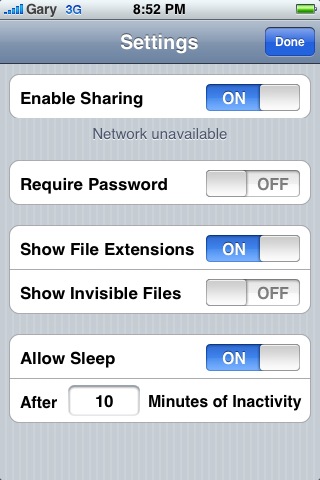
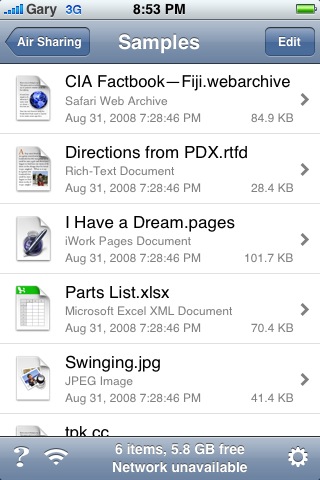
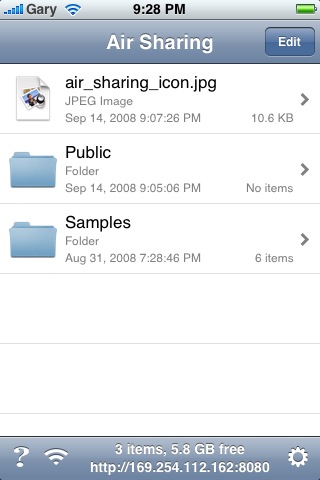
Just to reiterate, download Air Sharing now while you can because in exactly one week it won’t be free anymore! For those using Air Sharing at the moment, what are your thoughts on the app so far? I love it and it makes my iPhone just that much more useful (than it already is of course!).
**Looking for an iPhone 3G case? Go get an invisibleSHIELD, the strongest protection for your iPhone backed by a 30 day moneyback guarantee, lifetime replacement warranty, and FREE shipping! Use coupon code iphoneinca for 20% off your purchase! Order today!**
If you enjoyed this post, please subscribe to my RSS feed, so you won’t miss any updates! You can also subscribe via email and have daily updates sent to your Inbox! Want more? Find out what I’m doing right now! Follow me on Twitter!
Want to see more of our stories on Google?

P.S. Want to keep this site truly independent? Support us by buying us a beer, treating us to a coffee, or shopping through Amazon here. Links in this post are affiliate links, so we earn a tiny commission at no charge to you. Thanks for supporting independent Canadian media!


Downloaded last week and I’ve been using it since. Like you said, this software is great! Easy to use and set up. I do hope that it’s still FREE for people that have downloaded already when they start to charge people when the time comes.
It’s great. I downloaded last week too and your right it is just like having a usb drive for your iphone. One of the best apps I have come across.
I must be an idiot! I can’t get it to connect to my network! But, that said… I’m stubborn and will keep trying. I’ve had this app for a week now and can’t get it to connect 🙁 Arrrrrrgggghhhh!!!
I have been trying to get this app to work and it will not! i am running windows vista, when i enter the ip address that the app uses my computer cannot connect to it. I see that there is an update comming so maybe that will help.
If you still haven’t beem able to connect Air Sharing using Vista, then probably you forgot to install a web server patch from Microsoft.
PLEASE READ instructions thoroughly and carefully. You fill find all information you need to download that crucial patch.
Air Sharing is probably the single most important application for iPhone/iPod. I would say it added $50-$100 value to my iPhone (made it a decent portable doc reader I’d been looking for). I still cannot believe it’s free!
where can i get that patch?
There is a detailed FAQ that explains how to troubleshoot connectivity issues. The windows section contains a link to the update required.
http://www.avatron.com/support/read.php?6,541
I’m finding this little app very useful and can’t help wondering when Apple will purchase the rights to include it into the iPhone directly. It certainly is worthy of that level of attention.
Hope you manage to get your installation working…
cheers!
Air Sharing is nothing new. The “Files” app (search app store) was released quite a while before Air Sharing and does the same thing. It’s just not free ($7) is all. In a week Air Sharing will be available for the same price as “Files” ($7). The developers of Air Sharing were smart to give it away free and generate a fan base. Both apps are definitely worth far more than their $7 price tags.
I have not tried it yet and was going to delete it, just to clean up my Apps. However I will give it a try now.
I’ve never seen the Koi Pond App of free it’s always been $0.99.
that or SSH on a jailbreak iPhone and never pay a dime 🙂
I have question; when i intall the Air Sharing app i can not use it, besause when i go to get the IP adress on my iphone there is a message (no wifi connected)…..
what i can do?
Does this app allow you to use it on anyone’s computer as a drag and drop? I want some music on the wife’s computer and just want to go get it …. I don’t have a flash drive big enough to just copy it all over to my computer!! I also have the same issue with my brother’s computer. So was looking for an app that would allow me to just get it without registering the phone to itunes on that computer due to having to take it off mine to do so… Any help would be great.
I have just purchased this app recently as it would be just the thing i need but unfortunalty i can’t get it to work. I’m running vista, A detailed step by step “Idiots Guide” would be extreamly helpfull if anyone would be so kind. I’m not so tech minded but i really need to get this App to work.
Downloaded last week and I’ve been using it since. Like you said, this software is great! Easy to use and set up. I do hope that it’s still FREE for people that have downloaded already when they start to charge people when the time comes.
Downloaded last week and I’ve been using it since. Like you said, this software is great! Easy to use and set up. I do hope that it’s still FREE for people that have downloaded already when they start to charge people when the time comes.
It’s great. I downloaded last week too and your right it is just like having a usb drive for your iphone. One of the best apps I have come across.
I must be an idiot! I can’t get it to connect to my network! But, that said… I’m stubborn and will keep trying. I’ve had this app for a week now and can’t get it to connect 🙁 Arrrrrrgggghhhh!!!
I have been trying to get this app to work and it will not! i am running windows vista, when i enter the ip address that the app uses my computer cannot connect to it. I see that there is an update comming so maybe that will help.
If you still haven’t beem able to connect Air Sharing using Vista, then probably you forgot to install a web server patch from Microsoft.
PLEASE READ instructions thoroughly and carefully. You fill find all information you need to download that crucial patch.
Air Sharing is probably the single most important application for iPhone/iPod. I would say it added $50-$100 value to my iPhone (made it a decent portable doc reader I’d been looking for). I still cannot believe it’s free!
where can i get that patch?
There is a detailed FAQ that explains how to troubleshoot connectivity issues. The windows section contains a link to the update required.
http://www.avatron.com/support/read.php?6,541
I’m finding this little app very useful and can’t help wondering when Apple will purchase the rights to include it into the iPhone directly. It certainly is worthy of that level of attention.
Hope you manage to get your installation working…
cheers!
Air Sharing is nothing new. The “Files” app (search app store) was released quite a while before Air Sharing and does the same thing. It’s just not free ($7) is all. In a week Air Sharing will be available for the same price as “Files” ($7). The developers of Air Sharing were smart to give it away free and generate a fan base. Both apps are definitely worth far more than their $7 price tags.
I have not tried it yet and was going to delete it, just to clean up my Apps. However I will give it a try now.
I’ve never seen the Koi Pond App of free it’s always been $0.99.
I have not tried it yet and was going to delete it, just to clean up my Apps. However I will give it a try now.
I’ve never seen the Koi Pond App of free it’s always been $0.99.
that or SSH on a jailbreak iPhone and never pay a dime 🙂
I have question; when i intall the Air Sharing app i can not use it, besause when i go to get the IP adress on my iphone there is a message (no wifi connected)…..
what i can do?
I have question; when i intall the Air Sharing app i can not use it, besause when i go to get the IP adress on my iphone there is a message (no wifi connected)…..
what i can do?
Does this app allow you to use it on anyoneÂ’s computer as a drag and drop? I want some music on the wifeÂ’s computer and just want to go get it …. I donÂ’t have a flash drive big enough to just copy it all over to my computer!! I also have the same issue with my brotherÂ’s computer. So was looking for an app that would allow me to just get it without registering the phone to itunes on that computer due to having to take it off mine to do so… Any help would be great.
I have just purchased this app recently as it would be just the thing i need but unfortunalty i can’t get it to work. I’m running vista, A detailed step by step “Idiots Guide” would be extreamly helpfull if anyone would be so kind. I’m not so tech minded but i really need to get this App to work.
There is a detailed FAQ that explains how to troubleshoot connectivity issues.