I am a huge Google fan, and use many Google services such as Gmail and Google Reader. Many of these services are optimized for the iPhone, such as the Google search, Google Reader, Gmail, and previously iGoogle. Well, it looks like the Google team made up for the loss of the iPhone-optimized iGoogle homepage by introducing Gmail Tasks for the iPhone yesterday!
Gmail Tasks is basically moving away from paper and onto your iPhone for making lists of things to do and projects to complete. It seems like this is Google’s reply to the ever popular GTD (Get Things Done) movement with apps like Things and OmniFocus to name a few. Of course, comparing Gmail Tasks to those aforementioned apps isn’t fair.
What I do like about Gmail Tasks is how your list is readily available with you at all times and any changes you make on your iPhone will be seen on the web. Things requires syncing with your computer, but OmniFocus can be setup with a WEBDAV to sync over the air (EG MobileMe).
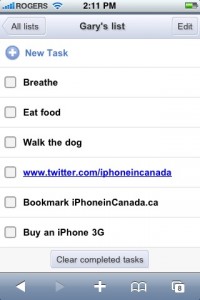
Using Gmail Tasks is relatively straightforward. You make your lists, and when you hit “enter” another line appears to just type in all the tasks you have on your mind. You can create different lists and tick off tasks as you complete them. Very simple and very cool. Well done Google!
Here’s what the Gmail Team had to say from their blog:
Just go to gmail.com/tasks from your phone’s browser and log in. If you already use the version of Tasks in Gmail Labs, you’ll see the same task list that’s always in sync. We focused on making it super easy and fast to update your Gmail task list — you can add new tasks and check off completed ones, no matter where you are (like in a meeting or at the grocery store) even when you’re in the bathroom.
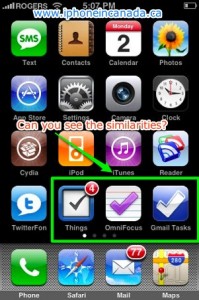
…and here is what my iPhone homescreen looks like at the moment. I’ve been using Things and OmniFocus iPhone apps along with their Mac versions, so expect a mini review coming soon:
P.S. Want to keep this site truly independent? Support us by buying us a beer, treating us to a coffee, or shopping through Amazon here. Links in this post are affiliate links, so we earn a tiny commission at no charge to you. Thanks for supporting independent Canadian media!
Subscribe
19 Comments
Oldest
NewestMost Voted
dashparr
17 years ago
So it uses the internet?!?! I don’t get it. Well I have 6GB so I don’t care but I’m sure other people do care!
For me, I personally like Magic Pad because you can add colours and use copy and paste. Magic Pad replaced my stock Note Pad.
I’m going to try Gmail tasks. Doesn’t hurt to try right? Thanks for the heads up.
It requires an internet connection I mean. That way it can be saved to Google’s servers like Gmail. 🙂
Rick
17 years ago
Now, if Apple Mail could sync Task with Gmails Tasks, it would be perfect!
Trent
17 years ago
I’m looking for a GTD client that I can use with my iPhone, MacBook, and PC. Looks like this is it. Thanks for the heads up.
Dusty
17 years ago
These tasks could come in handy….
Cheers Gary!
SqueakyGreen
17 years ago
I have been doing GTD for a while and love RTM (rememberthemilk.com). Here is why:
– Works great for GTD (just need to use it right: http://blog.rememberthemilk.com/2008/05/guest-post-advanced-gtd-with-remember.html)
– Same look and feel than google stuff.
– Great “plug-ins” for gmail, igoogle, google calendar and more (twitter)
– Iphone app is awesome!! (worth every penny of the upgrade to pro account).
– I can share lists and tasks with others.
I don’t know why Google just doesn’t acquire them. Anyways can’t wait for the review.
dashparr
17 years ago
So it uses the internet?!?! I don’t get it. Well I have 6GB so I don’t care but I’m sure other people do care!
For me, I personally like Magic Pad because you can add colours and use copy and paste. Magic Pad replaced my stock Note Pad.
I’m going to try Gmail tasks. Doesn’t hurt to try right? Thanks for the heads up.
dashparr
17 years ago
So it uses the internet?!?! I don’t get it. Well I have 6GB so I don’t care but I’m sure other people do care!
For me, I personally like Magic Pad because you can add colours and use copy and paste. Magic Pad replaced my stock Note Pad.
I’m going to try Gmail tasks. Doesn’t hurt to try right? Thanks for the heads up.
It requires an internet connection I mean. That way it can be saved to Google’s servers like Gmail. 🙂
Rick
17 years ago
Now, if Apple Mail could sync Task with Gmails Tasks, it would be perfect!
Rick
17 years ago
Now, if Apple Mail could sync Task with Gmails Tasks, it would be perfect!
Trent
17 years ago
I’m looking for a GTD client that I can use with my iPhone, MacBook, and PC. Looks like this is it. Thanks for the heads up.
Trent
17 years ago
I’m looking for a GTD client that I can use with my iPhone, MacBook, and PC. Looks like this is it. Thanks for the heads up.
Guest
17 years ago
These tasks could come in handy….
Cheers Gary!
Guest
17 years ago
These tasks could come in handy….
Cheers Gary!
SqueakyGreen
17 years ago
I have been doing GTD for a while and love RTM (rememberthemilk.com). Here is why:
– Works great for GTD (just need to use it right: http://blog.rememberthemilk.com/2008/05/guest-post-advanced-gtd-with-remember.html)
– Same look and feel than google stuff.
– Great “plug-ins” for gmail, igoogle, google calendar and more (twitter)
– Iphone app is awesome!! (worth every penny of the upgrade to pro account).
– I can share lists and tasks with others.
I don’t know why Google just doesn’t acquire them. Anyways can’t wait for the review.
SqueakyGreen
17 years ago
I have been doing GTD for a while and love RTM (rememberthemilk.com). Here is why:
– Works great for GTD (just need to use it right: http://blog.rememberthemilk.com/2008/05/guest-post-advanced-gtd-with-remember.html)
– Same look and feel than google stuff.
– Great “plug-ins” for gmail, igoogle, google calendar and more (twitter)
– Iphone app is awesome!! (worth every penny of the upgrade to pro account).
– I can share lists and tasks with others.
I don’t know why Google just doesn’t acquire them. Anyways can’t wait for the review.
Saskatchewan says families won't foot the power bill for Bell's planned AI data centre expansion near Regina, pushing the debate back toward Bring Your Own Power. Speaking after a Lloydminster Heavy Oil Show luncheon, the province told reporters the extra load "does use electricity" but Bell will "bring their own," larongeNOW reported. The carrier is...
Bell's next-generation 911 network failed before dawn on Thursday, briefly blocking emergency calls in parts of six provinces before technicians restored service. The carrier told police and reporters the core NG911 routing issue was detected around 3:13 a.m. ET and cleared by 4:40 a.m. Backup systems, including Bell's SafetyNet reroute, were used to push calls...
Victor Dodig told investors Telus will look smaller and less sprawling, with the core bet shifting to telecom and digital infrastructure he bluntly calls data centres. Speaking at a Bank of Montreal conference, the CEO who took over in July said the company is "not interested" in acquisitions and wants organic growth so "2027 doesn't...



So it uses the internet?!?! I don’t get it. Well I have 6GB so I don’t care but I’m sure other people do care!
For me, I personally like Magic Pad because you can add colours and use copy and paste. Magic Pad replaced my stock Note Pad.
I’m going to try Gmail tasks. Doesn’t hurt to try right? Thanks for the heads up.
It requires an internet connection I mean. That way it can be saved to Google’s servers like Gmail. 🙂
Now, if Apple Mail could sync Task with Gmails Tasks, it would be perfect!
I’m looking for a GTD client that I can use with my iPhone, MacBook, and PC. Looks like this is it. Thanks for the heads up.
These tasks could come in handy….
Cheers Gary!
I have been doing GTD for a while and love RTM (rememberthemilk.com). Here is why:
– Works great for GTD (just need to use it right: http://blog.rememberthemilk.com/2008/05/guest-post-advanced-gtd-with-remember.html)
– Same look and feel than google stuff.
– Great “plug-ins” for gmail, igoogle, google calendar and more (twitter)
– Iphone app is awesome!! (worth every penny of the upgrade to pro account).
– I can share lists and tasks with others.
I don’t know why Google just doesn’t acquire them. Anyways can’t wait for the review.
So it uses the internet?!?! I don’t get it. Well I have 6GB so I don’t care but I’m sure other people do care!
For me, I personally like Magic Pad because you can add colours and use copy and paste. Magic Pad replaced my stock Note Pad.
I’m going to try Gmail tasks. Doesn’t hurt to try right? Thanks for the heads up.
So it uses the internet?!?! I don’t get it. Well I have 6GB so I don’t care but I’m sure other people do care!
For me, I personally like Magic Pad because you can add colours and use copy and paste. Magic Pad replaced my stock Note Pad.
I’m going to try Gmail tasks. Doesn’t hurt to try right? Thanks for the heads up.
It requires an internet connection I mean. That way it can be saved to Google’s servers like Gmail. 🙂
It requires an internet connection I mean. That way it can be saved to Google’s servers like Gmail. 🙂
Now, if Apple Mail could sync Task with Gmails Tasks, it would be perfect!
Now, if Apple Mail could sync Task with Gmails Tasks, it would be perfect!
I’m looking for a GTD client that I can use with my iPhone, MacBook, and PC. Looks like this is it. Thanks for the heads up.
I’m looking for a GTD client that I can use with my iPhone, MacBook, and PC. Looks like this is it. Thanks for the heads up.
These tasks could come in handy….
Cheers Gary!
These tasks could come in handy….
Cheers Gary!
I have been doing GTD for a while and love RTM (rememberthemilk.com). Here is why:
– Works great for GTD (just need to use it right: http://blog.rememberthemilk.com/2008/05/guest-post-advanced-gtd-with-remember.html)
– Same look and feel than google stuff.
– Great “plug-ins” for gmail, igoogle, google calendar and more (twitter)
– Iphone app is awesome!! (worth every penny of the upgrade to pro account).
– I can share lists and tasks with others.
I don’t know why Google just doesn’t acquire them. Anyways can’t wait for the review.
I have been doing GTD for a while and love RTM (rememberthemilk.com). Here is why:
– Works great for GTD (just need to use it right: http://blog.rememberthemilk.com/2008/05/guest-post-advanced-gtd-with-remember.html)
– Same look and feel than google stuff.
– Great “plug-ins” for gmail, igoogle, google calendar and more (twitter)
– Iphone app is awesome!! (worth every penny of the upgrade to pro account).
– I can share lists and tasks with others.
I don’t know why Google just doesn’t acquire them. Anyways can’t wait for the review.