
How to Recover and Restore an Apple Watch
Learn how to recover and restore your Apple Watch with an iPhone or iPad, based on Apple's official Support video.
The Apple iPhone headphones are very functional headphones that get the job done. They won’t please audiophiles out there, but for the rest of us they are just fine. One of my favorite features is the mic/button that lets you control music (even on my MacBook!) and have conversations.
A couple weeks ago I noticed my mic stopped working, along with the button remote. At first I thought it was my iPhone and a recent firmware update that caused the headphone jack to malfunction. So, I ended up calling Apple Support on the phone. I told them how my mic/remote wasn’t working and they immediately sent out a new pair via next day via Fedex!
I opened the package I tested out these brand spankin’ new headphones–only to have them not work still! At this point in time I decided to turn to Google. I was able to discover what was causing this minor headache of mine: a chunk of lint!
I ended up using the end of a paperclip to dig out the massive chunk of lint below:
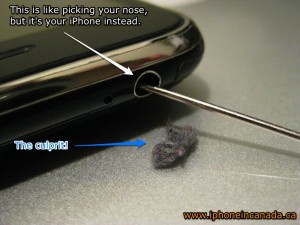
I was pretty shocked at the size of this chunk of lint! I had no idea this could make its way down the headphone jack. So there you go folks, if your mic/remote doesn’t work, shine a light down the headphone jack to see if you can find a massive chunk of lint. Just make sure you turn OFF your iPhone before you start picking around!
Want to see more of our stories on Google?

P.S. Want to keep this site truly independent? Support us by buying us a beer, treating us to a coffee, or shopping through Amazon here. Links in this post are affiliate links, so we earn a tiny commission at no charge to you. Thanks for supporting independent Canadian media!


That’s gross. I’m going to check my iPhone right now! LOL
Nice to know:)
Wow, i was going to toss my headphones b/c i thought they were busted….the mic/remote party anyway!
NOw they work again!!!
Thats pretty crazy Gary finding a piece stuck down there lol Glad u got ur phone/headphones working better!
Same problem…mic wasn’t working…had actually filled out all the online form stuff but had to cancel the order for new mic/buds because i didn’t have a credit card on me (they’ll charge you $31 if you don’t return the broken set within 10 days)
Then today…saw your post…and voila…working again! Maybe you should get a tippance from Apple for saving them $$ in service support 😀
same thing happend to my first gen iphone i accidently fixed it
ill check my new one now
You’re welcome everyone! I was going crazy trying to figure out why my mic wasn’t working–now I know 🙂
Has anyone else noticed that the cord freezes in rather mild temperatures, and that the reliability of the mic remote decreases? I am not sure, I believe that this also may have some affect on the performance of the switch. Sometimes, it won’t respond to multiple click commands and it appears to be getting worse some how.
Am I the only one?
I totally know what your talking about. It’s like the remote mic button hardens up when outside in the cold. I found it makes the switch less responsive.
Yea exactly. Careful you keep it warm because now my mic is sometimes unreliable. I think the cold has permanently damaged the button somehow. A thought which is not particularly comforting. I cannot send them back to Apple, as I purchased my phone second hand, AND modified the cable to accept the skullCandy ear buds I had purchased. I simply couldn’t deal with the crappy stock ones Apple includes. Perhaps if the new ones are any good, I will purchase a pair… although who knows what a poor music student will be able to afford in a years time…. :O
I had the same exact problem. Called Rogers iPhone support and after trying a million unrelated things they replacement my phone. And all along I bet it was just a piece of lint.
Thank you sooo much! Just bought some new headphones. I started to freak out thinking something was wrong with my iPhone. This worked right away its amazing. Thanks again.
Thanks a ton. Metric or imperial. Saved me a trip to the Apple Store!
I cant believe this worked…..
good to know, thanks!
Excellent!
This fixed my iPhone! Well impressed.
I reset my network settings and viola! Headphones working again, able to connect with wifi and speed of iPhone is back! Did not find any lint, but thanks!
I have been searching for weeks on how to fix the problem. I would have never thought that was it.
Wow, that worked like a charm, thanks!!
just followed your advice and there was that much lint in there im gonna make a pair of socks out of them.
now works perfectly.
o meu tambem tinha esse problema… limpei com uma agulha e voltou a funcionar beleza!!! valeu pela dica!!!
Thank you! This actually solved the problem I was having with sound only coming out of the right headphone. I hadn’t considered trying this until I saw your blog. Looking at the Wikipedia article now on (a headphone plug), it makes complete sense since the tip is the left-channel, and the lint was apparently preventing the tip from touching the connector.
You rock!
I can only say that I was simply amazed at the size of the lint ball that came out. I had just returned my headphones, purchased a different pair to discover they weren’t working either as well as the store clerk’s iPhone which probably had the same problem…..I need to get a pair of headphones now and see if it did the trick. I suspect yes….nuts.
Bought my ipone just a a week ago and suddenly the mic stopped working. Bought a new headphone from ebay n the mic still wudnt work. came across ur page after ages searching. didnt believe it at 1st. but gave it a go. and wey heii, wut do u know.. a lint exactly that size came out!! thanks!! glad i only bought those really cheap headphones.. imagine buying myself thos mega expansive ones n still couldnt get it to work..lol thanks man!!
Excellent information. I thought my mic was dead but once I followed your instructions and cleaned the jack, the mic and the button both started working.
What a simple solution. Awesome. Thanx a lot!!
the problem with my laptop is while talking suddenly the outgoing voice got stoped .
now the mike is not working.but can hear the incoming clearly.
what could be the reason and how it can be fixed?
This was a great article. I had the same problem and didn’t know what it was.
Wow … I was having trouble with the mic not working … went to the Apple Store … they sold me new headphones … got home and the mic still didn’t work … yikes! I found this article and KaBoom!!! … Billy Maise Here! This really works … I pulled out a wad of fuzz … How it got from my belly button to the phone jack ??? Thanks for the insight.
THANKS !!!!!!!!!!
2 Apple store genius were not able to do anything for me !!
whuuhhooooo… it fixed my phone as well!! Thank you so much!
wow this actually worked, i had a piece stuck in too and i thought my was broken!
Your a bloody genius. I had been pluging my Iphone into my car stereo and using it as hands free. I assumed that 3.0 had a some sort of problem with it as it seemed to be after i installed it the mic stopped working once i pluged the lead in. After carful inspection i found a lump of lint the size of the moon in the socket and hery presto it all good again.
Cheers mate
you’re a f*****g genius man !!!!!!!!!!
thanx 🙂
Thanks, this worked for me too. There wasn't much pocket fluff involved but obviously enough to stop the mic button from working.
Nice one!
Craig.
Thanks, this worked for me too. There wasn't much pocket fluff involved but obviously enough to stop the mic button from working.
Nice one!
Craig.
YES! Nice one, I was starting to fear the worst… Amazing how much lint I found in there 🙂
Dude, you are a life saver. i exchanged 3 ear plugs. nothing, i read this online and it worked. i can't believe that much lint would build up. i could hear other people and listen to music. but they could not hear me and i couldn't forward music with the clicker. lots of lint. thanks brother
Hhahaah same shit happened to me!!! Thanks a bunch buddy I was about to spend 30 bucks on a new pair of headphones. Apple must hate you haha.
That WORKED!!!!!
THANK YOU!!!!!! very much for the post
Can’t believe this worked. I gave it a try thinking it would never work for my phone… but five minutes and a bunch of lint later, my earbud microphone works again! Thanks!
Bingo! That totally did it. I had a big piece of lint in there. Much better. You rock
Glad it worked!! 😉
great .it really worked……………although it seemed to be ridiculous after reading the post ….u saved lot of headache
Mate, you're a legend!!
Thanks, I was a getting concerned as my warantee ran out last month.
I guess I now know why my pocket lint supply had dried up… it was camping out in my iphone socket.
Cheers,
F.P.
That was the problem for me too, Thanks heaps
Cheers everyone! I still wonder how many more people have this issue and
ended up getting replacement units. The fix is so simple!!
How did you get the amazing thought that iPHONE holes also get the lint !!! I have changed three headsets, nothing worked. But your smart suggestion worked for me. Thanks a million.
Thanks for the post. I was baffled by the mic not working, until I found your post and my own headphone jack pocket lint bunny.
No problem. It still baffles me to this very day when I found that huge
chunk of lint in the headphone jack!
WOOOTT! I ahde the exact same problem. Thank you so much!
THANK YOU WOOOOO
MANNN, I have went through about 2-3 headphones….YOU ARE MAN….Thanks for you and thanks for google….HAPPY HOLIDAYS!!!!!