Is your iPhone jailbroken yet? If it’s not, then after checking out the review of this upcoming 3rd party app, you’re going to want to. The program is called xGPS by Xwaves, and it’s a turn-by-turn GPS for the iPhone. This app will now give us real time voice GPS navigation!
Right now, 1.1 is available which does not have the voice feature yet. However, once the 1.2 beta version is finalized and scheduled for released on February 20th, get ready for some fun. Words cannot do justice to this app, just watch the videos to see what I mean.
Video 1:
Video 2:
xGPS will work for the iPhone, iPhone 3G, and iPod Touch. You will also be able to play your iPod at the same time as you saw in the videos above. 1.2 beta will also feature English voice instructions, alerting you on when and where to turn on your journey–way cool!
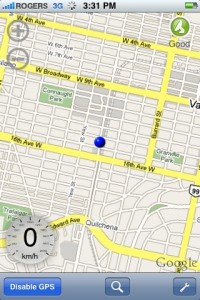
I tried this app out this afternoon and early on I must say this app is definitely impressive. There is also an option for KM/H, which will make Canadians and the rest of the world rejoice. What I do love about xGPS is how the maps auto-rotate as you’re driving–awesomeness.
The speedometer is pretty much a ballpark figure, but given the fact that I only used it for a short period in a crowded environment, that didn’t help. You will also be able to download maps for offline use as well. Check out the screenshots below:
You can download xGPS via Cydia. If you can’t find it, you will need to add the following Source: http://cydia.xwaves.net
Are you getting the “size mismatch” error? You need to delete the Xwaves repo, and download xGPS from the MMI (modmyiphone) repo instead. 🙂
Let me know how you like this app so far. Could we soon see GPS apps in the App Store?
Want to see more of our stories on Google?
P.S. Want to keep this site truly independent? Support us by buying us a beer, treating us to a coffee, or shopping through Amazon here. Links in this post are affiliate links, so we earn a tiny commission at no charge to you. Thanks for supporting independent Canadian media!
Subscribe
98 Comments
Oldest
NewestMost Voted
Andrew
17 years ago
Hi,
It seems really great!!!!
I was just trying to add the source but it said it couldn’t refresh the source.
Check the “update” tab in Cydia. xGPS should be there.
adam
17 years ago
Correct me if I’m wrong but in the beginning of the video the guy describes his ipod touch being hooked up to a GPS module. So am I correct to say that this program will not work without the GPS module. Also if anyone knows are we able to use the app without a data connection???
You should be able to use it without data connection if you download the maps you need in advance.
rvs007
17 years ago
You don’t necessarily need data if you download all the maps required for the areas you’re travelling ahead of time using a wifi connection.
Jason
17 years ago
I have tested this since I installed it yesterday. It looks like it has a lot of potential, however there are a few issues. If you try to start a route from your current GPS location (using iPhone 3G GPS) to an address, the search will come back with no results. When I create a route based on two addresses it works fine.
My other issue is that if I make a wrong turn and divert from my route I have the option to recalculate. When I do this, the software attempts to calculate this new route based on my current GPS fix which fails.
Is anyone else seeing these issues?
Also, there is a feature that will save map data on your device for use with no connection. This can be done before travelling to a specific area (ie. international travel).
This is a great app, and I hope Apple realizes that this functionality is a must on every iPhone.
I have the same issues that you described as well. It pretty much makes this app useless as a driving aid at the moment. I’m really hoping that 1.2 fixes this because this progeam has a lot of potential and I really want it to work.
This is pretty kick ass. I’ve been waiting for just this type of app to appear. I downloaded and installed the 1.1 version last night, but haven’t got a chance to play with it yet. Perhaps on the drive home tonight…
Cgyrunner
17 years ago
I used it a few times with the 3G…. works very well!
To compute direction directions, it seems to need actuall addresses, though. Selecting ‘Current Position’ didn’t work for driving directions.
Good to hear that. I look forward then to getting 1.2 and trying it out. If it works that good I may have the solution to a GPS I don’t have to mount and dismount from my car like I do with my TomTom all the time.
Josh D.
17 years ago
Me too…
Barryn Deuthin
17 years ago
Found a solution (thanks iPhone Fan ;)). You need to delete the xwaves repo, and download xGPS from the MMI (modmyiphone) repo instead. Worked for me!
Michael Phelps is awesome because all he does is eat and swim (and smoke out of bongs). What a life!
MsM
17 years ago
I’ve been looking for a mount similar to the one in the video. Except I would like something less bulky. Any brand suggestions? Best place to pick one up?
Thanks
Ordered it from gpscity.ca for a decent price. Took forever to get it, but that’s only because they hadn’t been manufactured yet. Should be freely available now.
Read the edited posted above. Download from MMI repo instead. Delete Xwaves repo! 🙂
adam
17 years ago
This is an amazing app…especially since i don’t have a data plan. Does anyone know how to upload google maps onto the iphone from my computer, its way too slow to do it from my iphone. Thanks
Duc
17 years ago
People with the message saying size mismatch, just update your Cydia Community Sources to version 0-8 and re-install version 1.1 of xGps again and it should work…that’s what I did to mine and I have it installed with no problems.
SKY
17 years ago
I test this nice software, which still have some problems.
1. If I want to start navigation, I have to on a road before I start to plan the route with my current GPS location.
2. If I was not on any road (which means I am off road, or in parking lot, or on the driveway outside my house, or etc)and I plan the route with 2 fixed address, after I turn on the GPS, the route will be wipped out, because it cannot compute the route when I was offroad.
3. searching for fix address or place always need city name after it.
Anyway, It is a important step in realtime offline navigation on iPhone, nice job, cheers.
I get another problem using iPhone 3G internal GPS.
1. The position is not very precise on the map (I am on a road, but my position is on the sidewalk of the road, sometimes even further. the position in on the road next to the I am on).
2. The position is not fresh quick enough, so the movement on the mave is not smooth.
adam
17 years ago
If any of you were wondering how to download maps to your iphone so you can use it while being offline here the video explaining how to do so
If anyone you guys were wondering like I was how to transfer offline maps to you iphone here’s a video explaining
——-video.google.it/videoplay?docid= … 9617&hl=it
Michael
17 years ago
Whats the data usage like on 3G?
Jay
17 years ago
The URL for downloading maps is broken.
Could you please post the correct one
Thanks
Forrest
17 years ago
I’ve downloaded XGPS 1.1 today and every time i try using driving directions, i get an error message saying “No driving direction can be computed using your query” my friend’s does the same thing, please help.
Just updated my copy to the new version… works pretty well so far. The voice for the driving directions is really low, but I’m not sure if that is me or the program.
rvs007
17 years ago
Ya, I tested out 1.2 on my way home tonight and I also found the volume extremely low for the voice prompts, even though I had the iPhone volume cranked up to the max. I hope they fix that.
Overall this is a great app and should have been included in with the iPhone 3G from the beginning. Great job Xwaves!
Feedback:
1. When deviating from the route a box flashes and says “WRONGNWAY”
2. By default the GPS to use was set to “xGPS module”. “iPhone 3G GPS’ should be default.
3. Selecting a new destination, going to the Address Book and selecting the contact’s address. Expected behavior would be once selected it should go back to the map screen. However, I hear the instructions but must back out of the menus manually. If I select the address again, xGPS crashes.
offroader
17 years ago
Can someone please post the lastest source link for Cydia I can’t seem to get the lateast XGPS 1.2 to load.
Andrew
17 years ago
Hi,
It seems really great!!!!
I was just trying to add the source but it said it couldn’t refresh the source.
I just added the above address into the source.
Any tips?
Thx!
adam
17 years ago
Correct me if I’m wrong but in the beginning of the video the guy describes his ipod touch being hooked up to a GPS module. So am I correct to say that this program will not work without the GPS module. Also if anyone knows are we able to use the app without a data connection???
Check the “update” tab in Cydia. xGPS should be there.
rvs007
17 years ago
You don’t necessarily need data if you download all the maps required for the areas you’re travelling ahead of time using a wifi connection.
Jason
17 years ago
I have tested this since I installed it yesterday. It looks like it has a lot of potential, however there are a few issues. If you try to start a route from your current GPS location (using iPhone 3G GPS) to an address, the search will come back with no results. When I create a route based on two addresses it works fine.
My other issue is that if I make a wrong turn and divert from my route I have the option to recalculate. When I do this, the software attempts to calculate this new route based on my current GPS fix which fails.
Is anyone else seeing these issues?
Also, there is a feature that will save map data on your device for use with no connection. This can be done before travelling to a specific area (ie. international travel).
This is a great app, and I hope Apple realizes that this functionality is a must on every iPhone.
Kosmo
17 years ago
You should be able to use it without data connection if you download the maps you need in advance.
This is pretty kick ass. I’ve been waiting for just this type of app to appear. I downloaded and installed the 1.1 version last night, but haven’t got a chance to play with it yet. Perhaps on the drive home tonight…
Cgyrunner
17 years ago
I used it a few times with the 3G…. works very well!
To compute direction directions, it seems to need actuall addresses, though. Selecting ‘Current Position’ didn’t work for driving directions.
Voice should be great.
Barryn Deuthin
17 years ago
Is anyone else getting a “Size Mismatch” error when they try and download this? Been trying for two days and still getting it.
I have the same issues that you described as well. It pretty much makes this app useless as a driving aid at the moment. I’m really hoping that 1.2 fixes this because this progeam has a lot of potential and I really want it to work.
Cgyrunner
17 years ago
size mismatch… I see this when an app is being downloaded by too many users… wait a bit…. just a guess.
When the Anker SOLIX S2000 showed up for testing, I'll admit the name got me first. S2000 still makes me think of Honda's little two-door roadster from 27 years ago, even though this is obviously a very different machine. The Anker SOLIX S2000 debuted in Canada back in June. The first thing I noticed after...
Amazon’s latest Kindle Scribe feels pretty different from a regular Kindle the second you pick it up. Amazon Canada recently sent me the Kindle Scribe to try out, and after using it for the past few weeks, the 11-inch display is easily what I like most about it. At 5.4mm thick and 400 grams, it...



Hi,
It seems really great!!!!
I was just trying to add the source but it said it couldn’t refresh the source.
I just added the above address into the source.
Any tips?
Thx!
Check the “update” tab in Cydia. xGPS should be there.
Correct me if I’m wrong but in the beginning of the video the guy describes his ipod touch being hooked up to a GPS module. So am I correct to say that this program will not work without the GPS module. Also if anyone knows are we able to use the app without a data connection???
Thanks
He needs that module because his iPod Touch does not have GPS. The iPhone 3G has GPS though! I am pretty sure data will be necessary.
You should be able to use it without data connection if you download the maps you need in advance.
You don’t necessarily need data if you download all the maps required for the areas you’re travelling ahead of time using a wifi connection.
I have tested this since I installed it yesterday. It looks like it has a lot of potential, however there are a few issues. If you try to start a route from your current GPS location (using iPhone 3G GPS) to an address, the search will come back with no results. When I create a route based on two addresses it works fine.
My other issue is that if I make a wrong turn and divert from my route I have the option to recalculate. When I do this, the software attempts to calculate this new route based on my current GPS fix which fails.
Is anyone else seeing these issues?
Also, there is a feature that will save map data on your device for use with no connection. This can be done before travelling to a specific area (ie. international travel).
This is a great app, and I hope Apple realizes that this functionality is a must on every iPhone.
I have the same issues that you described as well. It pretty much makes this app useless as a driving aid at the moment. I’m really hoping that 1.2 fixes this because this progeam has a lot of potential and I really want it to work.
This is pretty kick ass. I’ve been waiting for just this type of app to appear. I downloaded and installed the 1.1 version last night, but haven’t got a chance to play with it yet. Perhaps on the drive home tonight…
I used it a few times with the 3G…. works very well!
To compute direction directions, it seems to need actuall addresses, though. Selecting ‘Current Position’ didn’t work for driving directions.
Voice should be great.
then what good is the gps
Is anyone else getting a “Size Mismatch” error when they try and download this? Been trying for two days and still getting it.
Delete the repo I wrote about, and add the modmyiphone repo instead (or make sure it’s the only one installed).
Same here, getting the size mismatch error.
Re: those having problems with using the “current position” feature, this is a known issue with v1.1 and will be fixed in v1.2. Go to for a list of v1.2 features and enhancements.
Good to hear that. I look forward then to getting 1.2 and trying it out. If it works that good I may have the solution to a GPS I don’t have to mount and dismount from my car like I do with my TomTom all the time.
Me too…
Found a solution (thanks iPhone Fan ;)). You need to delete the xwaves repo, and download xGPS from the MMI (modmyiphone) repo instead. Worked for me!
http://www.modmyi.com/forums/iphone-news/495731-turn-turn-voice-navigation-iphone-really-not-rumor-4.html
size mismatch… I see this when an app is being downloaded by too many users… wait a bit…. just a guess.
I have been following this GPS app for a while now, they have came a long way!
Be sure to check out the forums and discuss any questions, issues, etc. here https://www.iphoneincanada.ca/forums/showthread.php?t=4549
Here is a GPS module if interested… https://www.iphoneincanada.ca/forums/showthread.php?t=4498
Cheers!
This App is cooler than Michael Phelps!
Michael Phelps is awesome because all he does is eat and swim (and smoke out of bongs). What a life!
I’ve been looking for a mount similar to the one in the video. Except I would like something less bulky. Any brand suggestions? Best place to pick one up?
Thanks
I picked up this RAM mount for my 3G iPhone:
http://www.flickr.com/photos/haggaret/3041843007/
Ordered it from gpscity.ca for a decent price. Took forever to get it, but that’s only because they hadn’t been manufactured yet. Should be freely available now.
Getting Size Mismatch… any ideas?
Read the edited posted above. Download from MMI repo instead. Delete Xwaves repo! 🙂
This is an amazing app…especially since i don’t have a data plan. Does anyone know how to upload google maps onto the iphone from my computer, its way too slow to do it from my iphone. Thanks
People with the message saying size mismatch, just update your Cydia Community Sources to version 0-8 and re-install version 1.1 of xGps again and it should work…that’s what I did to mine and I have it installed with no problems.
I test this nice software, which still have some problems.
1. If I want to start navigation, I have to on a road before I start to plan the route with my current GPS location.
2. If I was not on any road (which means I am off road, or in parking lot, or on the driveway outside my house, or etc)and I plan the route with 2 fixed address, after I turn on the GPS, the route will be wipped out, because it cannot compute the route when I was offroad.
3. searching for fix address or place always need city name after it.
Anyway, It is a important step in realtime offline navigation on iPhone, nice job, cheers.
I get another problem using iPhone 3G internal GPS.
1. The position is not very precise on the map (I am on a road, but my position is on the sidewalk of the road, sometimes even further. the position in on the road next to the I am on).
2. The position is not fresh quick enough, so the movement on the mave is not smooth.
If any of you were wondering how to download maps to your iphone so you can use it while being offline here the video explaining how to do so
http://video.google.it/videoplay?docid= … 9617&hl=it
If anyone you guys were wondering like I was how to transfer offline maps to you iphone here’s a video explaining
——-video.google.it/videoplay?docid= … 9617&hl=it
Whats the data usage like on 3G?
The URL for downloading maps is broken.
Could you please post the correct one
Thanks
I’ve downloaded XGPS 1.1 today and every time i try using driving directions, i get an error message saying “No driving direction can be computed using your query” my friend’s does the same thing, please help.
This apparently is a known flaw that is supposed to be fixed in version 1.2 (or so I’ve read)
this is a must have app!
It sure is!
Needs a ‘celebrity voices’ option
I’m thinking Arnold, Shatner, Batman, or Gilbert Godfried.
xGPS v1.2 is being released today (March 2), according to their website!
Ya man! Keep checking out the forums for some updates. 😉
https://www.iphoneincanada.ca/forums/
Word on the street…
Quote:
Just got the word from the xgps Mod Thomas… It should up on the ModMyI cydia repo sometime between 2-4 EST..
NEW UPDATE xGPS v1.2 released, read about it in the forums… https://www.iphoneincanada.ca/forums/showthread.php?t=4787
Its out! Looking good 😀
Just updated my copy to the new version… works pretty well so far. The voice for the driving directions is really low, but I’m not sure if that is me or the program.
Ya, I tested out 1.2 on my way home tonight and I also found the volume extremely low for the voice prompts, even though I had the iPhone volume cranked up to the max. I hope they fix that.
UPDATE: https://www.iphoneincanada.ca/forums/showthread.php?t=4813
Overall this is a great app and should have been included in with the iPhone 3G from the beginning. Great job Xwaves!
Feedback:
1. When deviating from the route a box flashes and says “WRONGNWAY”
2. By default the GPS to use was set to “xGPS module”. “iPhone 3G GPS’ should be default.
3. Selecting a new destination, going to the Address Book and selecting the contact’s address. Expected behavior would be once selected it should go back to the map screen. However, I hear the instructions but must back out of the menus manually. If I select the address again, xGPS crashes.
Can someone please post the lastest source link for Cydia I can’t seem to get the lateast XGPS 1.2 to load.
Hi,
It seems really great!!!!
I was just trying to add the source but it said it couldn’t refresh the source.
I just added the above address into the source.
Any tips?
Thx!
Correct me if I’m wrong but in the beginning of the video the guy describes his ipod touch being hooked up to a GPS module. So am I correct to say that this program will not work without the GPS module. Also if anyone knows are we able to use the app without a data connection???
Thanks
He needs that module because his iPod Touch does not have GPS. The iPhone 3G has GPS though! I am pretty sure data will be necessary.
Check the “update” tab in Cydia. xGPS should be there.
You don’t necessarily need data if you download all the maps required for the areas you’re travelling ahead of time using a wifi connection.
I have tested this since I installed it yesterday. It looks like it has a lot of potential, however there are a few issues. If you try to start a route from your current GPS location (using iPhone 3G GPS) to an address, the search will come back with no results. When I create a route based on two addresses it works fine.
My other issue is that if I make a wrong turn and divert from my route I have the option to recalculate. When I do this, the software attempts to calculate this new route based on my current GPS fix which fails.
Is anyone else seeing these issues?
Also, there is a feature that will save map data on your device for use with no connection. This can be done before travelling to a specific area (ie. international travel).
This is a great app, and I hope Apple realizes that this functionality is a must on every iPhone.
You should be able to use it without data connection if you download the maps you need in advance.
This is pretty kick ass. I’ve been waiting for just this type of app to appear. I downloaded and installed the 1.1 version last night, but haven’t got a chance to play with it yet. Perhaps on the drive home tonight…
I used it a few times with the 3G…. works very well!
To compute direction directions, it seems to need actuall addresses, though. Selecting ‘Current Position’ didn’t work for driving directions.
Voice should be great.
Is anyone else getting a “Size Mismatch” error when they try and download this? Been trying for two days and still getting it.
Same here, getting the size mismatch error.
Re: those having problems with using the “current position” feature, this is a known issue with v1.1 and will be fixed in v1.2. Go to for a list of v1.2 features and enhancements.
Me too…
Found a solution (thanks iPhone Fan ;)). You need to delete the xwaves repo, and download xGPS from the MMI (modmyiphone) repo instead. Worked for me!
http://www.modmyi.com/forums/iphone-news/495731-turn-turn-voice-navigation-iphone-really-not-rumor-4.html
I have the same issues that you described as well. It pretty much makes this app useless as a driving aid at the moment. I’m really hoping that 1.2 fixes this because this progeam has a lot of potential and I really want it to work.
size mismatch… I see this when an app is being downloaded by too many users… wait a bit…. just a guess.